
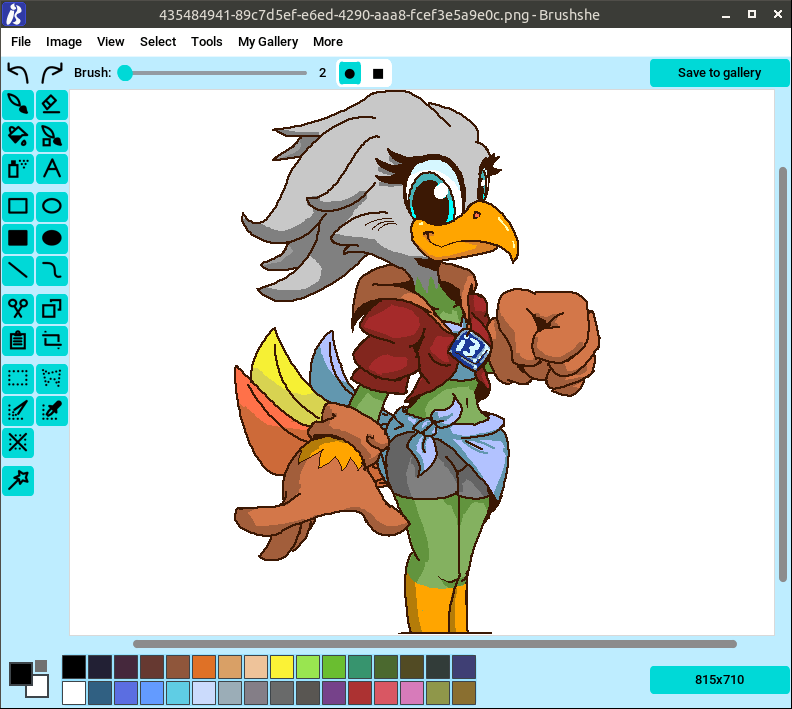
Brushshe is a simple and user-friendly raster graphics editor.
This is cross-platform software running under Linux and Windows.
This is free and open source software.
Key Features
- Open: You can open a picture from a file or URL.
- Painting: You can choose a color, change the brush thickness and shape, and paint. You can change canvas size.
- Recoloring brush: Draws through contours.
- Save to device: You can save picture to your PC in different formats (PNG, JPEG, GIF, BMP, DDS, DIB, EPS, ICNS, ICO, IM, MPO, PCX, PPM, SGI, TGA, TIFF, WEBP, PDF (only for save)).
- Autosave is supported.
- Undo and redo: You can undo and redo last actions.
- Eraser: Removing excess with an eraser.
- Fill: You can fill areas of a drawing, including with a gradient fill.
- Eyedropper: Right click on the desired place on the canvas to get its color and paint with it.
- Spray: Spray paint.
- Background: You can choose the background color.
- Stickers: You can add stickers from Brushshe sticker set (all sticker images are drawn by limafresh, founder of Brushshe, or created by AI) and resize them. You can also add a sticker from a file or URL.
- Text: You can place text and change its size.
- Frames: You can decorate the picture with frames.
- Shapes: Rectangle and oval (with or without fill), line, bezier curve.
- Effects: Blur, detail, contour, grayscale, inversion and other. Not work on GIF images.
- My Gallery: Window showing images drawn in Brushshe and “saved to gallery”. Images from the gallery are stored in /Pictures/Brushshe Images or /Brushshe Images on some minimalistic Linux distributions.
- Dark theme: There is a light and dark theme.
- Rotate: Rotate right, rotate left.
- Create screenshot: You can take a screenshot and draw on it. Not work on Linux with Wayland.
- Paste image from clipboard: You can paste image from clipboard.
- View: Zoom in, zoom out, reset zoom.
- Change size: You can change the size by cropping or scaling.
- Palettes: There are 4 built-in palette sets in the settings, and if there are not enough of them, you can load your own from .hex files.
- Brush smoothing: Brush smoothing with params.
- Cut, copy and insert: Cut, copy or insert fragments. Works on Windows, but on Linux you need to install xclip (X11) or wl-paste (Wayland). If they are not installed, everything else will work, but when you try to paste from the buffer, you will get a message that this is impossible.
- Remove white background: Replace white or really light gray background to transparent.
- Palettes: use standard or custom HEX palettes.
- Select: rectangle and polygon select, invert selected, deselect all, fuzzy select, select by color.
Website: github.com/limafresh/Brushshe
Support:
Developer: Maksim
License: Mozilla Public License 2.0
Brushshe is written in Python. Learn Python with our recommended free books and free tutorials.
Related Software
| Raster Image Editors | |
|---|---|
| GIMP | GNU Image Manipulation Program |
| JS Paint | Classic MS Paint recreation with modern browser-based features |
| Pinta | Mimics the usability of Paint.Net |
| Photoflare | Cross-platform image editor |
| LazPaint | Image editor with layers and transparency |
| dibuja | Simple to use paint program like Paintbrush for Mac or classic MS Paint |
| Drawing | Basic raster image editor similar to Microsoft Paint |
| Textual Paint | MS Paint in your terminal |
| Pixelitor | Feature-rich editing with layers, filters and effects |
| paint.software | Accessible Paint.NET-style raster editing application |
| Brushshe | Simple and user-friendly raster graphics editor |
| KolourPaint | Easy-to-use paint program by KDE |
| CinePaint | Tools for painting, manipulation and image processing |
Read our verdict in the software roundup.
 Explore our carefully curated directory of recommended free and open source software, covering every major software category. Explore our carefully curated directory of recommended free and open source software, covering every major software category.The directory forms part of our extensive collection of articles for Linux enthusiasts. It includes hundreds of detailed reviews, together with free and open source alternatives to proprietary software from companies such as Google, Microsoft, Apple, Adobe, IBM, Cisco, Oracle, and Autodesk. LinuxLinks also covers interesting projects worth exploring, Linux-compatible hardware, free programming books and tutorials, and much more. Know a useful free and open source Linux application that we haven’t covered? Tell us about it using our submission form. |
Please read our Comment Policy before commenting.