

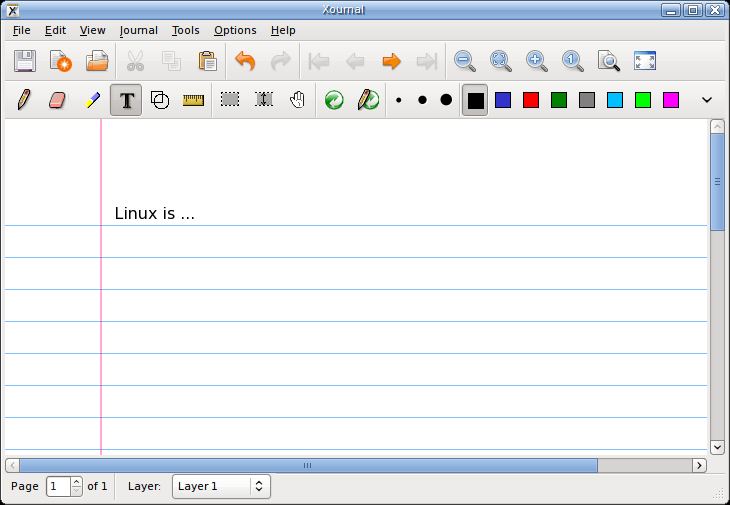
Xournal is a GTK+ application for notetaking, sketching and keeping a journal using a stylus. It can also be used to add annotations to PDF files.
Xournal uses the gtk-print architecture for printing. Xournal also includes a native PDF printing feature.
Xournal includes a PDF file parser compatible with PDF format version 1.4; the compression features of PDF 1.5 are not supported. When exporting a document that uses PDF backgrounds, Xournal attempts to preserve most of the structure of the original PDF file (however, auxiliary data such as thumbnails, hyperlinks, and annotations are lost).
Xournal has an intuitive interface.
Key Features
-
- Drawing and selection tools including:
- Pen.
- Eraser.
- Highlighter.
- Text tool.
- Ruler.
- Shape Recognizer.
- Undo / redo.
- Button mappings.
- PDF Annotation.
- Uses the poppler library.
- Drawing and selection tools including:
Website: xournal.sourceforge.net
Support: Manual
Developer: Denis Auroux
License: GNU General Public License v2.0
Xournal is written in C. Learn C with our recommended free books and free tutorials.
Related Software
| Interactive Whiteboards | |
|---|---|
| Excalidraw | Virtual whiteboard for sketching hand-drawn like diagrams |
| OpenBoard | Interactive whiteboard for schools and universities |
| Xournal++ | Handwriting notetaking software with PDF annotation support |
| AFFiNE | All-in-one workspace |
| pad.ws | Whiteboard as an IDE |
| Drawnix | All-in-one whiteboard tool |
| WBO | Online collaborative whiteboard that is easy to use |
| Lorien | Infinite canvas drawing/note-taking app focused on simplicity |
| Xournal | Notetaking, sketching, keeping a journal using a stylus |
| python-whiteboard | Build and operate a low-cost electronic whiteboard |
| Drawy | Work-in-progress infinite whiteboard tool |
| Mando | Human computer interface using a camera and a projector |
Read our verdict in the software roundup.
| PDF Tools | |
|---|---|
| Scribus | Desktop page layout software producing commercial grade PDF output |
| ONLYOFFICE | Cloud online office suite with great PDF functionality |
| LibreOffice Draw | Vector graphics editor and diagramming tool that can create PDFs |
| PDFBox | Java tool for working with PDF documents |
| Ghostscript | Ghostscript PostScript / PDF interpreter |
| Dangerzone | Make PDFs safe |
| pdf-compress | Compress an overly large PDF file to smaller monochrome |
| PoDoFo | Easy to use PDF parsing and creation library |
| veraPDF | Industry supported PDF/A validation |
| pdfgrep | Command-line utility to search text in PDF files |
| Rescribe | Desktop tool for performing OCR |
| PDF4QT | PDF editor |
| Scans to PDF | Create small, searchable PDFs from scanned documents |
| Paper Clip | Edit PDF document metadata |
| pdfposter | Print large posters on multiple sheets |
| plakativ | Stretches PDF or raster image across multiple pages |
| PDF Metadata Editor | Simple GUI tool |
| unlockR | Simple tool to decrypt PDF files |
| pdfresurrect | Analyze PDF documents |
| Densify | Compress PDF files using Ghostscript |
| IceBox | Converts images into a PDF file |
Read our verdict in the software roundup.
 Explore our comprehensive directory of recommended free and open source software. Our carefully curated collection spans every major software category. Explore our comprehensive directory of recommended free and open source software. Our carefully curated collection spans every major software category.This directory is part of our ongoing series of informative articles for Linux enthusiasts. It features hundreds of detailed reviews, along with open source alternatives to proprietary solutions from major corporations such as Google, Microsoft, Apple, Adobe, IBM, Cisco, Oracle, and Autodesk. You’ll also find interesting projects to try, hardware coverage, free programming books and tutorials, and much more. Discovered a useful open source Linux program that we haven’t covered yet? Let us know by completing this form. |
Please read our Comment Policy before commenting.
xournal++ is indeed very nice and needs more attentionI. love it on my laptop with a xppen drawing tablet on linux for note taking.