

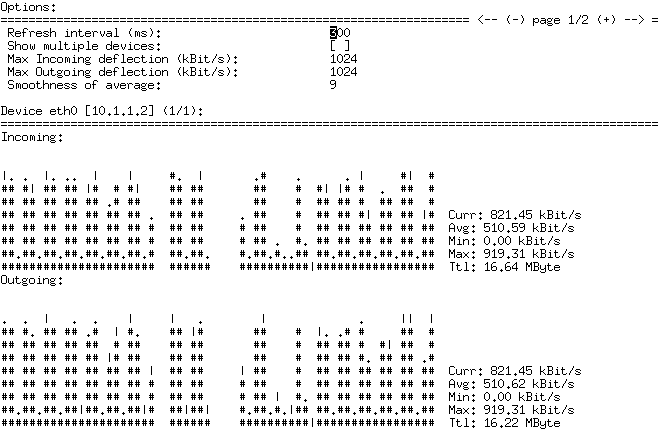
nload is a real time network traffic monitor for the text console.
It displays the current network usage. It visualizes the in- and outgoing traffic using two graphs and provides additional info like total amount of transferred data and min/max network usage.
This is free and open source software.
Website: github.com/rolandriegel/nload
Support:
Developer: Roland Riegel
License: GNU General Public License v2.0
nload is written in C++. Learn C++ with our recommended free books and free tutorials.
Related Software
| Network 'top' Tools | |
|---|---|
| NetHogs | Groups bandwidth by process |
| bandwhich | Shows network bandwidth usage by process and connection |
| NetWatch | Interactive terminal monitor for traffic, connections and packets |
| IPTraf-ng | Fork of IPTraf |
| RustNet | Real-time terminal monitor for connections and process traffic |
| vnStat | Lightweight monitor for long-term network traffic statistics |
| netshow | Process-aware terminal monitor for active network connections |
| iftop | Displays bandwidth usage on an interface by host |
| socktop | Remote system monitor with a rich TUI |
| Flow | Real-time terminal dashboard for upload and download speeds |
| bmon | Interactive bandwidth monitor with live interface statistics |
| rdmatop | Terminal monitor for RDMA traffic, devices and processes |
| ntap | Terminal tool for live network monitoring and packet capture |
Read our verdict in the software roundup.
 LinuxLinks helps you discover the best free and open source software for Linux. Explore our extensive collection of recommended applications, including alternatives to popular proprietary software. We also publish software reviews, Linux tutorials, hardware reviews, free programming books and articles covering the wider open source community. Browse our Linux resources to discover more. Know a useful free and open source Linux application we haven't covered? Suggest a program for inclusion. Has your software been featured on LinuxLinks? Display one of our Featured on LinuxLinks badges on your website or GitHub README. |