
Boot Maintenance Manager
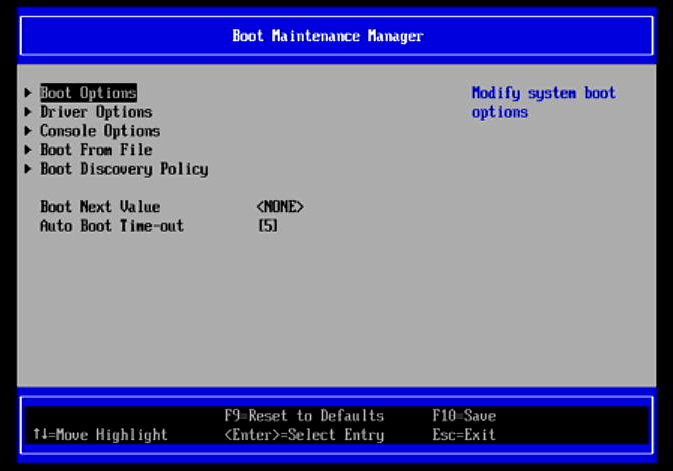
Boot Options – modify the system boot options including adding a boot option, deleting a boot option, as well as changing the boot order. By default the BIOS boots from the internal NVMe before my external USB drive, but this lets me change that.
Driver Options – modify boot driver options. Here we can add a driver option, delete a driver option, and change the driver order.
Console Options – we can enable console device as console input, console output, console standard error, and console output mode. There’s also a COM attribute setup page.
Boot From File – boot the system from a file or device.
Boot Discovery Policy – which is set to connect all devices.
If there are any BIOS pages you’d like to view, drop a comments below and I’ll add it to the article.
Pages in this article:
Page 1 – CIX System Manager
Page 2 – Device Manager
Page 3 – Boot Manager
Page 4 – Boot Maintenance Manager
Complete list of articles in this series:
| Minisforum MS-R1 ARM Mini Workstation | |
|---|---|
| Introduction | Introduction to the series and interrogation of the Mini Workstation |
| Benchmarks | Benchmarking the Minisforum MS-R1 ARM Mini Workstation |
| Power | Testing and comparing the power consumption |
| BIOS | Exploring the BIOS |
| Ubuntu | Testing the Ubuntu 26.04 LTS image |
| Scheduling | Minisforum Says Disable Four of the MS-R1’s 12 CPU Cores |
Please read our Comment Policy before commenting.