
Boot Manager Menu
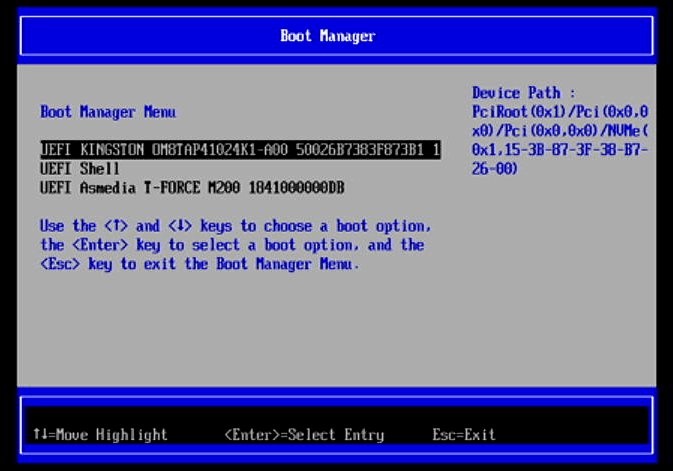
Besides booting to a UEFI shell, the other two entries are more interesting.
The first entry is the 1TB MVMe that came with the MS-R1 which has Debian 12 pre-installed.
The final entry starting UEFI Asmedia T-FORCE M2000 is a very fast USB external storage. If I select that line and press Enter, I can boot into a different operating system.
These entries are automatically created and mean that it’s easy to experiment with the MS-R1 without affecting my main image. The USB external storage device didn’t, of course, come with the machine.
Next page: Page 4 – Boot Maintenance Manager
Pages in this article:
Page 1 – CIX System Manager
Page 2 – Device Manager
Page 3 – Boot Manager
Page 4 – Boot Maintenance Manager
Complete list of articles in this series:
| Minisforum MS-R1 ARM Mini Workstation | |
|---|---|
| Introduction | Introduction to the series and interrogation of the Mini Workstation |
| Benchmarks | Benchmarking the Minisforum MS-R1 ARM Mini Workstation |
| Power | Testing and comparing the power consumption |
| BIOS | Exploring the BIOS |
| Ubuntu | Testing the Ubuntu 26.04 LTS image |
| Scheduling | Minisforum Says Disable Four of the MS-R1’s 12 CPU Cores |
Please read our Comment Policy before commenting.