
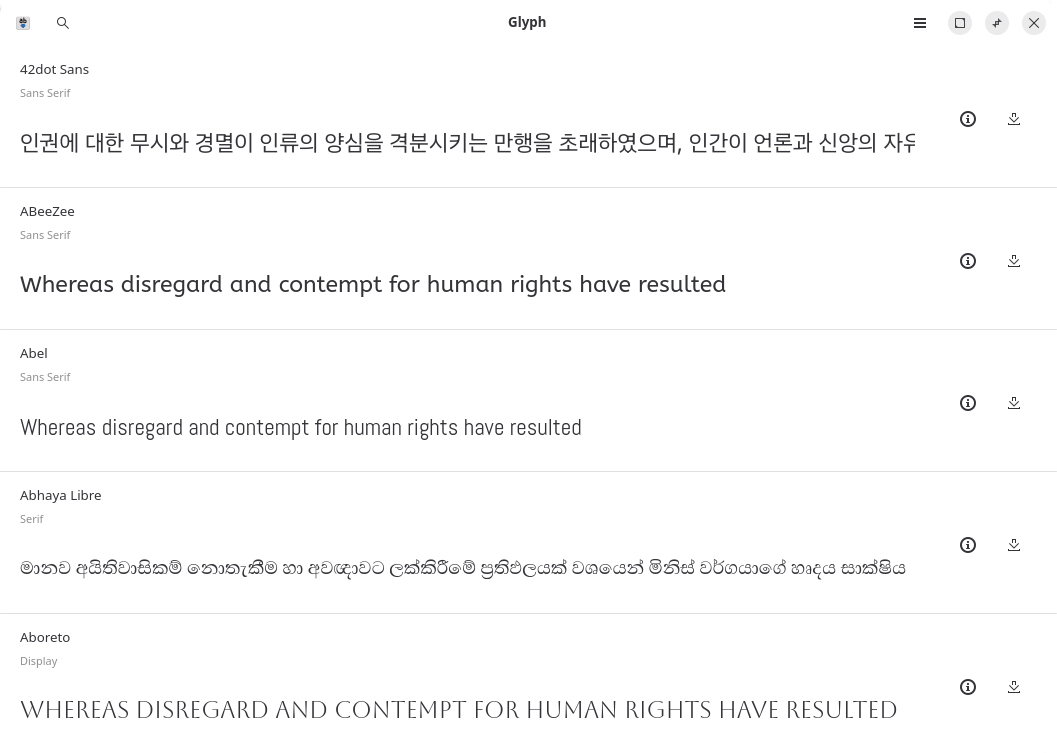
Lipi is a graphical font discovery and installation application for Linux. It provides a convenient interface to the large collection maintained in the Google Fonts GitHub repository, avoiding the need to browse the repository manually, download individual font files and copy them into the appropriate user font directory.
The application is built with GTK4 and libadwaita and uses an adaptive interface that works on both conventional desktop windows and narrower displays. Its focus is not simply installation: users can explore typefaces and examine how they will look before deciding whether to add them to their system.
This is free and open source software.
Key Features
- Search thousands of available typefaces by name.
- Filter the catalogue using categories including Sans, Serif and Monospace.
- Preview fonts without installing them or requiring an internet connection for the preview.
- Test typefaces with your own text to judge their appearance with real content.
- Provides an option to disable font fallback while testing a typeface.
- Installs selected font files into the user’s font collection.
- Removes fonts that were installed through Lipi.
- Recognises fonts that have been installed independently of the application.
- Displays detailed information including the font designer, license and available files.
- Tracks changes to the user’s font directory so the displayed installation state stays in sync.
- Uses responsive navigation suitable for smaller window sizes.
- Supports pointer, keyboard and touch input.
Website: github.com/shonebinu/Lipi
Support:
Developer: Shone Binu
License: GNU General Public License v3.0
Lipi is written in Python. Learn Python with our recommended free books and free tutorials.
Related Software
| Font Managers | |
|---|---|
| Font Manager | Simple tool suitable for the needs of most desktop users |
| Deepin Font Manager | Manage your fonts |
| Pardus Font Manager | Lightweight font management application |
| fnt | apt for fonts |
| ZFontManager | Preview, organise, install and activate fonts |
| Embellish | Install, remove, update and preview Nerd Fonts |
| Lipi | Search, preview and install fonts from Google Fonts |
| FontGet | Install and manage fonts from the command line |
| Fonty Python | Find, view and manage font files of all kinds |
Read our verdict in the software roundup.
| Font Viewers | |
|---|---|
| fontpreview | Search and preview fonts |
| GNOME Fonts | View fonts on your system |
| fntsample | PDF and PostScript font samples generator |
| cfonts | Command line tool for sexy ANSI fonts |
| Opcion Font Viewer | Java based font viewer |
| moji | Search, download, convert and inspect fonts |
| Sitra | Get fonts from online sources |
| fontvuer | Cross-platform font viewer |
| Font Viewer | View and install fonts |
| TTFviewer | Utility for viewing and inspecting TrueType fonts |
| Lipi | Install fonts from Google Fonts GitHub Repo |
| qfontviewer | Font viewer with an integrated character table |
| KFontview | View and install different types of fonts |
Read our verdict in the software roundup.
 Explore our carefully curated directory of recommended free and open source software, covering every major software category. Explore our carefully curated directory of recommended free and open source software, covering every major software category.The directory forms part of our extensive collection of articles for Linux enthusiasts. It includes hundreds of detailed reviews, together with free and open source alternatives to proprietary software from companies such as Google, Microsoft, Apple, Adobe, IBM, Cisco, Oracle, and Autodesk. LinuxLinks also covers interesting projects worth exploring, Linux-compatible hardware, free programming books and tutorials, and much more. Know a useful free and open source Linux application that we haven’t covered? Tell us about it using our submission form. |
Please read our Comment Policy before commenting.