
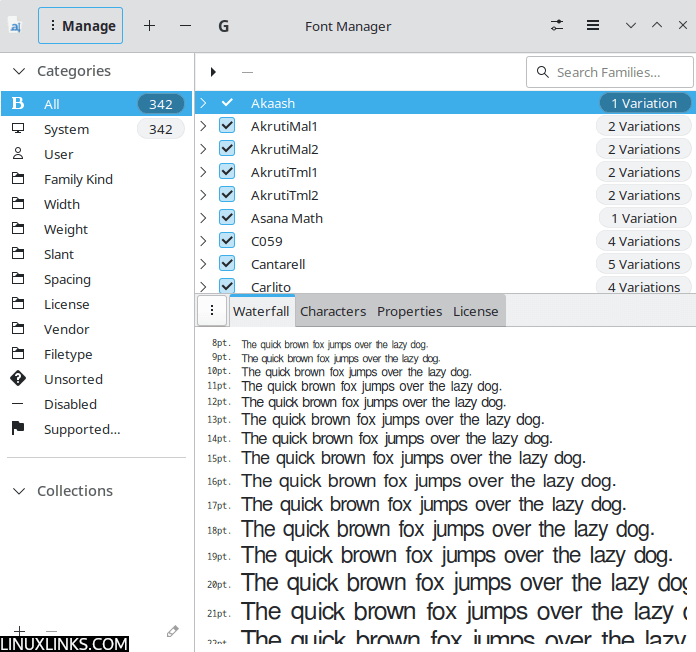
Font Manager is a useful utility that enables users to easily manage fonts on their system.
This application is not intended to be a professional-grade font management solution, but instead is a simple tool suitable for the needs of most desktop users.
Although designed with the GNOME desktop environment in mind, this utility integrates well with other desktop environments including KDE and XFCE.
Key Features
- Preview installed fonts.
- Compare installed fonts.
- Easily install or remove fonts.
- Easily activate and de-activate installed fonts.
- Specify different directories to search for fonts.
- Group fonts into “Collections”, and easily activate or de-activate groups of fonts.
- Export “Collections” to an archive for easy backup, sharing, etc.
- Provides quick access to all GNOME font utilities.
- Sort families by right-clicking.
Website: fontmanager.github.io
Support: GitHub Code Repository
Developer: Jerry Casiano
License: GNU General Public License v3.0
Font Manager is written in C. Learn C with our recommended free books and free tutorials.
Related Software
| Font Managers | |
|---|---|
| Font Manager | Simple tool suitable for the needs of most desktop users |
| Deepin Font Manager | Manage your fonts |
| Fontmatrix | Featureful personal font manager; keep your font collection in order |
| Pardus Font Manager | Lightweight font management application |
| fnt | apt for fonts |
| FontGet | Install and manage fonts from the command line |
| Fonty Python | Find, view and manage font files of all kinds |
Read our verdict in the software roundup.
| Font Renderers | |
|---|---|
| HarfBuzz | OpenType text shaping engine |
| FreeType | Small and efficient software font engine |
| Pango | International text layout and rendering with rich script support |
| LibICU | Libraries for Unicode and internationalization |
| Fontconfig | Library for configuring and customizing font access |
| COSMIC Text | Rust library for rich multi-line text layout, shaping and editing |
| FriBidi | Implementation of the Unicode Bidirectional Algorithm |
| Swash | Pure Rust toolkit for glyph shaping, scaling and rendering |
| SheenBidi | Compact Unicode bidirectional algorithm implementation for text engines |
| Raqm | Bidirectional layout and shaping for complex writing systems |
Read our verdict in the software roundup.
 Explore our comprehensive directory of recommended free and open source software. Our carefully curated collection spans every major software category. Explore our comprehensive directory of recommended free and open source software. Our carefully curated collection spans every major software category.This directory is part of our ongoing series of informative articles for Linux enthusiasts. It features hundreds of detailed reviews, along with open source alternatives to proprietary solutions from major corporations such as Google, Microsoft, Apple, Adobe, IBM, Cisco, Oracle, and Autodesk. You’ll also find interesting projects to try, hardware coverage, free programming books and tutorials, and much more. Discovered a useful open source Linux program that we haven’t covered yet? Let us know by completing this form. |
Please read our Comment Policy before commenting.
I am a newbie and was looking at the fonts in Debian 12. There were a number of foreign fonts I don’t need. I downloaded the font manager to remove groups of fonts. Unfortunately, I could not find a way to select multiple groups of fonts to delete at one time. I tried selected the first font group, then holding shift and selecting the last font group, but that did not appear to work. Is there another way to quickly remove multiple groups of fonts with the Font Manager?