

DNSDiag is a collection of command-line tools for measuring DNS performance, investigating how queries travel across a network and comparing the behaviour of different resolvers. The suite consists of dnsping, dnstraceroute and dnseval, each concentrating on a different aspect of DNS troubleshooting.
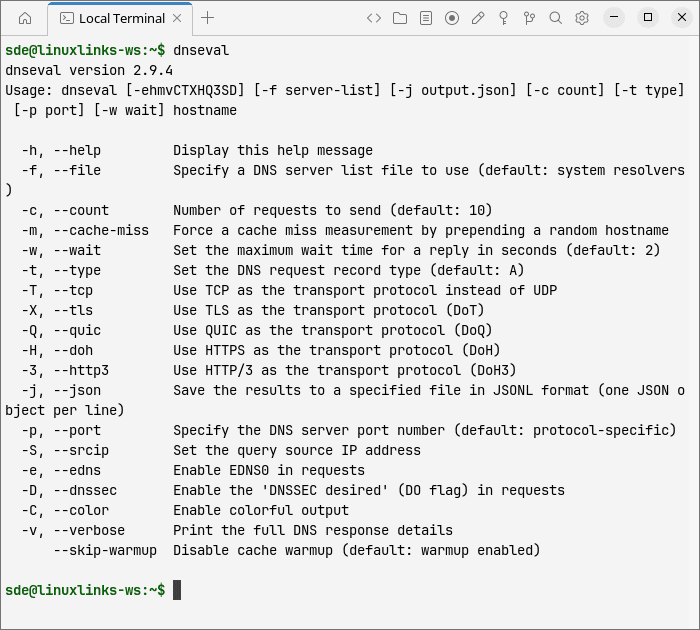
dnsping repeatedly sends a query to a DNS server and measures its responsiveness. dnstraceroute traces the network path taken by DNS requests and can help identify unexpected routing or possible interception. dnseval sends queries to multiple resolvers and compares their latency, packet loss and responses, making it useful for evaluating resolver performance and reliability.
The tools are useful for routine troubleshooting, resolver benchmarking and investigating DNS security problems without requiring a graphical interface.
This is free and open source software.
Key Features
- Supports DNS over UDP and TCP together with encrypted transports including DNS over TLS, DNS over HTTPS, DNS over QUIC and DNS over HTTP/3 where supported by the individual tool.
- Measures minimum, maximum and average DNS response times together with packet loss and response-time variation.
- Requests DNSSEC data and exposes DNS response flags, including the DO and AD flags used when investigating validation behaviour.
- Displays Extended DNS Errors, providing additional detail when resolvers report problems such as failed DNSSEC validation.
- Supports EDNS Client Subnet for examining responses returned for specified client networks.
- Can request Name Server Identifier information to help determine which server in an anycast deployment answered a query.
- Displays DNS cookies returned by servers that support the mechanism.
- dnstraceroute can display Autonomous System information and expert hints that highlight potentially suspicious DNS routing.
- dnseval compares multiple resolvers in a single run and reports latency, packet loss, TTL, response flags and result codes.
- Exports dnseval measurements as JSON Lines for subsequent processing with tools such as jq.
Website: github.com/farrokhi/dnsdiag
Support:
Developer: Babak Farrokhi
License: BSD 2-Clause ‘Simplified’ License
DNSDiag is written in Python. Learn Python with our recommended free books and free tutorials.
Related Software
| Useful DNS Tools | |
|---|---|
| DNSControl | System for maintaining DNS zones |
| q | Command line DNS client |
| octoDNS | Manage DNS across multiple providers |
| nsupdate.info | Implement a free dynamic DNS service |
| DomainMOD | Manage domains and other internet assets in a central location |
| Poweradmin | Web-based DNS administration tool |
| dnsperf | Measure performance of authoritative domain name services |
| ctrld | Configurable DNS forwarding proxy |
| Atomia DNS | Multi-tenant system for handling large amounts of DNS data |
| SPFtoolbox | Look up DNS records |
| Designate | Multi-tenant DNSaaS service for OpenStack |
| dnsi | Tool to investigate the DNS |
| Digger | Modern DNS lookup tool with a graphical interface |
| dnst | Toolset to assist DNS operators with zone and nameserver maintenance |
| dnspyre | Command-line DNS benchmark tool |
Read our verdict in the software roundup.
 Explore our carefully curated directory of recommended free and open source software, covering every major software category. Explore our carefully curated directory of recommended free and open source software, covering every major software category.The directory forms part of our extensive collection of articles for Linux enthusiasts. It includes hundreds of detailed reviews, together with free and open source alternatives to proprietary software from companies such as Google, Microsoft, Apple, Adobe, IBM, Cisco, Oracle, and Autodesk. LinuxLinks also covers interesting projects worth exploring, Linux-compatible hardware, free programming books and tutorials, and much more. Know a useful free and open source Linux application that we haven’t covered? Tell us about it using our submission form. |
Please read our Comment Policy before commenting.