
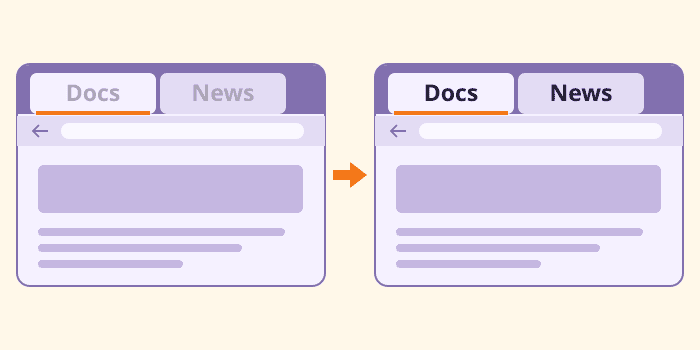
I often have two Firefox windows open, one on each monitor. When I click a tab on the left, the tab labels on the right fade until I can barely read them. When I click back on the right, the lettering is clear again. That’s irritating when I’m looking for a particular page. I have to click inside the window just to see which tab I want.
I fixed this with userChrome.css, a stylesheet for Firefox’s own interface. The rules below keep my tab labels and icons readable in both windows.
Open your Firefox profile
Type about:support in the address bar and press Enter. Under Application Basics, find Profile Directory and click Open Directory.

In the file manager, open the chrome folder, creating it if necessary. Inside that folder, open or create a plain text file called userChrome.css. Use a capital C in the filename.
Keep the tabs readable
Paste the following CSS into the file and save it. If you already have rules in userChrome.css, add these at the end.
:root {
    --inactive-titlebar-opacity: 1 !important;
    --toolbox-background-color-inactive: var(--toolbox-background-color) !important;
    --toolbox-text-color-inactive: var(--toolbox-text-color) !important;
}

:root:-moz-window-inactive .tabbrowser-tab,
:root:-moz-window-inactive .tabbrowser-tab .tab-content,
:root:-moz-window-inactive .tabbrowser-tab .tab-label,
:root:-moz-window-inactive .tabbrowser-tab .tab-icon-stack {
    opacity: 1 !important;
}

:root:-moz-window-inactive .tabbrowser-tab:not([selected]) .tab-background {
    opacity: 1 !important;
    background-color: color-mix(in srgb, currentColor 10%, transparent) !important;
}

:root[customtitlebar] .browser-titlebar:-moz-window-inactive,
:root:-moz-window-inactive #TabsToolbar,
:root:-moz-window-inactive #titlebar {
    opacity: 1 !important;
}
The :-moz-window-inactive selector applies when another window has focus. The opacity rules keep the tab labels and icons from fading, while the color-mix() line gives unselected tabs a faint background tint drawn from the theme’s text colour.
Enable the stylesheet
Open about:config in Firefox and search for the following preference.
toolkit.legacyUserProfileCustomizations.stylesheets
Set it to true, then quit Firefox completely and reopen it. Press Ctrl+N to open a second window and put a couple of tabs in each. Click inside one window and look at the tab labels in the other. I can now tell which tab I want on the other monitor without clicking there first.
Please read our Comment Policy before commenting.