

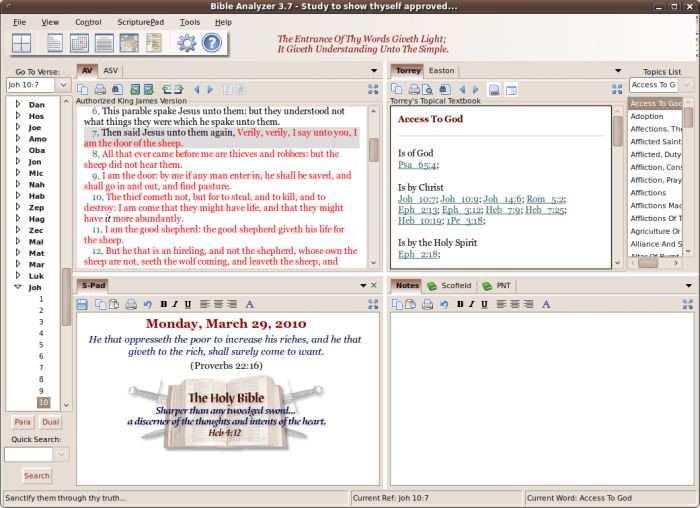
Bible Analyzer is a comprehensive Bible study and analysis application with a number of features not typically found in other bible software such as text comparison, proximity searches, detailed statistics, etc.
Bible Analyzer was developed to aid believers in their study, analysis, and application of the word of God.
It has some advanced features.
Features include:
- List every difference between two Bible texts.
- Show where a keyword (such as “Lord”) is omitted between two Bible texts.
- Do multi-word proximity searches.
- Show a complete word list of all references (including “Red-Letter”) with a frequency count.
- Ability to search ONLY Christ’s words.
- Display a comprehensive statistics of any Bible book, chapter, or even verse.
- Display the Flesch-Kincaid Grade Level Score for a book or chapter.
- Ability to customize the Titlebar and/or Toolbar.
- Commentary Panel.
- User Notes and Commentary Editor.
- Built-in Word Processor, ScripturePad.
- Foriegn Language support (including Hebrew and Greek).
- A Daily Devotions Display.
- Enhanced Image Viewer.
- Book Reader.
- Improved Search capabilities and statistical features.
- Display the Flesch-Kincaid Grade Level Score for a range of text.
Website: www.bibleanalyzer.com
Support: Manual
Developer: Timothy Morton
License: Bible Analyzer License
| Explore Linux | |
|---|---|
 | Best Free and Open Source Software - A huge collection of recommended free and open source software covering every major category. |
 | In-depth Linux Software Reviews - Detailed assessments of Linux software covering features, usability and overall quality. |
 | The Big List of Active Linux Distros - An extensive collection of actively developed Linux distributions. |
 | Open Source Alternatives - Alternatives to software and services from Google, Microsoft, Apple, Adobe, IBM, Autodesk, Oracle and others. |
 | Essential Linux System Tools - Indispensable utilities for monitoring, maintaining and managing Linux systems. |
 | Linux Productivity Tools - Useful utilities for improving productivity and streamlining everyday tasks. |
 | Alternatives to Popular CLI Tools - Modern alternatives to familiar command-line utilities supplied with Linux systems. |
 | Awesome Free Linux Game Tools - Tools, utilities and companion software that improve gaming on Linux. |
 | Machine Learning on Linux - Machine learning and deep learning software, self-hosted applications and practical tools. |
 | Saving Money with Linux - Practical ways to reduce electricity consumption and lower computing costs with Linux. |
 | Linux Candy - Fun, entertaining and sometimes delightfully quirky software from the lighter side of Linux. |
Please read our Comment Policy before commenting.
I was pretty disappointed that the developer didn’t offer Strong’s Dictionary for free. To charge for something which is in the public domain is unethical. To compile it and then add to it is also unethical. If the dictionary had been offered for free, I wouldn’t have uninstalled software which cost me approximately half an hour to install (with other modules selected, of course). Further, to require my street address/city/name to purchase the module (granted, for only $3!!) was ridiculous. I bypassed this software solely on the basis that Strong’s wasn’t offered for free. Even if a donation was requested for such, I would likely have agreed (but again, NOT offering my location information!). Strong’s is the first step toward fostering interest in the original languages, moving on to an Interlinear, then embarking on learning the originals.
Pretty disappointed.
As a developer I know that many people who say they would have donated had the program/extension/addon/plugin been free are often being mendacious.