

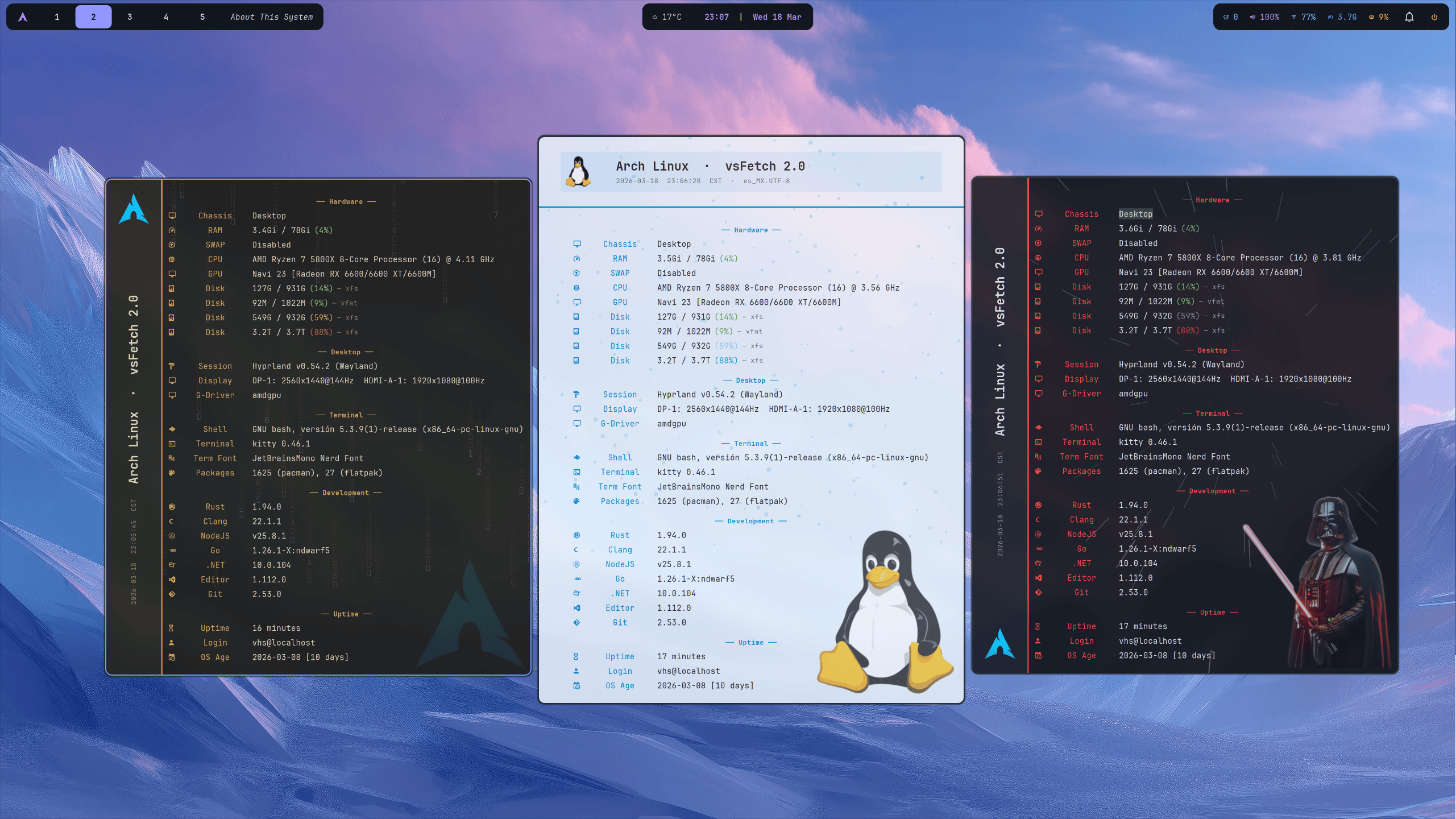
vsFetch is a graphical system information utility inspired by Fastfetch but designed around a GTK desktop window rather than textual command-line output.
It acts as an attractive “About This Computer” panel, combining hardware information with details about the current desktop environment, shell, terminal and development tools. The program is highly customisable, with alternate layouts, theme inheritance and decorative background effects, so it can serve both as a practical system profiler and as a personalised desktop information display.
This is free and open source software.
Key Features
- Groups information into Hardware, Desktop, Terminal, Development and Uptime sections.
- Offers a conventional top-header layout and an alternative left-hand sidebar.
- Provides a compact mode containing the header and hardware information.
- Automatically identifies the operating system and can display its distribution logo.
- Detects details including the shell, terminal, fonts and installed package information.
- Uses colour-coded indicators to make memory and disk utilisation easier to assess.
- Provides configurable rain, snow, matrix, aurora and warp background animations.
- Can overlay a user-selected image on the application background.
- Offers configurable two-colour animated separator bars.
- Stores user preferences in a JSON configuration file.
- Supports partial configurations which inherit unspecified built-in defaults.
- Provides theme inheritance so machine-specific settings can remain separate from visual themes.
- Includes a collection of ready-made appearance themes.
- Lets users customise colours, fonts, window dimensions and visible sections.
- Can run with an explicitly selected configuration file for easy theme testing.
- Provides a companion graphical settings editor for users who prefer not to edit JSON manually.
Website: github.com/victorsosaMx/vsFetch
Support:
Developer: Victor Sosa
License: MIT License
vsFetch is written in Python. Learn Python with our recommended free books and free tutorials.
Related Software
| GUI System Profilers | |
|---|---|
| Hardinfo2 | A continuation of HardInfo offering system information and benchmarking |
| CPU-X | Similar tool to CPU-Z but differs in a few important ways |
| I-Nex | Gambas based alternative to CPU-Z |
| HardInfo | System Profiler and Benchmark |
| KInfoCenter | Centralized and convenient overview of your system |
| Examine | System information viewer for the COSMIC Desktop |
| CPU-G | Python based alternative to CPU-Z |
| CPU Info | Presents detailed hardware and software information |
| Big Hardware Info | View and share hardware information |
Read our verdict in the software roundup.
 Explore our carefully curated directory of recommended free and open source software, covering every major software category. Explore our carefully curated directory of recommended free and open source software, covering every major software category.The directory forms part of our extensive collection of articles for Linux enthusiasts. It includes hundreds of detailed reviews, together with free and open source alternatives to proprietary software from companies such as Google, Microsoft, Apple, Adobe, IBM, Cisco, Oracle, and Autodesk. LinuxLinks also covers interesting projects worth exploring, Linux-compatible hardware, free programming books and tutorials, and much more. Know a useful free and open source Linux application that we haven’t covered? Tell us about it using our submission form. |
Please read our Comment Policy before commenting.