
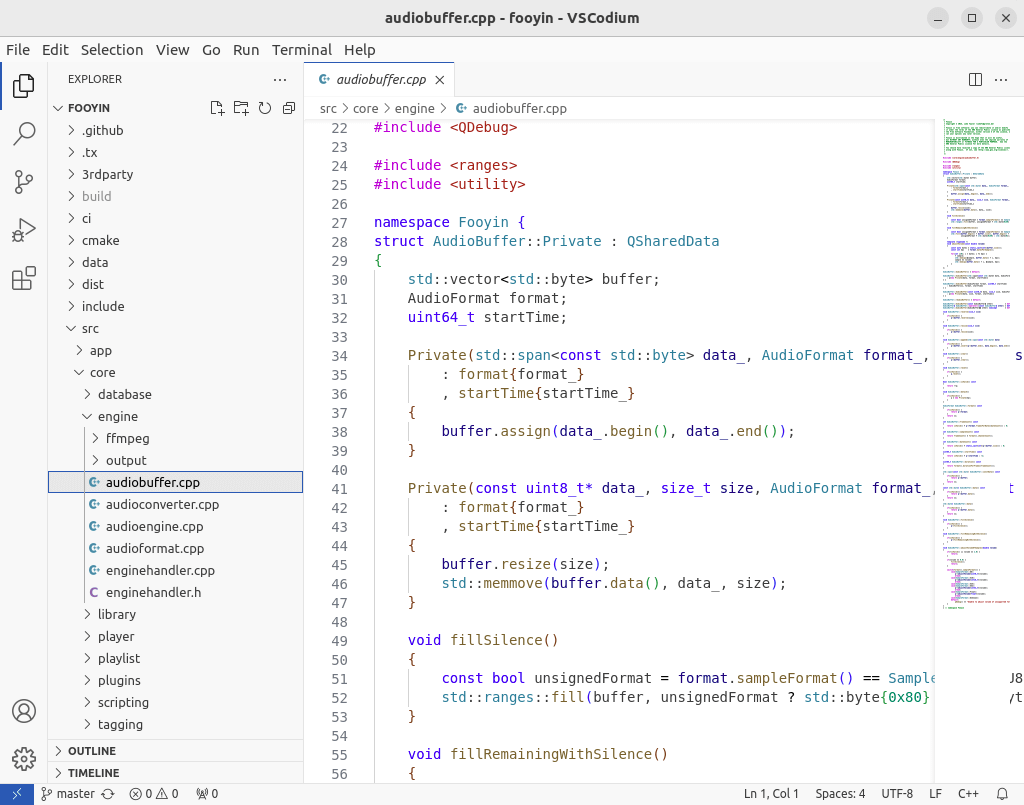
VSCodium is a community-driven, freely-licensed binary distribution of Microsoft’s editor VS Code.
Microsoft’s vscode source code is open source (MIT-licensed), but the product available for download (Visual Studio Code) is licensed under a not-FLOSS license and contains telemetry/tracking.
The VSCodium project exists so that you don’t have to download and build the software from the source code. VSCodium includes special build scripts that clone Microsoft’s vscode repo, run the build commands, and upload the resulting binaries for you to GitHub releases. These binaries are licensed under the MIT license. Telemetry is disabled.
Key Features
- Fast source code editor.
- Support for hundreds of languages.
- Syntax highlighting, bracket-matching, auto-indentation, box-selection, snippets, and more. Intuitive keyboard shortcuts, easy customization and community-contributed keyboard shortcut mappings.
- Built-in support for IntelliSense code completion, rich semantic code understanding and navigation, and code refactoring.
- Interactive debugger, so you can step through source code, inspect variables, view call stacks, and execute commands in the console.
- Integrates with build and scripting tools to perform common tasks making everyday workflows faster.
- Support for Git so you can work with source control without leaving the editor including viewing pending changes diffs.
Website: vscodium.com
Support: GitHub Code Repository
Developer: The VSCodium contributors / Microsoft Corporation
License: MIT License
Related Software
| Integrated Development Environments | |
|---|---|
| RStudio | Enterprise-ready professional software for R |
| PyCharm | Integrated Development Environment for Python |
| Neovim | Continuation and extension of Vim |
| Lapce | Fast and powerful code editor written in Rust |
| NetBeans IDE | Java based IDE from Apache |
| VSCodium | Binary distribution of VS Code |
| Eclipse | Java based environment combining a number of different Eclipse projects |
| Qt Creator | Cross-platform, complete Integrated Development Environment |
| Spyder | The Scientific Python Development Environment |
| KDevelop | An easy to use IDE for KDE |
| Helix | Post-modern modal text editor |
| Theia | Cloud & desktop IDE framework |
| eric | Full featured Python editor and IDE |
| Thonny | Python Integrated Development Environment for Beginners |
| Lazarus | Delphi compatible cross-platform IDE |
| PyDev | Python Integrated Development Environment for Eclipse |
| Gambas | Development environment and a full powerful development platform |
| Che | Kubernetes based Cloud Development Environments for Enterprise Teams |
| Leo | Python based IDE, Outliner and PIM |
| IntelliJ IDEA | IDE for Java, Groovy, and other languages |
| LiteIDE | Edit and build Go projects |
| Arduino IDE | Electronics prototyping platform |
| ZeroBrane Studio | Lightweight Lua-based IDE for Lua |
| CodeLite | Powerful and lightweight C/C++ IDE |
| Pyzo | Cross-Platform Python IDE focused on interactivity and introspection |
| DrRacket | IDE for the Racket programming languages |
| Builder | IDE for GNOME |
| Geany | Small and lightweight IDE based on Scintilla |
| Code::Blocks | Very extensible and fully configurable |
| Ecere SDK | Software development kit |
| Zasper | IDE for Data Science |
| U++ | Rapid application development framework |
| roobuilder | Vala and JavaScript IDE |
Read our verdict in the software roundup.
| HTML Editors | |
|---|---|
| Zed | Fast, multiplayer code editor built for serious development |
| VSCodium | VS Code binaries without Microsoft branding or telemetry |
| Bluefish | Powerful editor for writing websites, scripts and programming code |
| NetBeans | Java based integrated development environment |
| Pulsar | Community-led Atom continuation for highly customizable editing |
| SeaMonkey | All-in-one internet application suite |
| Phoenix Code | Browser-based editor with live preview and collaborative coding |
| Webstudio | Visual website builder aimed at open, code-friendly design |
| Geany | Lightweight IDE offering speed, simplicity, and broad language support |
| Kate | KDE’s powerful text editor with sessions, projects, and plugins |
Read our verdict in the software roundup.
 Explore our comprehensive directory of recommended free and open source software. Our carefully curated collection spans every major software category. Explore our comprehensive directory of recommended free and open source software. Our carefully curated collection spans every major software category.This directory is part of our ongoing series of informative articles for Linux enthusiasts. It features hundreds of detailed reviews, along with open source alternatives to proprietary solutions from major corporations such as Google, Microsoft, Apple, Adobe, IBM, Cisco, Oracle, and Autodesk. You’ll also find interesting projects to try, hardware coverage, free programming books and tutorials, and much more. Discovered a useful open source Linux program that we haven’t covered yet? Let us know by completing this form. |
Please read our Comment Policy before commenting.