

Helix is a terminal-based modal text editor inspired by Kakoune and Neovim. Its selection-first editing model encourages users to identify text before applying changes, making it particularly effective for precise and repetitive editing tasks.
Written in Rust, Helix combines keyboard-driven editing with sophisticated code navigation and project management tools. It runs directly in a terminal, making it suitable for local development, remote SSH sessions and terminal multiplexers.
Helix provides many features associated with integrated development environments without requiring an extensive plugin ecosystem. Language-aware functionality is integrated into the editor, although external language servers are required to enable the corresponding capabilities.
This is free and open source software.
Key Features
- Vim-like modal editing with normal, insert and selection modes.
- Multiple selections and cursors for modifying several parts of a document simultaneously.
- Tree-sitter integration for incremental syntax highlighting, automatic indentation and structural code navigation.
- Navigate and select syntax tree nodes, including functions, classes and other language constructs.
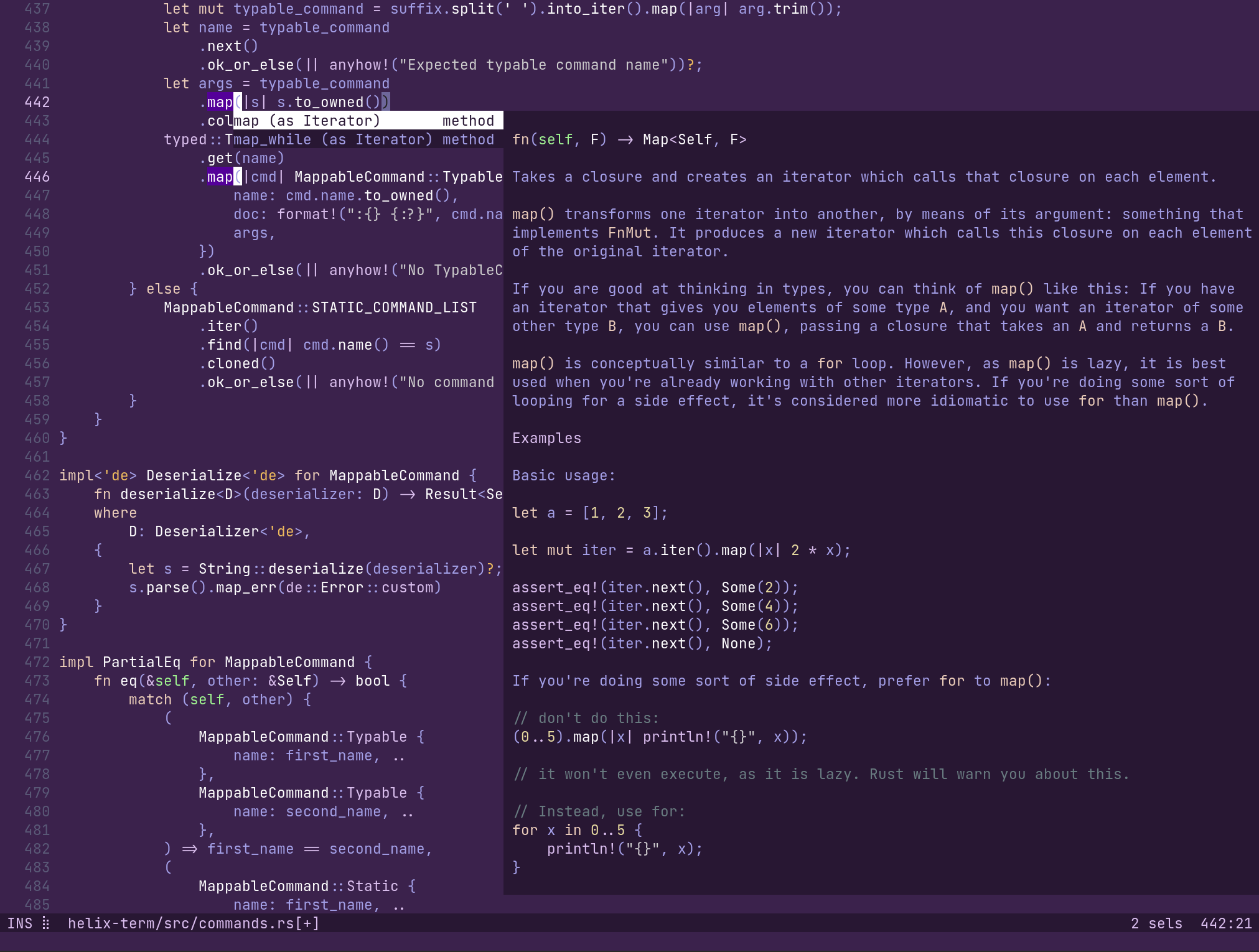
- Built-in Language Server Protocol support for code completion, diagnostics, symbol renaming, code actions and navigation to definitions and references.
- Display inline diagnostics, signature help, hover documentation and inlay hints from supported language servers.
- Fuzzy file and symbol pickers for navigating projects and locating definitions.
- Project-wide search with interactive selection of matching results.
- Support for multiple buffers and split windows.
- Git integration with gutter indicators highlighting added, modified and deleted lines.
- Automatic formatting on save, configurable indentation and automatic insertion of matching brackets.
- Pipe selected text through external shell commands and replace selections with command output.
- Configurable keyboard shortcuts, editor behaviour and status line.
- Customisable colour schemes with support for separate light and dark themes.
- Clipboard integration, regular expression searches and automatic text wrapping.
- Cross-platform support – runs on Linux, macOS, and Windows.
Website: github.com/helix-editor/helix
Support:
Developer: Blaž Hrastnik, Michael Davis, Dmitry Sharshakov, Gokul Soumya, Ivan Tham, and other contributors
License: Mozilla Public License v2.0
Helix is written in Rust. Learn Rust with our recommended free books and free tutorials.
Related Software
| Vim-like Text Editors | |
|---|---|
| Neovim | Vim-fork focused on extensibility and usability |
| Helix | Kakoune / Neovim inspired editor. |
| Lapce | Modern editor in Rust which uses native GUI and GPU rendering |
| NvChad | Neovim config aiming to provide a base configuration |
| LunarVim | IDE layer for Neovim |
| Kakoune | Implements Vi’s "keystrokes as a text editing language" model |
| Vis | Combining modal editing with structural regular expressions |
| vile | Text editor that combines aspects of the Emacs and vi editors |
| pyvim | Implementation of Vim in Python |
| gVim | Vim with a built-in GUI |
| amp | Vim-like editor written in Rust |
| Vy | Vim-like in Python made from scratch |
| moe | Command-line editor inspired by Vim |
| wig | Modal, Vim-like text editor |
| sled | Simple text editor with a terminal UI |
| red | Modern modal text editor written in Rust |
| ad | Adaptable text editor |
| hat | Hackable modal text editor |
| HAKO | Lightweight terminal-based modal text environment |
| xvi | Portable multi-file text editor |
| aretext | Minimalist text editor with vim-compatible key bindings |
| Levee | Also known as Captain Video |
Read our verdict in the software roundup.
| Integrated Development Environments | |
|---|---|
| RStudio | Enterprise-ready professional software for R |
| PyCharm | Integrated Development Environment for Python |
| Neovim | Continuation and extension of Vim |
| Lapce | Fast and powerful code editor written in Rust |
| NetBeans IDE | Java based IDE from Apache |
| VSCodium | Binary distribution of VS Code |
| Eclipse | Java based environment combining a number of different Eclipse projects |
| Qt Creator | Cross-platform, complete Integrated Development Environment |
| Spyder | The Scientific Python Development Environment |
| KDevelop | An easy to use IDE for KDE |
| Helix | Post-modern modal text editor |
| Theia | Cloud & desktop IDE framework |
| eric | Full featured Python editor and IDE |
| Thonny | Python Integrated Development Environment for Beginners |
| Lazarus | Delphi compatible cross-platform IDE |
| PyDev | Python Integrated Development Environment for Eclipse |
| Gambas | Development environment and a full powerful development platform |
| Che | Kubernetes based Cloud Development Environments for Enterprise Teams |
| Leo | Python based IDE, Outliner and PIM |
| IntelliJ IDEA | IDE for Java, Groovy, and other languages |
| LiteIDE | Edit and build Go projects |
| Arduino IDE | Electronics prototyping platform |
| ZeroBrane Studio | Lightweight Lua-based IDE for Lua |
| CodeLite | Powerful and lightweight C/C++ IDE |
| Pyzo | Cross-Platform Python IDE focused on interactivity and introspection |
| DrRacket | IDE for the Racket programming languages |
| Builder | IDE for GNOME |
| Geany | Small and lightweight IDE based on Scintilla |
| Code::Blocks | Very extensible and fully configurable |
| Ecere SDK | Software development kit |
| Zasper | IDE for Data Science |
| U++ | Rapid application development framework |
| roobuilder | Vala and JavaScript IDE |
Read our verdict in the software roundup.
 LinuxLinks helps you discover the best free and open source software for Linux. Explore our extensive collection of recommended applications, including alternatives to popular proprietary software. We also publish software reviews, Linux tutorials, hardware reviews, free programming books and articles covering the wider open source community. Browse our Linux resources to discover more. Know a useful free and open source Linux application we haven't covered? Suggest a program for inclusion. Has your software been featured on LinuxLinks? Display one of our Featured on LinuxLinks badges on your website or GitHub README. |
Please read our Comment Policy before commenting.