
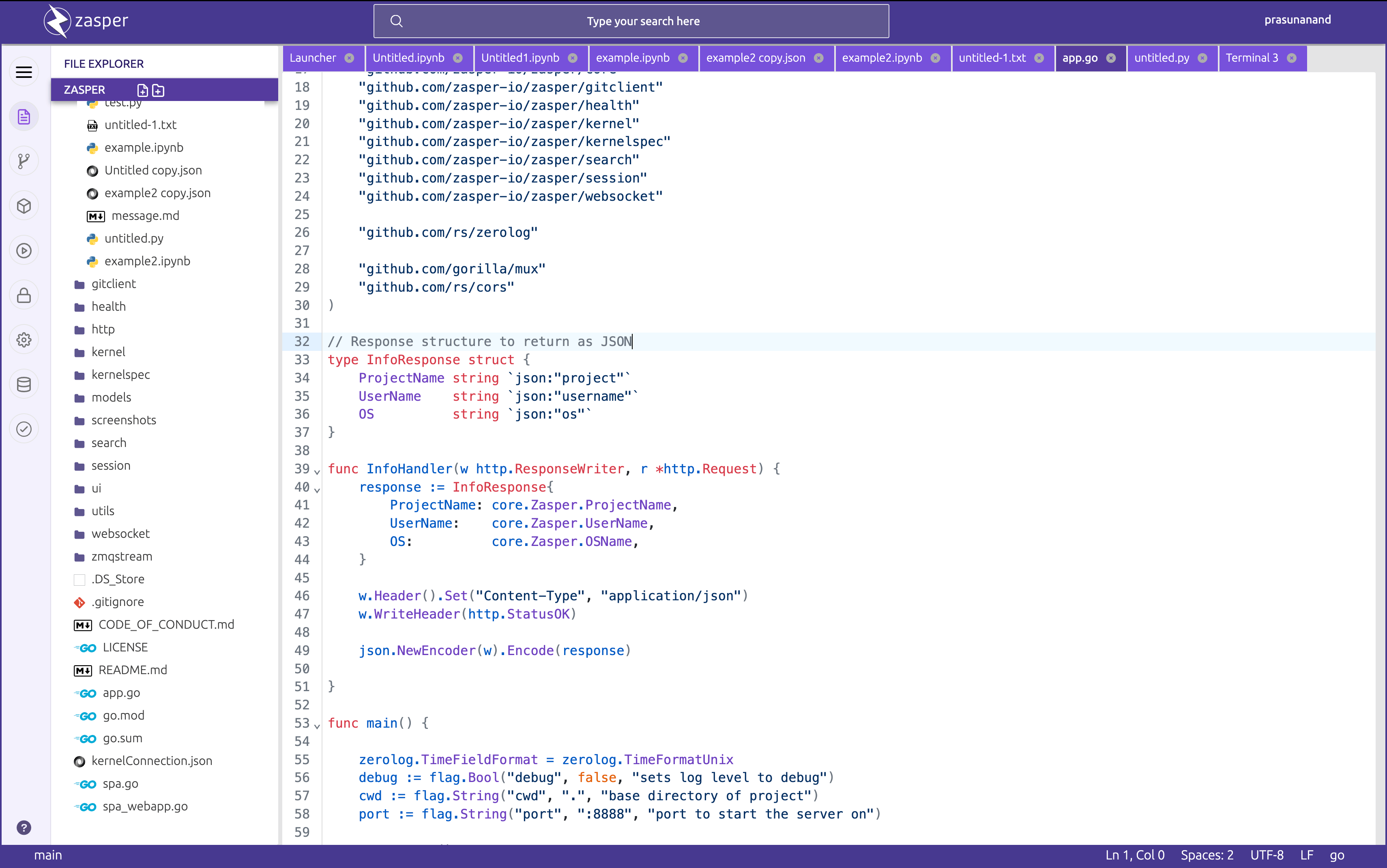
Zasper is an integrated development environment designed for working with Jupyter notebooks. It focuses on responsive performance, low resource consumption, and efficient handling of multiple concurrent notebook sessions.
The application uses the Jupyter communication protocol and works with existing Jupyter kernels. It reads and writes standard .ipynb notebook files, allowing users to work with notebooks created in JupyterLab without converting them to a different format.
Zasper provides a browser-based interface that can run on a local machine or be accessed from a self-hosted server. It combines notebook editing with conventional development tools, making it suitable for data exploration, scientific computing, and interactive programming.
The environment also integrates external coding agents, enabling users to delegate notebook operations while reviewing the resulting changes.
This is free and open source software.
Key Features
- Jupyter compatibility – open, edit, execute, and save standard notebook files using existing Jupyter kernels.
- Concurrent execution – manage numerous kernel connections with an architecture designed for low memory and CPU consumption.
- Rich notebook output – display interactive widgets, Plotly charts, HTML, Markdown, and LaTeX content.
- Kernel management – discover available kernels and development environments when creating notebooks.
- Data exploration – inspect kernel variables and work with DataFrames in sortable, filterable tables and charts.
- SQL cells – execute database queries and return their results as DataFrames.
- Integrated editor – edit source files alongside notebooks, with language-server features such as completion and navigation.
- Built-in terminal – work with system shells without leaving the development environment.
- Git integration – stage and commit changes, manage branches, and inspect notebook differences cell by cell.
- Coding agent integration – connect compatible external agents to read, edit, and execute notebook cells, with review and undo controls.
- Persistent execution – retain notebook execution results even when a browser tab is closed.
- Command palette – search files and execute commands from a unified interface.
- Security controls – trusted folders restrict code execution, while self-hosted sessions use access tokens.
- Interface customisation – light and dark themes, adjustable zoom, and workspace controls.
- Cross-platform support – runs on Linux, macOS, and Windows.
Website: github.com/zasper-io/zasper
Support:
Developer: Prasun Anand
License: GNU Affero General Public License v3.0
Zasper is written in Go. Learn Go with our recommended free books and free tutorials.
Return to Integrated Development Environments
This article was written with the help of a visitor who completed this form. Help the site by suggesting new open source software.
Related Software
| Integrated Development Environments | |
|---|---|
| RStudio | Enterprise-ready professional software for R |
| PyCharm | Integrated Development Environment for Python |
| Neovim | Continuation and extension of Vim |
| Lapce | Fast and powerful code editor written in Rust |
| NetBeans IDE | Java based IDE from Apache |
| VSCodium | Binary distribution of VS Code |
| Eclipse | Java based environment combining a number of different Eclipse projects |
| Qt Creator | Cross-platform, complete Integrated Development Environment |
| Spyder | The Scientific Python Development Environment |
| KDevelop | An easy to use IDE for KDE |
| Helix | Post-modern modal text editor |
| Theia | Cloud & desktop IDE framework |
| eric | Full featured Python editor and IDE |
| Thonny | Python Integrated Development Environment for Beginners |
| Lazarus | Delphi compatible cross-platform IDE |
| PyDev | Python Integrated Development Environment for Eclipse |
| Gambas | Development environment and a full powerful development platform |
| Che | Kubernetes based Cloud Development Environments for Enterprise Teams |
| Leo | Python based IDE, Outliner and PIM |
| IntelliJ IDEA | IDE for Java, Groovy, and other languages |
| LiteIDE | Edit and build Go projects |
| Arduino IDE | Electronics prototyping platform |
| ZeroBrane Studio | Lightweight Lua-based IDE for Lua |
| CodeLite | Powerful and lightweight C/C++ IDE |
| Pyzo | Cross-Platform Python IDE focused on interactivity and introspection |
| DrRacket | IDE for the Racket programming languages |
| Builder | IDE for GNOME |
| Geany | Small and lightweight IDE based on Scintilla |
| Code::Blocks | Very extensible and fully configurable |
| Ecere SDK | Software development kit |
| Zasper | IDE for Data Science |
| U++ | Rapid application development framework |
| roobuilder | Vala and JavaScript IDE |
Read our verdict in the software roundup.
| Python Integrated Development Environments | |
|---|---|
| PyCharm | Full-featured IDE. Two editions are available, one is open source software |
| JupyterLab | Interactive environment for notebooks, coding and data analysis |
| Spyder | Python development environment providing MATLAB-like features |
| eric | Full featured Python editor and IDE, written in Python |
| Thonny | Tk-based IDE designed for novice programmers |
| PyDev | Python plugin for Eclipse |
| Leo | PIM, IDE and outliner |
| Pyzo | Interactive editor for scientific Python |
| PTK | Interactive environment for Python |
| IDLE | Python’s Integrated Development and Learning Environment |
| Zasper | Fast, notebook-focused IDE with integrated development tools |
Read our verdict in the software roundup.
 LinuxLinks helps you discover the best free and open source software for Linux. Explore our extensive collection of recommended applications, including alternatives to popular proprietary software. We also publish software reviews, Linux tutorials, hardware reviews, free programming books and articles covering the wider open source community. Browse our Linux resources to discover more. Know a useful free and open source Linux application we haven't covered? Suggest a program for inclusion. Has your software been featured on LinuxLinks? Display one of our Featured on LinuxLinks badges on your website or GitHub README. |
Please read our Comment Policy before commenting.