

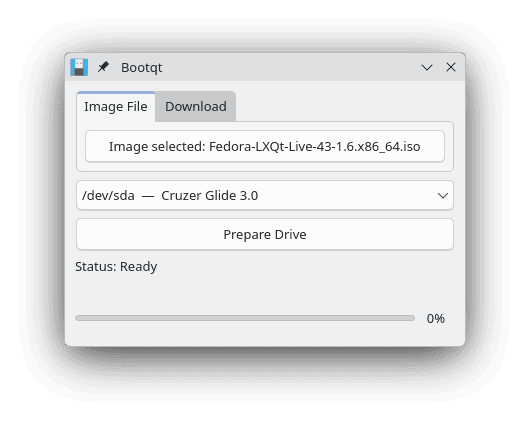
Bootqt is a graphical application for preparing bootable USB drives from disk images. It provides a straightforward way to transfer operating system installers, live environments and recovery tools to removable media. The workflow involves choosing a destination USB disk and then either selecting an existing image file or obtaining one through the built-in download section.
Alongside conventional image writing, Bootqt provides access to Ventoy, which takes a different approach to bootable media. Once Ventoy is installed on a USB drive, multiple compatible image files can be stored on the same device and selected from a boot menu. This is useful when maintaining a collection of installation and troubleshooting environments.
Writing an image is a destructive operation, as existing data on the chosen USB device may be overwritten. Bootqt provides a compact Qt interface that fits comfortably into Linux desktop environments, particularly KDE Plasma.
This is free and open source software.
Key Features
- Write ISO, IMG and RAW disk images to USB drives.
- Automatically detect connected USB disks and display their device paths and model names.
- Download installation images for Ubuntu, Fedora Workstation, Linux Mint Cinnamon and Clonezilla.
- Download and install Ventoy for creating multiboot USB drives.
- Separate tabs for selecting local image files and downloading images.
- Display a confirmation dialog identifying the destination drive before overwriting its contents.
- Show image-writing status, transferred data and progress information.
- Request administrator privileges for operations requiring direct disk access.
- Attempt to unmount existing partitions on the selected device before writing.
- Provide interface translations for Danish, German, Italian, Brazilian Portuguese and Turkish.
Website: github.com/giantpinkrobots/bootqt
Support:
Developer: Giant Pink Robots
License: GNU General Public License v3.0
Bootqt is written in Python. Learn Python with our recommended free books and free tutorials.
Related Software
| Boot Utilities | |
|---|---|
| Ventoy | Create bootable USB drive for ISO/WIM/IMG/VHD(x)/EFI files |
| Limine | Multiprotocol bootloader and boot manager |
| rEFInd | EFI boot manager |
| Plymouth | Boot splash and boot logger |
| UNetbootin | Universal Netbook installer |
| sbctl | Create, enroll and manage Secure Boot keys |
| Grub Customizer | Graphical interface to configure the grub2/burg settings |
| bootchart2 | Merge of bootchart-collector and pybootchartgui |
| OProfile | Low-overhead, transparent system-wide profiler |
| e4rat | Ext4 - Reducing Access Times; toolset to accelerate the boot process |
Read our verdict in the software roundup.
 LinuxLinks helps you discover the best free and open source software for Linux. Explore our extensive collection of recommended applications, including alternatives to popular proprietary software. We also publish software reviews, Linux tutorials, hardware reviews, free programming books and articles covering the wider open source community. Browse our Linux resources to discover more. Know a useful free and open source Linux application we haven't covered? Suggest a program for inclusion. Has your software been featured on LinuxLinks? Display one of our Featured on LinuxLinks badges on your website or GitHub README. |
Please read our Comment Policy before commenting.