

Turn On is a graphical utility for waking devices such as computers, NAS systems and other network hardware using Wake-on-LAN.
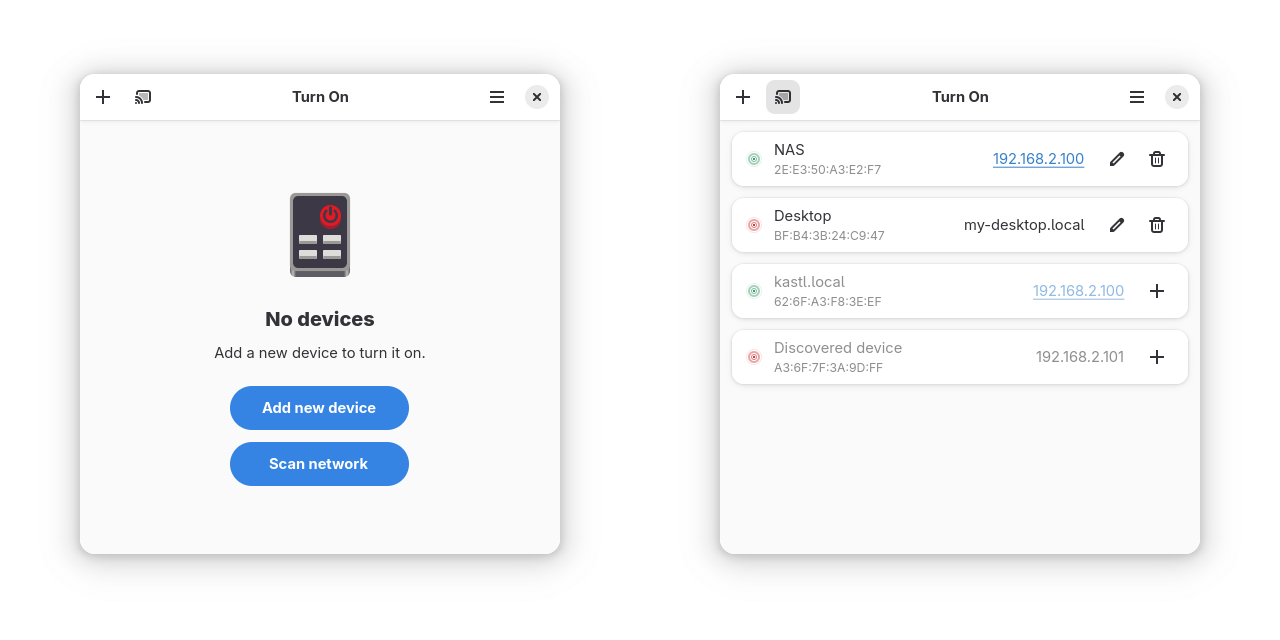
The application maintains a list of devices and provides network discovery to make adding machines easier. It can also detect web interfaces offered by systems on the local network and monitor whether configured devices are currently available.
Turn On integrates with the desktop as well as providing its own interface. This makes it possible to wake a configured machine without first opening the application.
This is free and open source software.
Key Features
- Add and manage devices that support Wake-on-LAN.
- Discover devices automatically on the local network.
- Discover web interfaces exposed by network devices.
- Monitor whether configured devices are currently online.
- Send Wake-on-LAN magic packets to selected machines.
- Integrates with GNOME Shell search.
- Exports a KRunner interface for integration with KDE search.
- Provides a command-line interface for waking configured devices.
- Stores information about devices so their MAC addresses do not need to be entered repeatedly.
- Uses a GTK and libadwaita interface designed to fit naturally with modern Linux desktops.
Website: codeberg.org/swsnr/turnon
Support:
Developer: Sebastian Wiesner
License: European Union Public Licence v1.2
Turn On is written in Rust. Learn Rust with our recommended free books and free tutorials.
Related Software
| Wake-on-LAN Tools | |
|---|---|
| UpSnap | Self-hosted wake-on-LAN web application |
| gWakeOnLAN | Small graphical utility that lets you wake up machines |
| Turn On | Small GNOME utility |
| wakeonlan | Perl script |
| virtwold | Wake-on-LAN for libvirt based VMs |
| Awake on Lan | Wake up computers remotely using Wake-on-LAN packets |
| wakey | Manage and wake devices using Wake-on-Lan |
| UPSWake | Sends Wake-on-LAN packets to bring systems back online |
| wol.rs | Wake On LAN magic packet command line tool and crate |
| wol | Wake networked computers remotely using a CLI or web interface |
Read our verdict in the software roundup.
 LinuxLinks helps you discover the best free and open source software for Linux. Explore our extensive collection of recommended applications, including alternatives to popular proprietary software. We also publish software reviews, Linux tutorials, hardware reviews, free programming books and articles covering the wider open source community. Browse our Linux resources to discover more. Know a useful free and open source Linux application we haven't covered? Suggest a program for inclusion. Has your software been featured on LinuxLinks? Display one of our Featured on LinuxLinks badges on your website or GitHub README. |
Please read our Comment Policy before commenting.