

Awake on LAN is a graphical application for keeping a list of computers and waking them remotely using Wake-on-LAN.
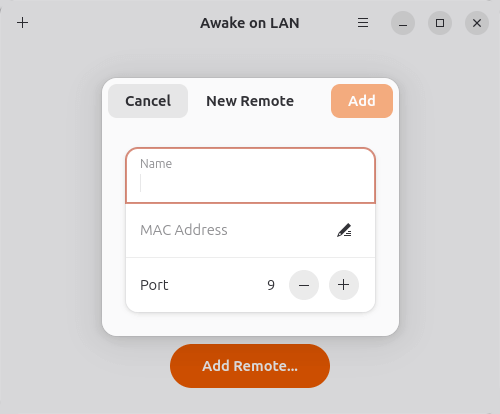
Each computer can be saved so that its network details do not need to be entered each time it is required. Machines can be added, edited and removed from the application, with the wake action available directly from the main interface.
The software uses GTK and libadwaita on Linux and keeps its approach deliberately straightforward. It is well suited to users who want a graphical alternative to command-line magic-packet utilities without the additional administration features of a larger self-hosted Wake-on-LAN server.
This is free and open source software.
Key Features
- Save computers that need to be woken regularly.
- Add, edit and remove entries from the device list.
- Send a Wake-on-LAN magic packet with a single action.
- Stores MAC addresses for configured computers.
- Supports hostnames when defining target systems.
- Provides a GTK and libadwaita interface on Linux.
- Designed around a small, focused workflow rather than broader network administration.
- Allows the same collection of frequently used systems to be managed without repeatedly entering networking information.
Website: github.com/logonoff/awake-on-lan
Support:
Developer: logonoff
License: GNU General Public License v3.0
Awake on Lan is written in Python. Learn Python with our recommended free books and free tutorials.
Related Software
| Wake-on-LAN Tools | |
|---|---|
| UpSnap | Self-hosted wake-on-LAN web application |
| gWakeOnLAN | Small graphical utility that lets you wake up machines |
| Turn On | Small GNOME utility |
| wakeonlan | Perl script |
| virtwold | Wake-on-LAN for libvirt based VMs |
| Awake on Lan | Wake up computers remotely using Wake-on-LAN packets |
| wakey | Manage and wake devices using Wake-on-Lan |
| UPSWake | Sends Wake-on-LAN packets to bring systems back online |
| wol.rs | Wake On LAN magic packet command line tool and crate |
| wol | Wake networked computers remotely using a CLI or web interface |
Read our verdict in the software roundup.
 LinuxLinks helps you discover the best free and open source software for Linux. Explore our extensive collection of recommended applications, including alternatives to popular proprietary software. LinuxLinks helps you discover the best free and open source software for Linux. Explore our extensive collection of recommended applications, including alternatives to popular proprietary software.We also publish software reviews, Linux tutorials, hardware reviews, free programming books and articles covering the wider open source community. Browse our Linux resources to discover more. Know a useful free and open source Linux application we haven't covered? Suggest a program for inclusion. Has your software been featured on LinuxLinks? Display one of our Featured on LinuxLinks badges on your website or GitHub README. |
Please read our Comment Policy before commenting.