

Trimage is an open source cross-platform graphical user interface and command-line interface to optimize image files via optipng, advpng, pngcrush and jpegoptim, depending on the filetype (currently, PNG and JPG files are supported).
All image files are losslessly compressed on the highest available compression levels.
Trimage gives you various input functions to fit your own workflow: A regular file dialog, dragging and dropping and various command line options.
Key Features
- Drag-and-drop images into the window.
- Use threads to use multiple CPUs.
- Uses lossless optimizers: OptiPNG, Pngcrush, Advpng, and jpegoptim.
Website: trimage.org
Support: GitHub Code Repository
Developer: Neil Wallace, Jeroen Goudsmit, Tarnay Kálmán, Thomas Lété, Kyrill Detinov
License: MIT License
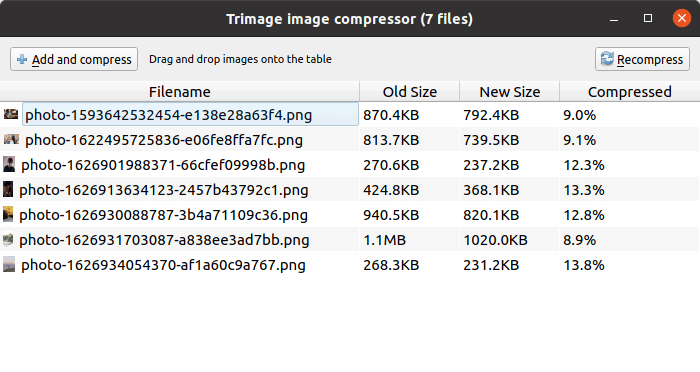
Trimage is written in Python. Learn Python with our recommended free books and free tutorials.
Related Software
| GUI Image Compression Tools | |
|---|---|
| XL Converter | Easy-to-use image converter for modern formats |
| Imagine | Software to compress PNG, JPEG and WebP images |
| Caesium | Simple to use image compression tool |
| Curtail | Lossless and lossy compression modes (PNG, JPEG and WEBP) |
| YOGA Image Optimizer | Convert and optimize JPEG, PNG and WebP images |
| OptiImage | Useful image compressor that supports PNG, JPEG, WebP and SVG |
| Image Optimizer | Simple lossless compression |
| Halftone | Apply a pixel art-like style and reduce the file size in the process |
| PicSharp | Cross-platform desktop image compression application |
| Trimage | Cross-platform tool for losslessly optimizing PNG and JPG files |
| E-Mage | Cross-platform tool for losslessly image compression |
| Drop Compress Image | Convert and compress images |
Read our verdict in the software roundup.
 Explore our comprehensive directory of recommended free and open source software. Our carefully curated collection spans every major software category. Explore our comprehensive directory of recommended free and open source software. Our carefully curated collection spans every major software category.This directory is part of our ongoing series of informative articles for Linux enthusiasts. It features hundreds of detailed reviews, along with open source alternatives to proprietary solutions from major corporations such as Google, Microsoft, Apple, Adobe, IBM, Cisco, Oracle, and Autodesk. You’ll also find interesting projects to try, hardware coverage, free programming books and tutorials, and much more. Discovered a useful open source Linux program that we haven’t covered yet? Let us know by completing this form. |
Please read our Comment Policy before commenting.