

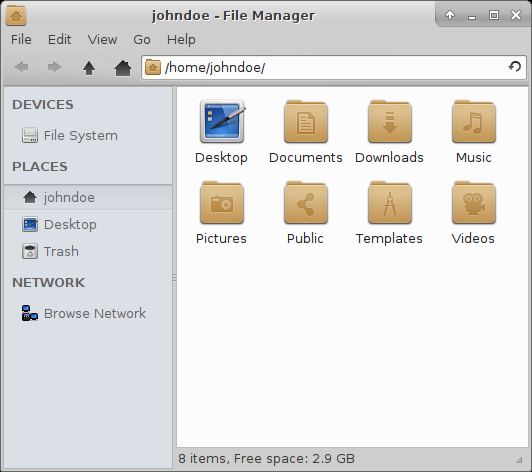
Thunar is a modern file manager for the Xfce Desktop Environment.
The main goal of the Thunar project is to create a file manager that is fast, clean, and easy to use. It is designed to start up faster and be more responsive than other Linux file managers, such as Nautilus and Konqueror.
It can create folders and documents, display files and folders, manage files and folders, run and manage custom actions, as well as accessing removable media.
Thunar implements the various FreeDesktop.org standards to integrate nicely into todays UNIX/Linux desktop world.
Using the Thunar Extensions Framework it is easy to extend the basic functionality provided by Thunar to integrate even complex tasks into the file manager.
Key Features
- Functionality provided by plugins:
- Advanced Properties plugin – provces 2 additional pages for the file properties dialog (Image page – displays advanced properties of image files including Exif metainformation, and a simple editor for .desktop files).
- Archive Plugin – create and extract archive files.
- Media Tags Plugin – provides an audio tag based renamer.
- Bulk Renamer – allows users to easily rename multiple files at once using criterions that can be specified using the available renamer plugins.
- Additional Thumbnailers.
- User Customizable Actions.
Website: docs.xfce.org/xfce/thunar
Support:
Developer: Benedikt Meurer, Jeffs Franks, Jannis Pohlmann, Nick Schermer
License: GNU General Public License v2.0
Thunar is written in C. Learn C with our recommended free books and free tutorials.
Related Software
| GUI Batch Renamers | |
|---|---|
| KRename | Powerful batch file renamer for the KDE desktop with plugin support |
| Bulky | Developed by Linux Mint but not tied to any Linux distro or desktop |
| GPRename | GTK batch renamer for files and directories |
| Szyszka | Fast and powerful file renamer |
| CoreRenamer | Simple lightweight batch file renamer application; part of the C Suite |
| Flut Renamer | Bulk file renamer written in flutte |
| Thunar | xfce’s file manager |
| OncePower | Tool based on Flutter |
| Métamorphose | wxPython based batch renamer for files and folders |
| PBRenamer | Batch file renaming utility built with Python and Qt 6 |
| Caja-Rename | Batch renaming extension for Caja |
| Inviska Rename | Qt-based batch file rename utility |
Read our verdict in the software roundup.
| GTK File Managers | |
|---|---|
| Double Commander | File manager with two panels side by side |
| Files | File browser designed for elementary OS; loose fork of GNOME Files |
| GNOME Files | Simple file manager for GNOME |
| GNOME Commander | Two-panel graphical file manager |
| 4Pane | Multi-pane, detailed-list file manager |
| PCManFM | Slim and useful, but not to have any feature bloat |
| Sunflower | Small and highly customizable twin-panel file manager |
| Thunar | xfce’s file manager |
| Flux | Multi-threaded Linux file manager |
| Tux Commander | Windowed file manager with two panels side by side |
| Portfolio | Minimalist, touch-friendly file manager |
| A couple of GNOME Files forks are also worth mentioning. | |
| Nemo | File manager for the Cinnamon desktop environment |
| Caja | File manager for the MATE desktop |
Read our verdict in the software roundup.
 LinuxLinks helps you discover the best free and open source software for Linux. Explore our extensive collection of recommended applications, including alternatives to popular proprietary software. We also publish software reviews, Linux tutorials, hardware reviews, free programming books and articles covering the wider open source community. Browse our Linux resources to discover more. Know a useful free and open source Linux application we haven't covered? Suggest a program for inclusion. Has your software been featured on LinuxLinks? Display one of our Featured on LinuxLinks badges on your website or GitHub README. |
Please read our Comment Policy before commenting.