
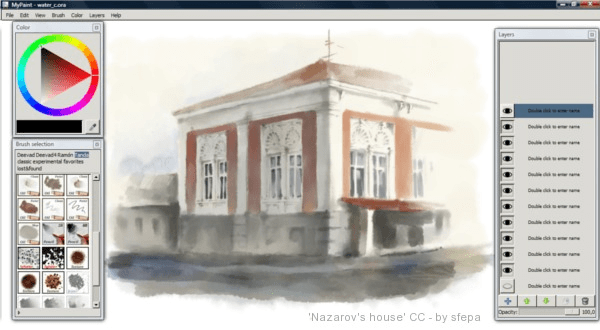
MyPaint is a digital painting application designed for artists who prefer a distraction-free workspace. It specialises in freehand painting with pressure-sensitive graphics tablets, combining an extensive collection of brushes with a highly configurable brush engine. Its brushes can simulate pencils, charcoal, ink and traditional paint, while custom settings allow artists to produce effects that are less closely associated with physical media.
The application provides an effectively infinite canvas, removing the need to decide on image dimensions before beginning a sketch. Its painting engine supports pigment-style colour mixing, linear compositing and detailed control over how brushes respond to tablet input. Layers, layer groups and several symmetry modes help organise more elaborate artwork. MyPaint also supports the OpenRaster format, allowing layered images to be exchanged with other compatible painting applications.
This is free and open source software.
Key Features
- Paint and sketch on an effectively infinite canvas.
- Support pressure-sensitive graphics tablets and stylus input.
- Provide an extensive collection of brushes simulating pencils, charcoal, ink and paint.
- Configure brush size, opacity, hardness, smudging and other properties.
- Control brush behaviour using tablet pressure, tilt, speed, direction and barrel rotation.
- Create and save custom brushes.
- Use a pigment-based colour mixing model to simulate traditional media.
- Support linear RGB compositing for non-pigment painting modes.
- Organise artwork using layers, layer groups and blending modes.
- Use layer views to manage alternative arrangements of visible artwork.
- Adjust layer opacity and protect transparent pixels.
- Paint using vertical, horizontal, rotational and snowflake symmetry.
- Use flood fill with controls for feathering, offsets and gap detection.
- Provide brush stroke smoothing and an inking tool.
- Rotate, zoom and mirror the canvas view while painting.
- Use a scratchpad for experimenting with colours and brushes.
- Provide a fullscreen painting mode with minimal interface distractions.
- Save layered artwork using OpenRaster files.
- Import layers from other images and export finished artwork.
- Support configurable keyboard shortcuts and interface preferences.
- Cross-platform support – runs on Linux, macOS, and Windows.
Website: github.com/mypaint/mypaint
Support:
Developer: Martin Renold and contributors
License: GNU General Public License v2.0
MyPaint is written in C++ and Python. Learn C++ with our recommended free books and free tutorials. Learn Python with our recommended free books and free tutorials.
Related Software
| Painting Tools | |
|---|---|
| Krita | Edit and paint images; part of the KOffice office suite |
| MyPaint | Paint program with dynamic brushes for graphic tablets |
| GIMP | GNU Image Manipulation Program |
| Drawpile | Draw, paint, sketch and animate |
| AzPainter | Full color painting software |
| Tux Paint | Drawing and painting software designed for children |
| Milton | Infinite-canvas paint program |
| Vara | Minimalist digital painting tool |
| CorePaint | Paint app for C Suite |
| InfiniPaint | Collaborative, infinite space, infinite zoom, canvas note-taking/drawing app |
| BlockPaint | Terminal-based painting tool |
| Alchemy | Non-orthodox painting tool experimenting with alternative ways of drawing |
Read our verdict in the software roundup.
 LinuxLinks helps you discover the best free and open source software for Linux. Explore our extensive collection of recommended applications, including alternatives to popular proprietary software. We also publish software reviews, Linux tutorials, hardware reviews, free programming books and articles covering the wider open source community. Browse our Linux resources to discover more. Know a useful free and open source Linux application we haven't covered? Suggest a program for inclusion. Has your software been featured on LinuxLinks? Display one of our Featured on LinuxLinks badges on your website or GitHub README. |
Please read our Comment Policy before commenting.