
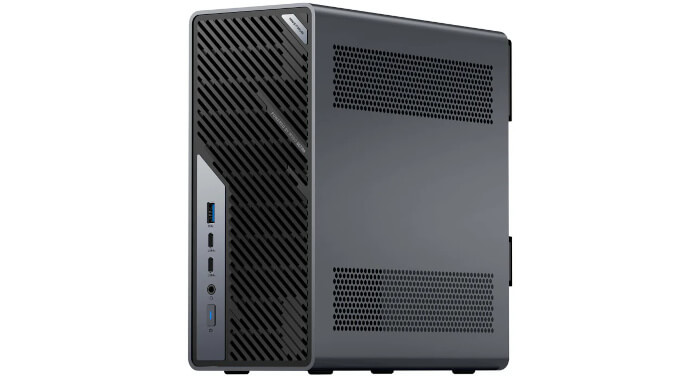
This is a series looking at the Minisforum MS-02 Ultra 285HX Mini Workstation running Linux. In this series, I’ll put this machine through its paces from a Linux perspective, comparing it with other systems, including desktops, to show how it really stacks up.
The Minisforum MS-02 Ultra is very different from a conventional mini PC. It’s a compact workstation and mini-server class machine built around the Intel Core Ultra 9 285HX processor. The model I’m testing offers far more expandability than a typical mini PC, including PCIe expansion, 4 M.2 NVMe slots, an internal 350 W power supply, 10GbE and 2.5GbE networking, and dual 25GbE.
I’m running CachyOS, an Arch-based Linux distribution, on the MS-02 Ultra. CachyOS uses the Btrfs file system by default.
Btrfs is a modern copy-on-write file system for Linux designed to improve reliability, flexibility, and storage efficiency. It supports transparent compression, snapshots, subvolumes, checksums for data and metadata, and online resizing. These features make it well suited to rolling-release distributions such as CachyOS, where snapshots can provide a quick route back after a problematic update.
Compression can also reduce disk usage and, on fast CPUs, sometimes improve effective I/O performance. Btrfs is not just about saving space; it also gives administrators practical tools for monitoring, repairing, and managing storage without relying on a separate volume manager underneath the system stack.
Compression
Let’s take a quick look at the benefits of compression.
To show the space saved on Btrfs, the best tool is compsize. Install it with the command:
$ sudo pacman -S compsize
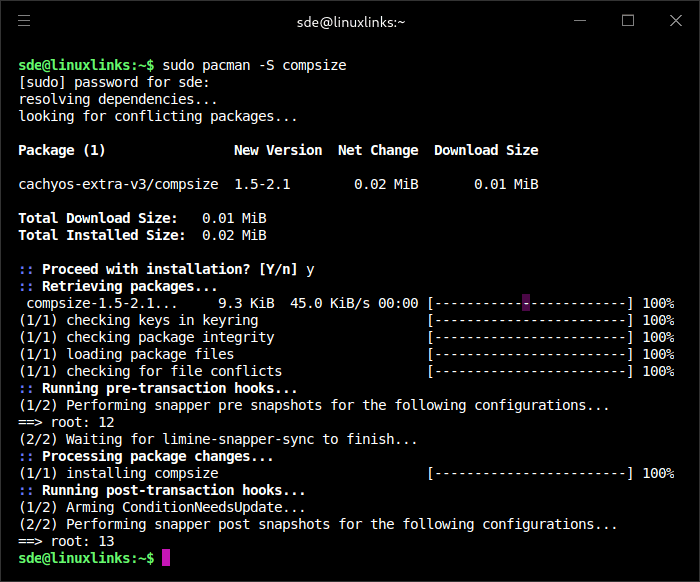
We can then run compsize on / or on my home directory. On a freshly installed system, this is what it shows.
$ sudo compsize -x /
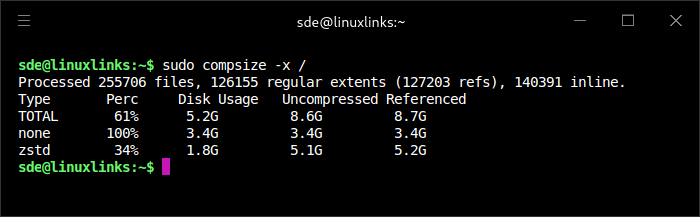
I’m using the -x flag so compsize doesn’t cross filesystem boundaries. On my system it’s excluding the /home folder too.
On a freshly installed CachyOS system, Btrfs compression is already delivering useful space savings. The root filesystem (which excludes /home) contains around 8.6GB of uncompressed data, but it occupies only 5.2GB on disk. Around 5.1GB of the data is compressed with Zstandard, reducing it to 1.8GB. Overall, the installation uses about 39% less disk space than it would without compression.
We can get a broader view with the command:
$ sudo btrfs filesystem usage /
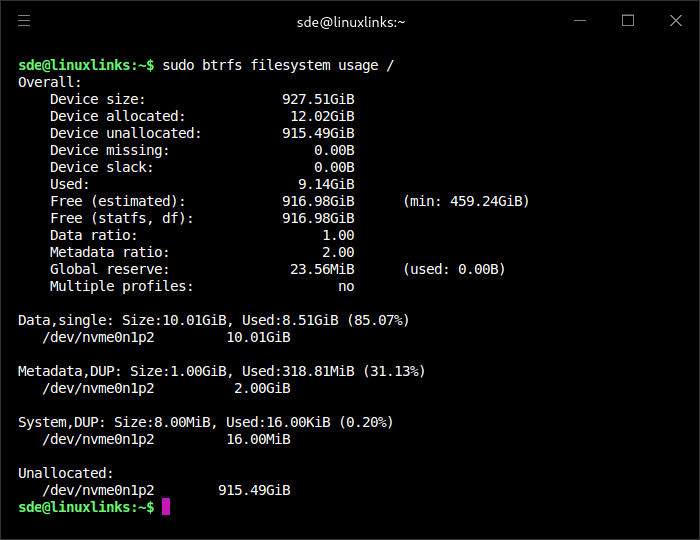
This output shows that CachyOS’ default Btrfs layout is both space efficient and conservative in how it allocates disk space.
Let’s check the compression level being used.
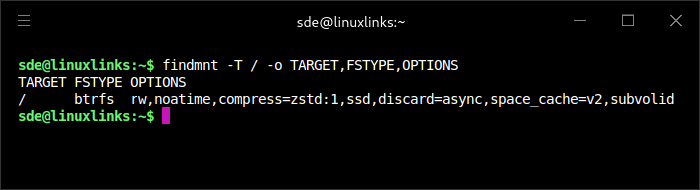
CachyOS mounts the root Btrfs filesystem with compress=zstd:1, so newly written data is compressed using Zstandard at level 1. This is a performance-friendly setting that still delivers useful space savings, as shown by compsize, while keeping CPU overhead low on normal desktop workloads. The filesystem is also mounted with SSD-oriented options including noatime, ssd, discard=async, and space_cache=v2.
Higher Zstandard levels may improve compression slightly, but the returns are modest on a typical Linux root filesystem. For example, moving from zstd:1 to zstd:9 might only reduce this installation by a further few hundred megabytes, while increasing CPU work during writes. For a fast NVMe system, zstd:1 is a pragmatic performance-focused choice.
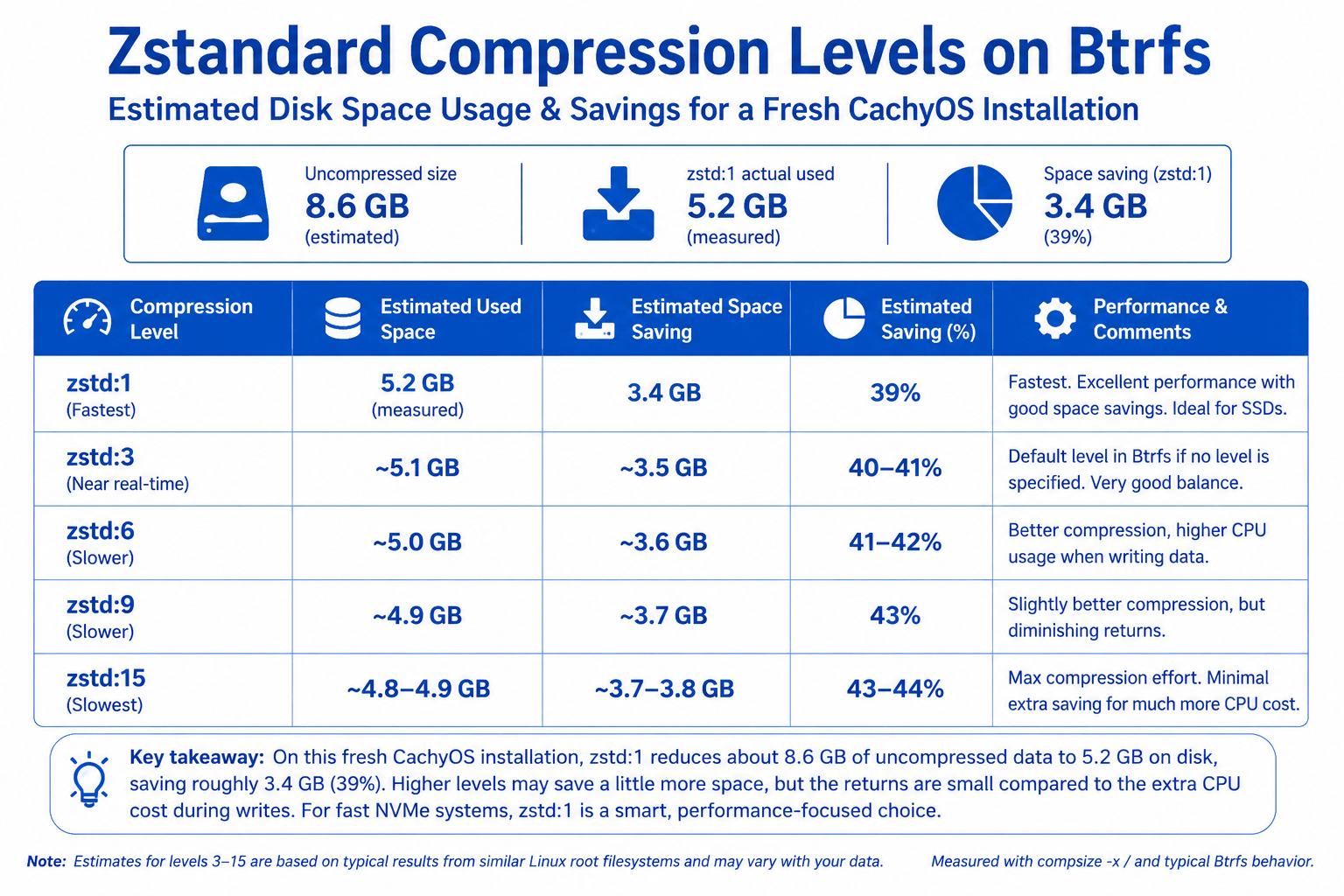
I’m not going to change the compression level. zstd:1 is a sensible default for an NVMe system because it gives most of the space saving with minimal CPU overhead.
Other points to bear in mind
Btrfs compression is generally a poor fit for files that are large, frequently rewritten, already compressed, or latency-sensitive. Virtual machine disk images tick several of those boxes.
Other things I’d usually avoid compressing:
- Database files: PostgreSQL, MariaDB, SQLite-heavy workloads.
- Containers: Docker/Podman storage, especially overlay layers.
- Game libraries: Steam, Lutris, Proton prefixes, game assets.
- Media collections: videos, music, JPEG/PNG/AVIF photos.
- Large archives: .zip, .xz, .zst, .7z, .rar.
- ISO images.
- AppImages.
- Build directories for very heavy compile workloads.
- Browser caches.
For a normal desktop root filesystem, zstd:1 is good. For VMs, databases, containers and game libraries, I’ll put them on a separate Btrfs subvolume mounted with compress=no, or mark the directory/files as no-compress.
For a new VirtualBox VM directory:
$ mkdir -p ~/VirtualBox\ VMs
$ chattr +C ~/VirtualBox\ VMs
chattr +C only works properly for new files created after setting it. Existing VM images won’t automatically change. The usual approach is to create a new no-COW/no-compress directory, then copy or recreate the VM disk images into it.
Check attributes with:
$ lsattr -d ~/VirtualBox\ VMs
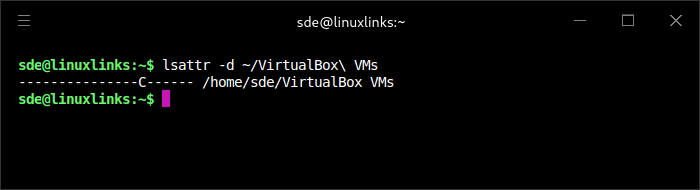
The C means the directory has the No_COW attribute set. For new files created inside that directory, Btrfs won’t use copy-on-write, and compression won’t be applied in the normal way. That’s a better setup for VirtualBox disk images. The trade-off is that No_COW also disables Btrfs data checksumming for those files.
After installing a virtual machine, my /home directory looks like this. My main data is stored on network drives.
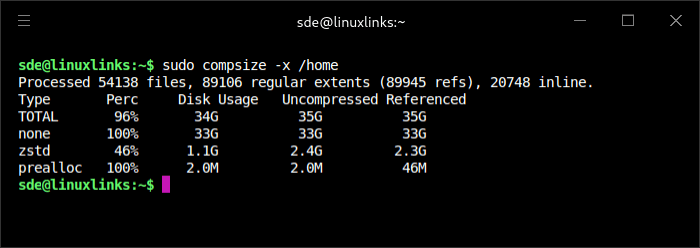
My /home files are getting decent zstd compression, but my VM folder dominates the total and is uncompressed, so the overall saving looks small.
Complete list of articles in this series:
| Minisforum MS-02 Ultra 285HX | |
|---|---|
| Introduction | Introduction to the series and interrogation of the machine |
| Benchmarks | Benchmarking the Minisforum MS-02 Ultra 285HX Mini Workstation |
| Power | Testing and comparing the power consumption |
| Dual channel memory | Assessing the impact of adding a second SO-DIMM |
| Cores | Benchmarking cores under Linux |
| BIOS | In the world of computing, BIOS, which stands for Basic Input/Output System, plays a crucial role |
| Btrfs | Advanced, modern copy-on-write (CoW) file system for Linux |
| Intel processors | P-Cores, E-Cores and LP E-Cores Compared Across 4 Intel Processors |
| More articles will be published next week | |
Please read our Comment Policy before commenting.