

Storage
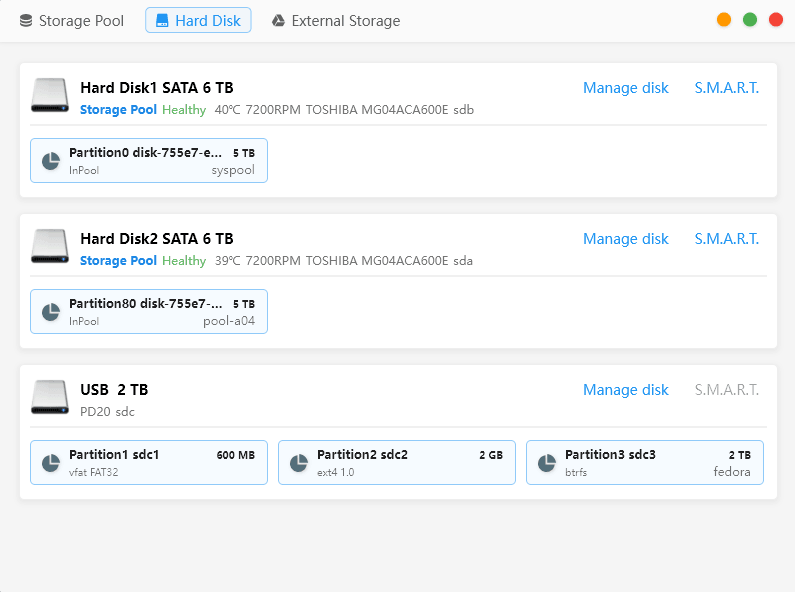
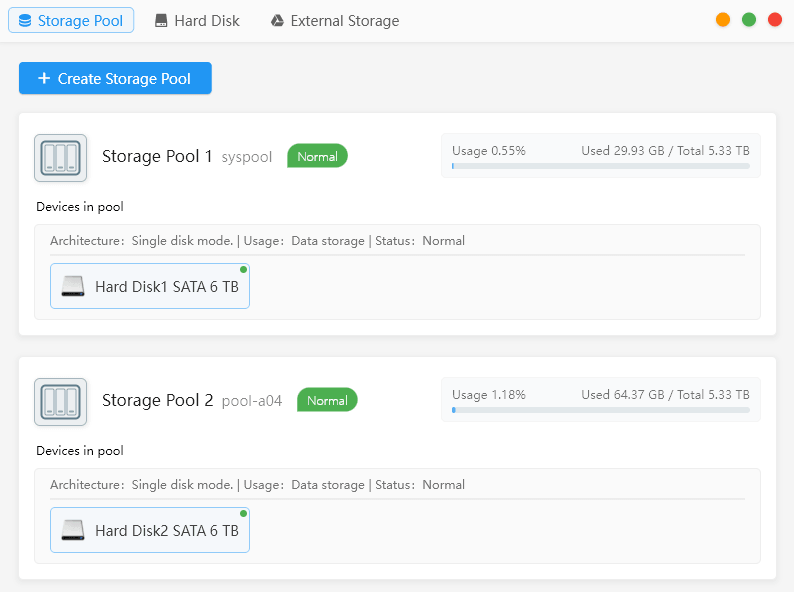
The two views show MinisCloud OS managing two separate single-disk ZFS storage pools:
Storage Pool 1 — syspool: Hard Disk 1, 6TB Toshiba MG04ACA600E; 29.93GB used of 5.33TB.
Storage Pool 2 — pool-a04: Hard Disk 2, identical 6TB Toshiba drive; 64.37GB used of 5.33TB.
Both pools report Normal/Healthy, but single-disk mode provides no redundancy. Failure of either disk would result in the loss of that pool’s data. I set up this arrangement purely for testing the OS, simply to demonstrate that it’s possible to create separate storage pools in single-disk mode.
The Hard Disk view reports the drives at 40°C and 39°C, running at 7,200RPM, with disk-management and S.M.A.R.T. controls available. It also detects a 2TB USB drive containing three partitions: a 600MB FAT32 partition, a 2GB ext4 partition and a roughly 2TB Btrfs partition labelled fedora. This is an external NVMe drive attached to one of the USB4 ports.
Next page: Page 4 – Applications: LAN sharing
Pages in this article:
Page 1 – Introduction and Setup
Page 2 – Applications: Docker
Page 3 – Applications: Storage
Page 4 – Applications: LAN sharing
Page 5 – Applications: Album
Page 6 – Applications: Backup
Page 7 – Applications: File Manager
Page 8 – Applications: Device Monitoring
Page 9 – Applications: Virtual Machine
Page 10 – Applications: Settings
Page 11 – Applications: Other Apps
Page 12 – Summary
Complete list of articles in this series:
| Minisforum N5 Pro NAS | |
|---|---|
| Hardware Review | Five-Bay NAS with Ryzen AI 9 Power |
| MinisCloud OS | Customised Linux NAS operating system |
| NPU | Using the NPU with FastFlowLM |
| More articles to be published next week | |
Please read our Comment Policy before commenting.
MinisCloud OS looks very promising, but I would be reluctant to entrust important data to a beta NAS operating system.