

There are many ways you can transfer files between computers. Here’s a few methods. We can transfer files between two hosts on Linux using the scp command. The scp command establishes a secure connection between the two hosts and it uses the standard SSH port in order to transfer files. Alternatively, many people send files as attachments although there are often limitations with this method. Or users frequently use file hosting services in the cloud, WebTorrents, a personal server, wormhole and many others.
We are always on the look out for easy, simple and secure ways to transfer files and folders.
This roundup focuses exclusively on terminal-based tools. GUI and web-based software are covered in separate roundups.
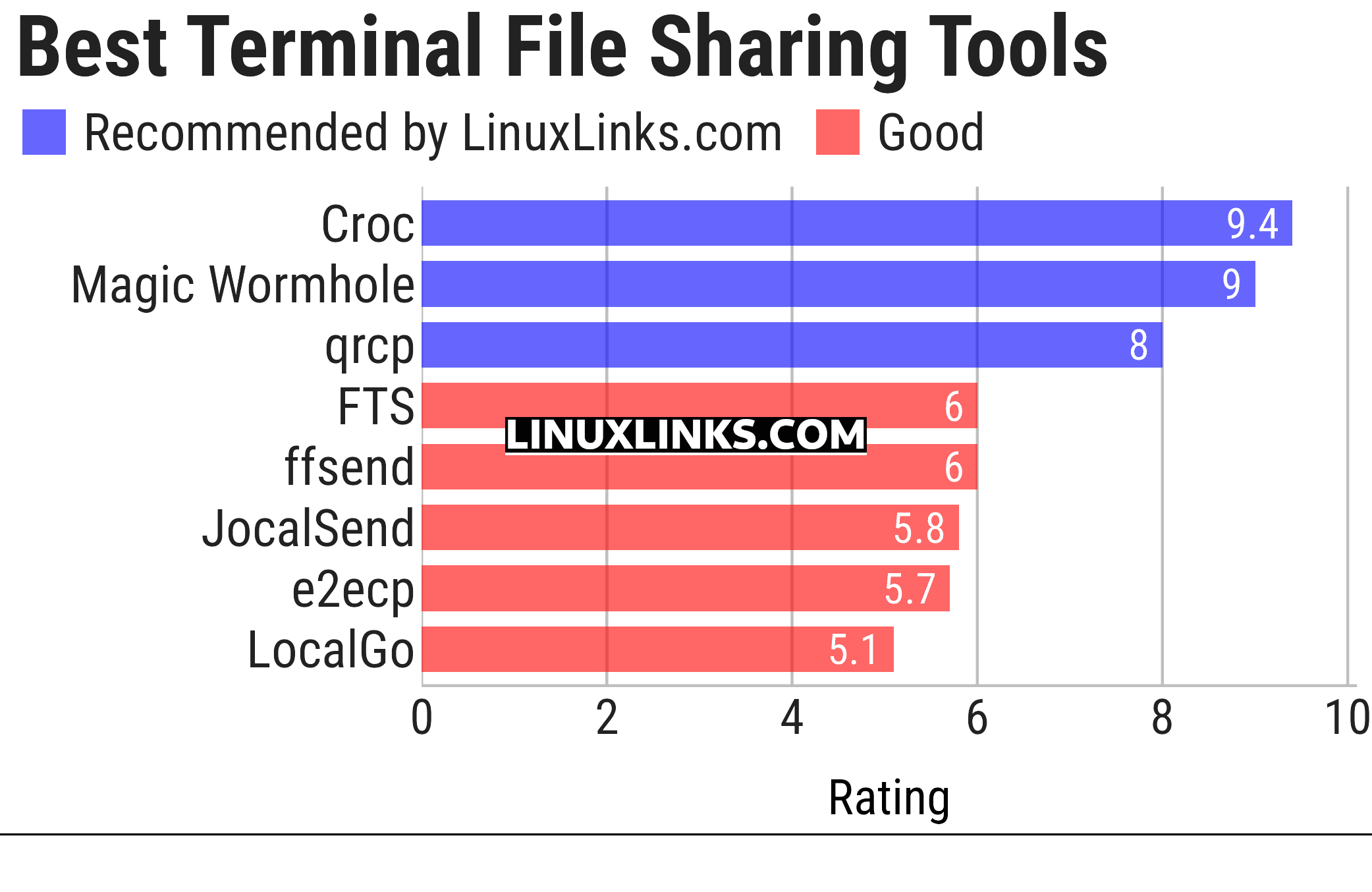
Here’s our verdict captured in a legendary LinuxLinks-style ratings chart. Only free and open source software is eligible for inclusion here.
Click the links in the table below to explore each tool.
| Terminal-Based File Sharing Tools | |
|---|---|
| Croc | Securely transfer files and folders |
| Magic Wormhole | Provides a library and a command-line tool named wormhole |
| qrcp | Transfer files over Wi-Fi from your computer to a mobile device |
| FTS | Fast local-network file transfers and communication |
| ffsend | Securely share files from the command line |
| JocalSend | TUI LocalSend implementation |
| e2ecp | Cross-platform tool |
| LocalGo | LocalSend-compatible command-line file sharing |
This article has been updated to reflect the changes outlined in our recent announcement.
 Explore our carefully curated directory of recommended free and open source software, covering every major software category. Explore our carefully curated directory of recommended free and open source software, covering every major software category.The directory forms part of our extensive collection of articles for Linux enthusiasts. It includes hundreds of detailed reviews, together with free and open source alternatives to proprietary software from companies such as Google, Microsoft, Apple, Adobe, IBM, Cisco, Oracle, and Autodesk. LinuxLinks also covers interesting projects worth exploring, Linux-compatible hardware, free programming books and tutorials, and much more. Know a useful free and open source Linux application that we haven’t covered? Tell us about it using our submission form. |
Please read our Comment Policy before commenting.
I’ve written a file-sharing tool that I use every day. It’s pretty neat, is stable and written in Rust. I did use Claude to help. How do I submit it?
Hi Alex
We’re happy to consider additional software for inclusion in our roundups.
One point to note is our policy on AI-heavy projects. We don’t automatically exclude software where AI tools have been used during development, but projects developed largely or almost entirely with generative AI are rarely featured. We look for software that is reliable, maintainable, actively developed, and backed by developers who understand and take responsibility for the code.
Our policy is explained here:
https://www.linuxlinks.com/ai-heavy-projects/
Please submit the software using our software submission form, including details of any significant use of generative AI during development:
https://www.linuxlinks.com/suggest-open-source-program/