

mcabber is a small XMPP (Jabber) console client.
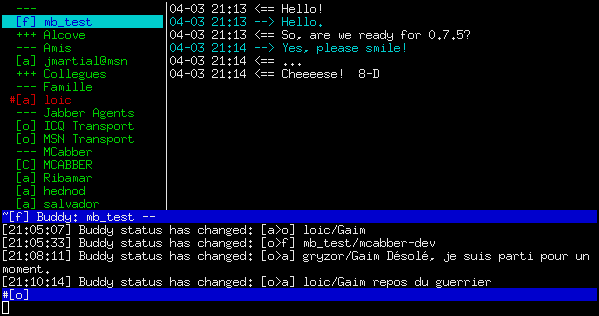
The mcabber screen is divided into 4 regions. The roster, alias buddylist, is on the left. The chat window, or chat buffer, is on the right. The input line lies at the bottom of the screen, under a small log window.
Two status lines surround the log window. The bottom status line is the “main status line” and reflects mcabber general status. The other line is the “chat status line” and shows the status of the currently selected buddy.
To display buddies chat buffers, you will have to enter chat mode. You can enter chat mode by pressing enter (unless vi mode is enabled), and leave chat mode with the ESC key. Simply sending a message will also enable chat mode (unless vi mode is enabled).
There are several advantages to the two-mode implementation: first, it allows accurate “unread” message functionality, as described in the next section; without this, merely scrolling to a specific buddy will “read” the new messages of all buddies in-between. Second, it allows quickly hiding the conversation with a single keystroke. Third, it allows jumping between the few buddies with whom you are conversing with the /roster alternate command described in another section, without having to manually scroll back and forth.
Key Features
- SASL/SSL/TLS support.
- MUC (Multi-User Chat) support.
- History logging – save discussions to text history log files.
- Command completion – complete your command line if you hit the Tab key.
- OpenPGP encryption.
- OTR (Off-the-Record Messaging) support.
- Chat States support (typing notifications).
- Input line history – any message or command entered is in the input line history and can be reused easily.
- Dynamic modules that extend the program’s functionality.
- External action triggers – some events (like receiving a message) can trigger an external action such as a shell script if you enable it in your configuration file.
- Cross-platform support – runs under Linux, BSD, Mac OS X, and Windows (via Cygwin).
Website: mcabber.com
Support: User Guide
Developer: Mikael Berthe and others
License: GNU General Public License
mcabber is written in C. Learn C with our recommended free books and free tutorials.
Related Software
| Console Based XMPP Clients | |
|---|---|
| Profanity | OTR, PGP and OMEMO encryption, inspired by Irssi |
| Poezio | Python based console based Jabber/XMPP client |
| mcabber | Small client with SASL/SSL/TLS support, MUC support, and more |
| Freetalk | Like Emacs, you can customize and extend Freetalk with Scheme language |
| BitlBee | IRC gateway program for a variety of instant messaging protocol |
| BarnOwl | IM client forked from the ktools owl |
| Communiqué | Supports the XMPP protocol and public Jabber network |
| CenterIM | Uses the libpurple library as a communication backend |
Read our verdict in the software roundup.
 Explore our comprehensive directory of recommended free and open source software. Our carefully curated collection spans every major software category. Explore our comprehensive directory of recommended free and open source software. Our carefully curated collection spans every major software category.This directory is part of our ongoing series of informative articles for Linux enthusiasts. It features hundreds of detailed reviews, along with open source alternatives to proprietary solutions from major corporations such as Google, Microsoft, Apple, Adobe, IBM, Cisco, Oracle, and Autodesk. You’ll also find interesting projects to try, hardware coverage, free programming books and tutorials, and much more. Discovered a useful open source Linux program that we haven’t covered yet? Let us know by completing this form. |
Please read our Comment Policy before commenting.