
In Operation
whisper is run from the command-line, there’s no fancy graphical user interface included with the project.
The software comes with a range of pre-trained models in varying sizes which is useful to examine the scaling properties of Whisper. Here’s the complete list: ‘tiny.en’, ‘tiny’, ‘base.en’, ‘base’, ‘small.en’, ‘small’, ‘medium.en’, ‘medium’, ‘large-v1’, ‘large-v2’, and ‘large’.
Let’s try the software using the medium model on a MP3 file (FLAC and WAV are also supported). The first time you use a model, the model is downloaded. The medium model is a 461MB download (the large model is 2.87GB download).
If we don’t specify the language with the flag --language the software automatically detects the language using up to the first 30 seconds. We can tell the software the spoken language which avoids the overhead of auto-detection. There’s support for more than 100 languages.
We want a transcription of the audio.mp3 file using the medium model. We’ll tell the software this file is spoken English.
$ whisper audio.mp3 --model medium --language English
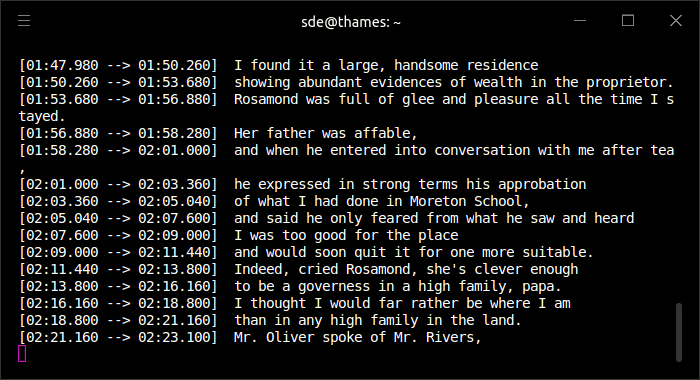
The image below shows transcribing in progress.
We verify that this transcription is using our GPU.
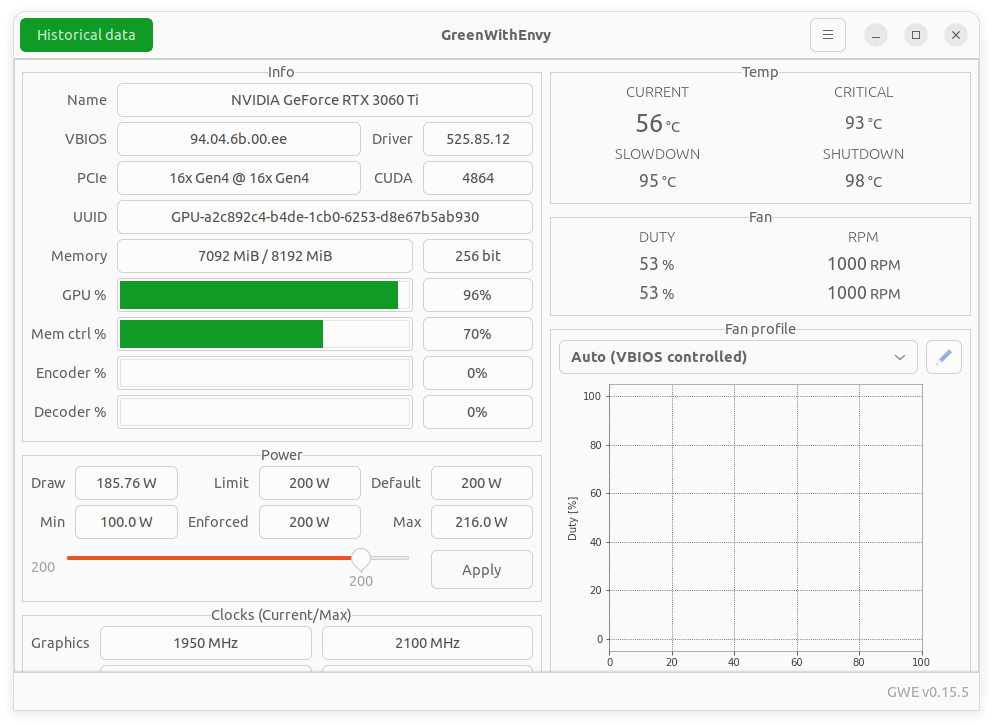
You can see our GPU has 8GB of VRAM. Note the large model won’t run on this GPU as it requires over 8GB of VRAM.
There are tons of options available which can be viewed with $ whisper --help
Summary
Whisper gets our highest recommendation. From our testing, the accuracy of transcription is excellent approaching human level robustness and accuracy.
There’s support for an impressive number of languages.
Whisper doesn’t come with graphical interface, nor can it record audio. It can only take existing audio files and output text files.
There are some interesting uses of Whisper detailed on the project’s Show and tell page. Examples include a transcriber for WhatsApp voice notes, and a script to burn whisper AI generated transcription / translation subtitles into provided video using ffmpeg.
Whisper has amassed over 25,000 GitHub stars.
Website: openai.com/research/whisper
Support: GitHub Code Repository
Developer: OpenAI
License: MIT License
Whisper is written in Python. Learn Python with our recommended free books and free tutorials.
 For other useful open source apps that use machine learning/deep learning, we’ve compiled this roundup.
Pages in this article:
Page 1 – Introduction and Installation
Page 2 – In Operation and Summary
Related Software
| Speech Recognition Tools | |
|---|---|
| Whisper | Automatic speech recognition (system trained on 680,000 hours of data |
| whisper.cpp | Run Whisper locally with fast, efficient C/C++ speech recognition |
| Flashlight | Fast, flexible machine learning library written entirely in C++. |
| sherpa-onnx | Offline speech recognition for many platforms and languages |
| Kaldi | C++ toolkit designed for speech recognition researchers. |
| FunASR | Versatile speech recognition toolkit for real-world audio |
| faster-whisper | Faster Whisper transcription with reduced memory use |
| SpeechBrain | All-in-one conversational AI toolkit based on PyTorch |
| Handy | Offline speech-to-text application |
| ESPnet | End-to-End speech processing toolkit |
| PocketSphinx | Lightweight speech recognition for embedded and mobile use |
| deepspeech.pytorch | Implementation of DeepSpeech2 using Baidu Warp-CTC. |
| Epicenter | Transcription application with global speech-to-text functionality |
| Julius | Two-pass large vocabulary continuous speech recognition engine |
| Speech Note | Write notes, transcribe speech, translate text and read content aloud |
| aTrain | Private local transcription of recorded speech through a polished GUI |
| hyprwhspr | Native speech-to-text designed for Arch / Omarchy |
| Vocalinux | Local voice dictation through a clean desktop interface |
| ostt | Open Speech-to-Text |
| Simon | Flexible speech recognition software |
Read our verdict in the software roundup.
 Explore our carefully curated directory of recommended free and open source software, covering every major software category. Explore our carefully curated directory of recommended free and open source software, covering every major software category.The directory forms part of our extensive collection of articles for Linux enthusiasts. It includes hundreds of detailed reviews, together with free and open source alternatives to proprietary software from companies such as Google, Microsoft, Apple, Adobe, IBM, Cisco, Oracle, and Autodesk. LinuxLinks also covers interesting projects worth exploring, Linux-compatible hardware, free programming books and tutorials, and much more. Know a useful free and open source Linux application that we haven’t covered? Tell us about it using our submission form. |
Please read our Comment Policy before commenting.
Whisper is Amazing! I haven’t tried the API for C++ yet but hopefully there’s finally hope for Linux speech recognition!
This is a really useful tutorial on installing and setting up Whisper, so many times tutorials have errors leading to frustration but this one guided me through without a hitch….Many Thanks
No matter the input file size, I got: untyped_storage = torch.UntypedStorage(
torch.cuda.OutOfMemoryError: CUDA out of memory…. Very frustrating.
What graphics card are you using? Try using the tiny model to start with.
It didn’t work. How do I uninstall all those massive packages?
possibly with ubuntu 23.04 it doesn’t work? in my case it’s like this, and it is mentioned that at the top (as we ran into issues using Ubuntu 22.10).
It worked on my laptop with ubuntu 22.04,
on my laptop I used anaconda3 https://repo.anaconda.com/archive/Anaconda3-2023.09-0-Linux-x86_64.sh instead of the above older version
If you want to uninstall, just remove the directory:
$ rm $HOME/anaconda3
Whisper is awesome.
Long message saying it didn’t work. suggested using pipx after installing pipx tried command but it didn’t like the -U flag. Currently says it is installing without that. Seems to go on for ever, no change in size of Anaconda folder. xubuntu23.10
I’ve updated the installation section for Ubuntu 23.10. The old way of install via pip -U was deprecated after publishing my review.
This worked great! I was able to get this running on Ubuntu 22.04, but had to remove pipx, and reinstall. I did this:
rm -rf ~/.local/pipxThen just reinstall pipx, and it worked.
Is there a way to clean up the text output of Whisper?
I figured it out! I am using this command to output to a txt file.
whisper intro.wav --model medium --language English --output_format txtCreate a conda environment, and activate it.
$ conda create --name whisper$ conda activate whisperNow we’re ready to install Whisper using pipx.
IS THIS CORRECT??
ommand ‘conda’ not found, did you mean:
command ‘conga’ from snap conga (1.5.0)
See ‘snap info <snapname>’ for additional versions.
$: command not found
tim@tim-b550eaglewifi6:~$ conda create –name whisper
$ conda activate whispe
Command ‘conda’ not found, did you mean:
command ‘conga’ from snap conga (1.5.0)
See ‘snap info <snapname>’ for additional versions.
$: command not found
tim@tim-b550eaglewifi6:~$ conga create –name whisper
$ conga activate whisper
Command ‘conga’ not found, but can be installed with:
sudo snap install conga
$: command not found
tim@tim-b550eaglewifi6:~$
The error message tells you what’s wrong. Your system doesn’t have conda.