

krop is a simple graphical tool to crop the pages of PDF files and can automatically split pages to fit the screen of e-book readers.
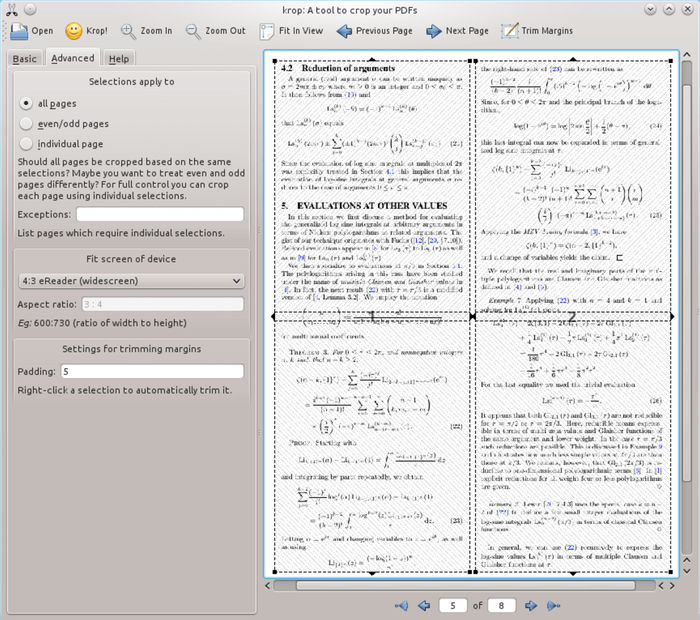
krop only adjusts which parts of a PDF are displayed; the original content is still there in the file and will, for instance, show up when editing the file in Inkscape. Using your mouse, you can create one or more selections on the PDF documents. These are the regions that are included in the cropped file. You can create individual selections for each page.
krop is written in Python.
Key Features
- Automatically split pages into subpages to fit the limited screen size of devices such as eReaders. This is particularly useful, if your eReader does not support convenient scrolling.
- Uses Ghostscript to optionally optimize the final PDF.
- Selections apply to all pages, even/odd pages, or individual pages. Specify pages which require individual selections.
- Fit screen of device:
- Generic (don’t break pages into arts).
- 4:3 eReader.
- 4:3 eReader (widescreen).
- Nook 1st edition.
- Nook 1st edition (widescreen).
- Custom.
- Rotate final PDF.
- Use krop on the command line to extract certain pages, rotate pages, and trim empty margins.
- snap package is available.
Website: arminstraub.com/software/krop
Support: GitHub Code Repository
Developer: Armin Straub
License: GNU General Public License Version 3.0
To build the software you’ll need PyQT5, python-poppler-qt5 and PyPDF2 (also works with PyQT4, python-poppler-qt4 and pyPdf).
krop is written in Python. Learn Python with our recommended free books and free tutorials.
Related Software
| PDF Manipulation Tools | |
|---|---|
| Stirling PDF | Locally hosted web based PDF manipulation tool |
| PDFsam | Extract pages, split, merge, mix and rotate PDF files |
| pdfcpu | PDF processing library |
| PDF Mix Tool | Perform common editing operations on PDF files |
| PDF Arranger | Merge, rearrange, split, rotate, and crop PDFs |
| cpdf | Set of command-line tools that let you modify PDF files |
| pdftk | The PDF toolkit |
| QPDF | Library and programs that inspect and manipulate the structure of PDF files |
| pstoedit | Translates PostScript and PDF graphics into other vector formats |
| img2pdf | Lossless conversion of raster images to PDF |
| PDF Chain | Graphical user interface for The PDF Toolkit |
| Tabula | Extract data tables inside PDF files |
| PDFStitcher | Utility for stitching together PDF pages |
| wkhtmltopdf | Render HTML into PDF |
| krop | Simple graphical tool to crop the pages of PDF files |
| Qpdf Tools | Qt interface for Ghostscript and QPDF |
| Quick PDF Join | Joins multiple PDF files together |
| PDF Tricks | Offer small manipulations in PDF files |
| OnePDFPlease | TUI for working with PDF files |
| PdfJumbler | Rearrange, merge, delete, and rotate pages |
| PDF Juggler | Mix, reorder and select PDF pages |
| jpeg2pdf | Command-line tool which lets you convert images to PDF |
Read our verdict in the software roundup.
 Explore our carefully curated directory of recommended free and open source software, covering every major software category. Explore our carefully curated directory of recommended free and open source software, covering every major software category.The directory forms part of our extensive collection of articles for Linux enthusiasts. It includes hundreds of detailed reviews, together with free and open source alternatives to proprietary software from companies such as Google, Microsoft, Apple, Adobe, IBM, Cisco, Oracle, and Autodesk. LinuxLinks also covers interesting projects worth exploring, Linux-compatible hardware, free programming books and tutorials, and much more. Know a useful free and open source Linux application that we haven’t covered? Tell us about it using our submission form. |
Please read our Comment Policy before commenting.