
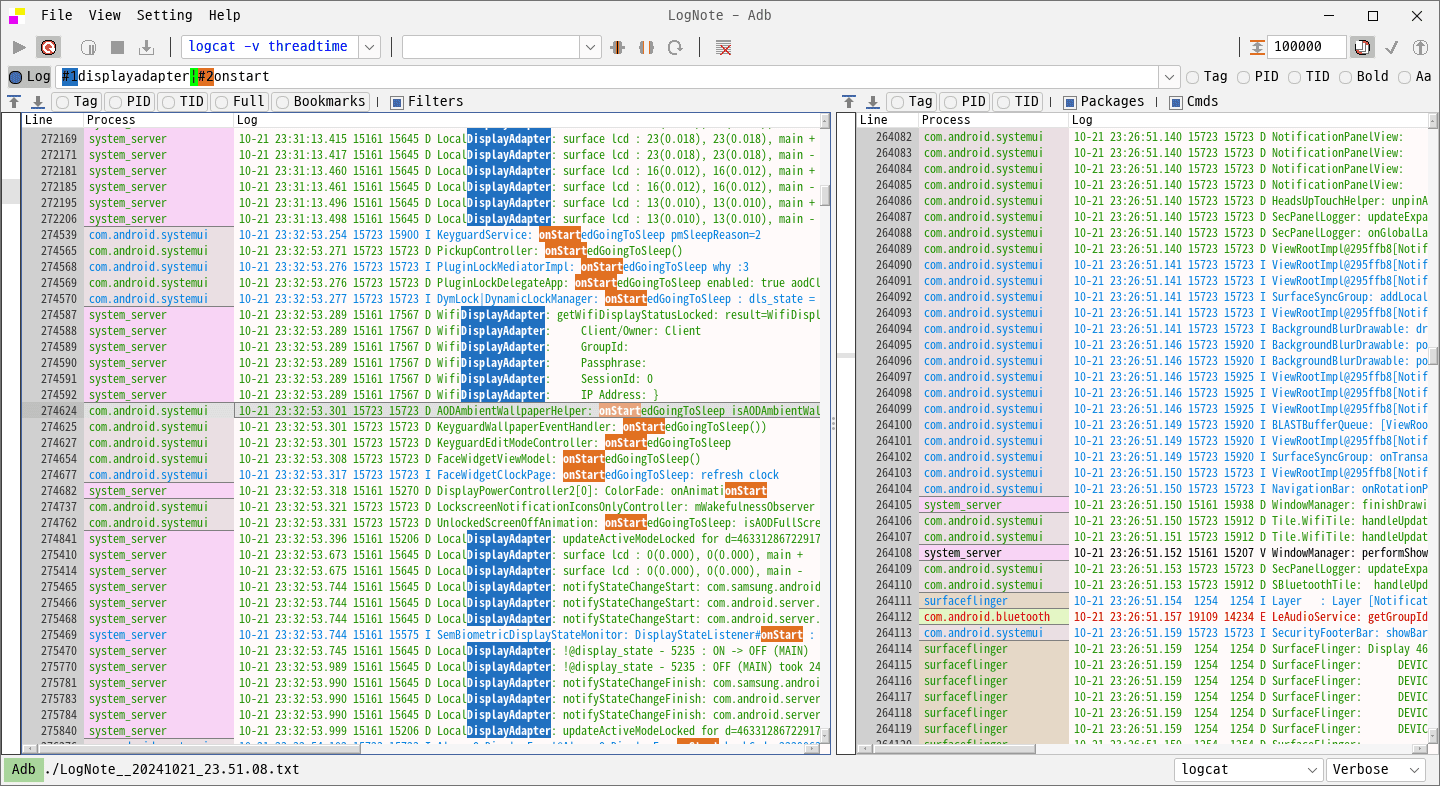
LogNote is a graphical log viewer which supports conventional log files as well as live Android logcat output. It can operate in several modes depending on whether logs are stored in files, produced by commands or being appended continuously to an existing file.
Read File mode opens saved logs and can process multiple files consecutively. Files can be added with drag and drop, while recent-file configurations preserve filters and bookmarks for later sessions. Follow File mode monitors a file as additional lines are written to it. Read Cmd mode executes a configured command and displays the resulting output, with Android Debug Bridge and logcat being prominent use cases.
Filtering is a major part of LogNote. It supports regular expressions, reusable filter configurations, inclusion and exclusion highlighting and configurable filter styles. Logs can also be divided into columns according to user-defined formats, so the application is not limited exclusively to Android’s logcat structure.
For Android logcat sessions, LogNote can display process information and restrict the view to particular application packages. Search, bookmarks and go-to-line navigation help with larger logs, while light and dark appearances and configurable fonts provide control over presentation.
The program also offers log triggers aimed at long-running or aging tests. When a matching log entry appears, LogNote can execute a command or display a dialog. Large continuous captures can be split automatically after a configured number of lines to stop a single output file growing indefinitely.
This is free and open source software.
Key Features
- Provides a graphical interface for examining saved diagnostic files.
- Opens multiple files consecutively and supports drag-and-drop operations.
- Follows files as new entries are appended.
- Displays output produced by external commands.
- Supports online and offline Android logcat viewing.
- Filters entries using regular expressions.
- Provides reusable filter configurations and configurable highlighting styles.
- Supports bookmarks and restoration of recent viewing configurations.
- Searches file contents and navigates between matches.
- Supports configurable formats and column-based presentation.
- Displays Android process information and filters output by application package.
- Runs commands or displays dialogs when configured triggers occur.
- Splits long-running captures after a specified number of lines.
- Offers light and dark appearances with configurable fonts.
- Cross-platform support – runs on Linux, macOS, and Windows.
Website: github.com/cdcsgit/lognote
Support:
Developer: hj
License: Apache License 2.0
LogNote is written in Kotlin. Learn Kotlin with our recommended free books and free tutorials.
Related Software
| Graphical and Web-Based Log Viewers | |
|---|---|
| Logdy | View and filter terminal output in real time through a local web UI |
| frontail | Stream and filter live output in your web browser |
| Giant Log Viewer | Open enormous text files without loading them into memory |
| LogNote | Inspect files, command output and Android logcat with flexible filters |
| Chipmunk | Analyse multi-gigabyte files quickly with a responsive graphical interface |
| QLogExplorer | Explore very large files with advanced searches and JSON support |
| glogg | Graphical grep-style searching for very large files |
| Xlogmaster | Monitor files, devices and command output with event-triggered actions |
Read our verdict in the software roundup.
 LinuxLinks helps you discover the best free and open source software for Linux. Explore our extensive collection of recommended applications, including alternatives to popular proprietary software. We also publish software reviews, Linux tutorials, hardware reviews, free programming books and articles covering the wider open source community. Browse our Linux resources to discover more. Know a useful free and open source Linux application we haven't covered? Suggest a program for inclusion. Has your software been featured on LinuxLinks? Display one of our Featured on LinuxLinks badges on your website or GitHub README. |
Please read our Comment Policy before commenting.