

Log files provide a wealth of information about system activity, application behaviour, errors, and security events. They are essential for diagnosing problems, identifying performance bottlenecks, and understanding what is happening behind the scenes. However, navigating large log files using traditional command-line tools or text editors can be cumbersome, particularly when dealing with constantly changing data.
Graphical and web-based log viewers offer a more accessible way to examine and analyse logs. They simplify tasks such as searching, filtering, highlighting important messages, and monitoring log output in real time. Some applications also support structured log formats, multiple log sources, and remote access through a web browser.
These tools are particularly useful for system administrators responsible for maintaining Linux servers, developers debugging applications, and DevOps engineers monitoring services and infrastructure. Security professionals can also use them to investigate suspicious activity, while desktop users may find them helpful when troubleshooting software or hardware issues.
Here’s our verdict captured in a legendary LinuxLinks-style ratings chart. Only free and open source software is included.
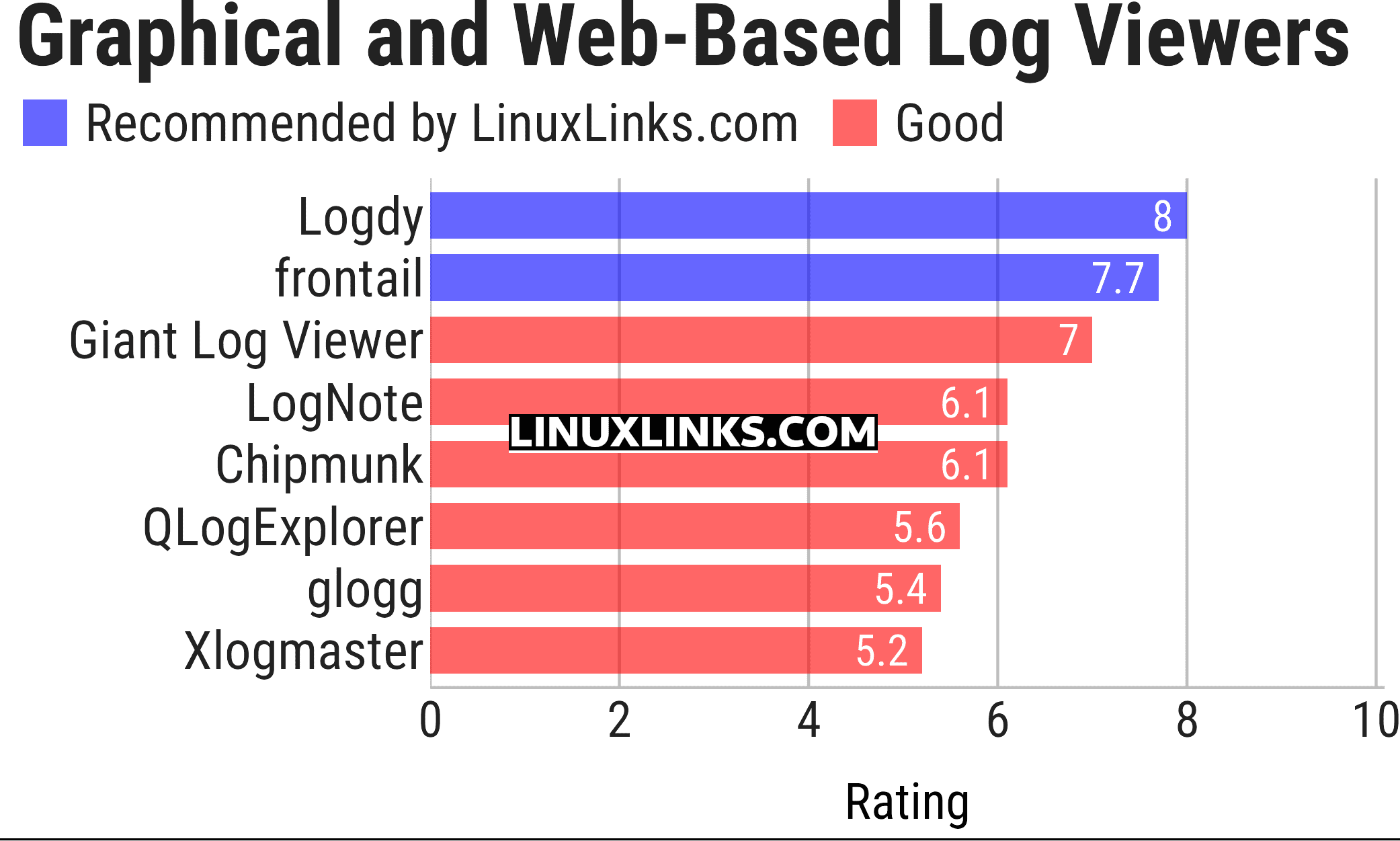
Click the links in the table below to learn more about each tool.
| Graphical and Web-Based Log Viewers | |
|---|---|
| Logdy | View and filter terminal output in real time through a local web UI |
| frontail | Stream and filter live output in your web browser |
| Giant Log Viewer | Open enormous text files without loading them into memory |
| LogNote | Inspect files, command output and Android logcat with flexible filters |
| Chipmunk | Analyse multi-gigabyte files quickly with a responsive graphical interface |
| QLogExplorer | Explore very large files with advanced searches and JSON support |
| glogg | Graphical grep-style searching for very large files |
| Xlogmaster | Monitor files, devices and command output with event-triggered actions |
 Explore our carefully curated directory of recommended free and open source software, covering every major software category. Explore our carefully curated directory of recommended free and open source software, covering every major software category.The directory forms part of our extensive collection of articles for Linux enthusiasts. It includes hundreds of detailed reviews, together with free and open source alternatives to proprietary software from companies such as Google, Microsoft, Apple, Adobe, IBM, Cisco, Oracle, and Autodesk. LinuxLinks also covers interesting projects worth exploring, Linux-compatible hardware, free programming books and tutorials, and much more. Know a useful free and open source Linux application that we haven’t covered? Tell us about it using our submission form. |
Please read our Comment Policy before commenting.