

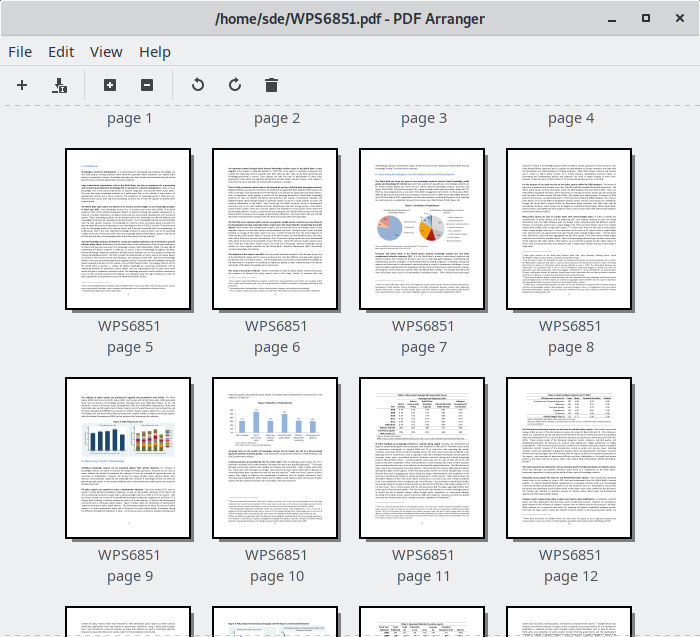
PDF Arranger is a graphical application for manipulating PDF documents. It provides an intuitive interface for merging, splitting, rotating, cropping and rearranging pages without requiring a full PDF editor.
The application displays document pages as thumbnails, making it easy to reorganise lengthy documents or combine selected pages from different files. Changes can be made using drag and drop, keyboard shortcuts and menu commands.
PDF Arranger uses pikepdf for PDF processing. It originated as a fork of PDF-Shuffler and has developed into a more comprehensive utility for everyday PDF management tasks.
This is free and open source software.
Key Features
- Open multiple PDF documents and display their pages as thumbnails.
- Merge several PDF files into a single document.
- Rearrange pages using drag and drop, cut, copy and paste.
- Move or copy pages between separate application windows.
- Split PDF documents and export selected pages as separate files.
- Rotate individual pages or groups of pages in 90-degree increments.
- Delete, duplicate and insert blank pages.
- Reverse page order or swap odd and even pages.
- Automatically remove white borders or manually adjust page cropping.
- Hide page margins without permanently removing their contents.
- Resize pages using specified dimensions or scaling percentages.
- Combine multiple pages onto a single sheet.
- Generate and split booklets for printing and document assembly.
- Overlay or underlay pages with content from other PDF pages.
- Import images and convert them into PDF pages.
- Extract text or images from selected pages to the clipboard.
- Search for text within PDF documents.
- Edit document metadata, including title, author and other properties.
- Export pages as PDF documents, rasterised PDFs or image files.
- Print documents, with undo and redo support for editing operations.
- Customisable keyboard shortcuts and support for light and dark themes.
- Cross-platform support – runs on Linux, macOS, and Windows.
Website: github.com/jeromerobert/pdfarranger
Support:
Developer: Jerome Robert, logari81, and other contributors
License: GNU General Public License v3.0
PDF Arranger is written in Python. Learn Python with our recommended free books and free tutorials.
Related Software
| PDF Manipulation Tools | |
|---|---|
| Stirling PDF | Locally hosted web based PDF manipulation tool |
| PDFsam | Extract pages, split, merge, mix and rotate PDF files |
| pdfcpu | PDF processing library |
| PDF Mix Tool | Perform common editing operations on PDF files |
| PDF Arranger | Merge, rearrange, split, rotate, and crop PDFs |
| cpdf | Set of command-line tools that let you modify PDF files |
| pdftk | The PDF toolkit |
| QPDF | Library and programs that inspect and manipulate the structure of PDF files |
| pstoedit | Translates PostScript and PDF graphics into other vector formats |
| img2pdf | Lossless conversion of raster images to PDF |
| PDF Chain | Graphical user interface for The PDF Toolkit |
| Tabula | Extract data tables inside PDF files |
| PDFStitcher | Utility for stitching together PDF pages |
| wkhtmltopdf | Render HTML into PDF |
| krop | Simple graphical tool to crop the pages of PDF files |
| Qpdf Tools | Qt interface for Ghostscript and QPDF |
| Quick PDF Join | Joins multiple PDF files together |
| PDF Tricks | Offer small manipulations in PDF files |
| OnePDFPlease | TUI for working with PDF files |
| PdfJumbler | Rearrange, merge, delete, and rotate pages |
| PDF Juggler | Mix, reorder and select PDF pages |
| jpeg2pdf | Command-line tool which lets you convert images to PDF |
Read our verdict in the software roundup.
 LinuxLinks helps you discover the best free and open source software for Linux. Explore our extensive collection of recommended applications, including alternatives to popular proprietary software. We also publish software reviews, Linux tutorials, hardware reviews, free programming books and articles covering the wider open source community. Browse our Linux resources to discover more. Know a useful free and open source Linux application we haven't covered? Suggest a program for inclusion. Has your software been featured on LinuxLinks? Display one of our Featured on LinuxLinks badges on your website or GitHub README. |
Please read our Comment Policy before commenting.