
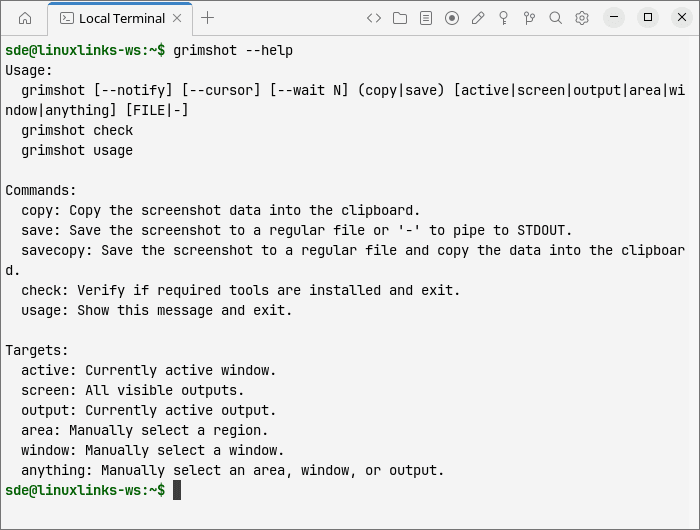
grimshot is a command-line screenshot helper for the Sway Wayland compositor. Rather than capturing pixels itself, it coordinates grim, slurp, swaymsg and wl-copy through a small shell script. This makes it suitable for keyboard shortcuts and users who prefer issuing commands rather than opening a screenshot application.
Different targets can be specified without changing the basic workflow. Users can capture the focused window, the active output or all displays, while interactive modes allow a window or rectangular area to be selected with the mouse.
Captures can be written to a PNG file, sent straight to the Wayland clipboard, or saved and copied together. Optional notifications and delayed captures provide additional control without requiring a persistent background service.
This is free and open source software.
Key Features
- Captures the currently focused window, the active display output or the entire desktop across all visible outputs.
- Supports interactive region selection through slurp, allowing users to draw a rectangle around the area they want to capture.
- Offers window selection by clicking the desired application window.
- Provides an anything selection mode for choosing a window, display output or rectangular region.
- Saves screenshots as PNG files, copies them directly to the clipboard or performs both operations with the savecopy command.
- Writes screenshot data to standard output when a hyphen is supplied as the destination, allowing integration with shell pipelines.
- Supports configurable output directories through XDG_SCREENSHOTS_DIR and XDG_PICTURES_DIR.
- Allows custom screenshot filenames using the GRIMSHOT_FILENAME_FORMAT environment variable.
- Offers an optional capture delay and can include the mouse cursor in screenshots.
- Can display desktop notifications after successful captures or when errors occur.
- Includes a check command that reports whether the required external utilities are installed.
- Can be assigned to Sway keyboard shortcuts for convenient access to different capture modes.
Website: github.com/OctopusET/sway-contrib/tree/master/grimshot
Support:
Developer: Sway-Contrib contributors
License: MIT License
Related Software
| CLI Screen Capture Tools | |
|---|---|
| maim | Make Image aims to improve on scrot |
| scrot | SCReenshOT is a simple command line screen capture utility |
| slop | Queries for a selection from the user and prints the region to stdout |
| wayshot | Screenshot tool for wayland compositors |
| termframe | Terminal output SVG screenshot tool |
| grim | Utility to take screenshots of Wayland desktops |
| shotman | Uncompromising screenshot tool for Wayland compositors |
| shotgun | Minimal screenshot utility |
| ImageMagick | Create, edit, and compose bitmap images |
| HyprCap | Capture screenshots and screen recordings on Hyprland |
| lqth | Simple but fast screenshot utility inspired by xscreenshot |
Read our verdict in the software roundup.
 Explore our carefully curated directory of recommended free and open source software, covering every major software category. Explore our carefully curated directory of recommended free and open source software, covering every major software category.The directory forms part of our extensive collection of articles for Linux enthusiasts. It includes hundreds of detailed reviews, together with free and open source alternatives to proprietary software from companies such as Google, Microsoft, Apple, Adobe, IBM, Cisco, Oracle, and Autodesk. LinuxLinks also covers interesting projects worth exploring, Linux-compatible hardware, free programming books and tutorials, and much more. Know a useful free and open source Linux application that we haven’t covered? Tell us about it using our submission form. |
Please read our Comment Policy before commenting.