

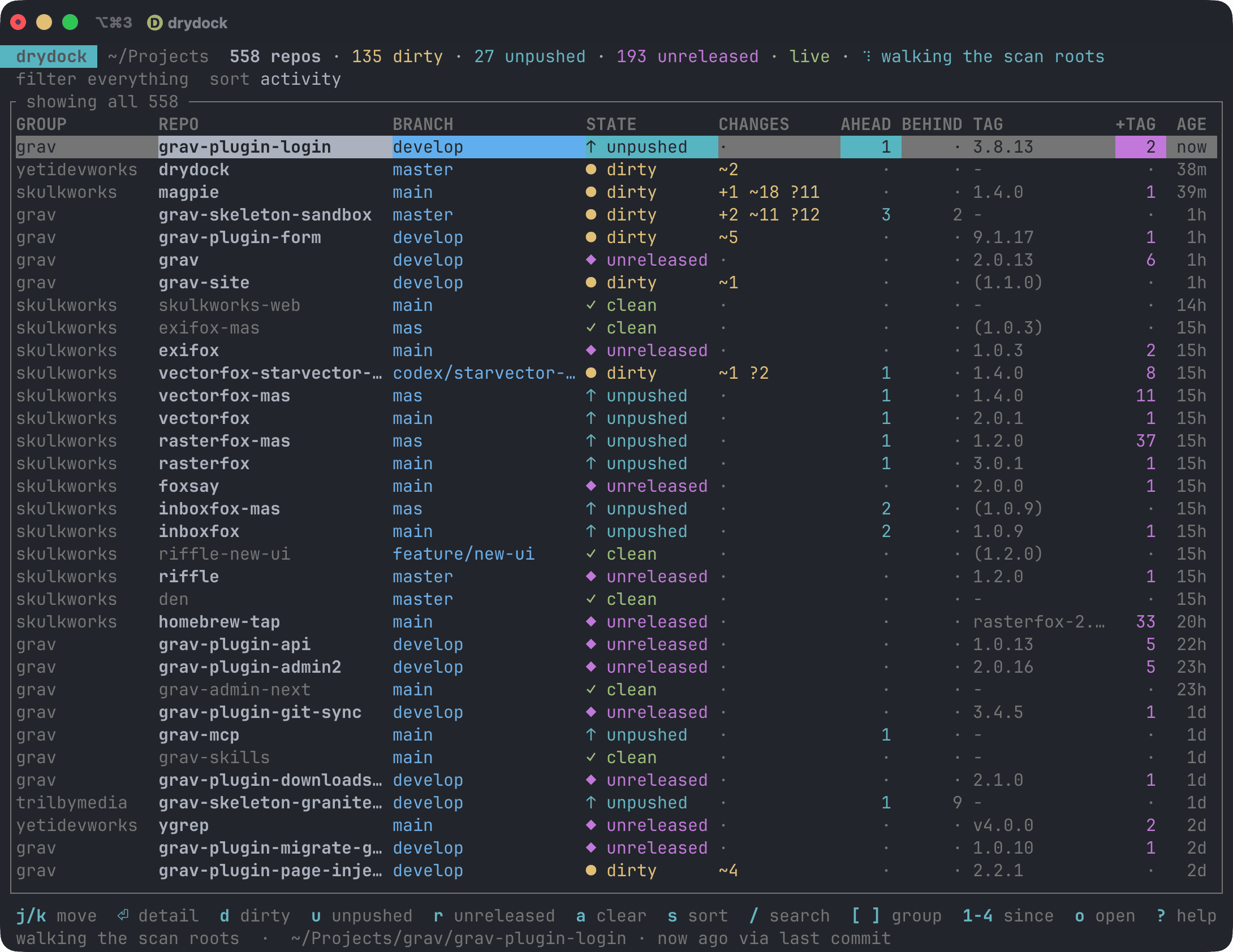
drydock is a terminal application for keeping track of outstanding work across large collections of Git repositories.
Instead of inspecting repositories individually, drydock scans configured directories and presents their state in a single live dashboard. It highlights repositories containing uncommitted changes, commits which have not been pushed, work created since the latest release tag, conflicts and incomplete Git operations.
The program distinguishes working state from release state, helping identify repositories that are clean but still contain commits which may need releasing. It also monitors repositories for filesystem changes, allowing individual repositories to be re-probed rather than repeatedly performing expensive full scans.
This is free and open source software.
Key Features
- Full-screen terminal dashboard for monitoring collections of Git repositories.
- Detects staged, unstaged, untracked and conflicted files.
- Shows commits which have not been pushed across all local branches.
- Identifies repositories with no releases, released repositories and repositories needing a new release.
- Displays commits made since the most recent reachable tag.
- Detects stashes, detached HEAD states, merge and rebase operations and probe errors.
- Filter repositories by dirty, unpushed, behind, conflicted, clean and release state.
- Filter by activity within the last hour, day, week or month.
- Fuzzy search repositories by name, group and branch.
- Open a repository in an editor, Git client, terminal or web browser.
- Fetch individual repositories or all repositories currently displayed.
- Provides table and JSON output for scripting and status-line integration.
- Caches working-tree information and uses filesystem watching to minimise repeated Git scans.
- Supports configurable repository roots, exclusions, scan depth, refresh intervals and concurrency.
- Cross-platform support – runs on Linux and macOS.
Website: github.com/yetidevworks/drydock
Support:
Developer: Andy Miller
License: MIT License
drydock is written in Rust. Learn Rust with our recommended free books and free tutorials.
Related Software
| Git Workflow Tools | |
|---|---|
| git-extras | Superb collection of tools for Git |
| forgit | Utility for using git interactively |
| wrkflw | Validate and run GitHub Actions workflows locally |
| git-branchless | Branchless workflow for git |
| git-absorb | Super-charging git rebase |
| git-toolbelt | Suite of useful Git commands |
| git-open | Adds a handy git open command to Git. |
| git-town | Automate the creation, synchronization, shipping, and cleanup |
| git-fuzzy | Interactive git with the help of fzf |
| git-recent | Jump between recently used local Git branches |
| git-machete | Robust tool that simplifies your git workflows |
| git-flow-next | Modern implementation of the Git-flow branching model |
| Git Interactive Rebase Tool | Terminal-based sequence editor for interactive rebase |
| git-crecord | Interactively select changes to commit or stage |
| git-xargs | Update across multiple GitHub repositories |
| git-prompt.zsh | Lightweight git prompt for zsh |
| git-imerge | Incremental merge and rebase for Git |
| git revise | Git subcommand and Python library |
| wtp | Enhanced Git worktree management |
| LazyWorktree | Git worktree management for the terminal |
| Hug SCM | The Humane Source Control Management Interface |
| git-smart | Small collection of Git helper commands |
| stax | CLI and TUI for stacked Git branches and PRs |
| git-fixup | Command-line helper for Git users |
| git-autofixup | Git helper that creates fixup commits for topic branches |
| Branchlet | Create and manage Git worktrees |
| git-when-merged | Merge commit finder |
| git-flow | High-level repository operations |
Read our verdict in the software roundup.
 Explore our carefully curated directory of recommended free and open source software, covering every major software category. Explore our carefully curated directory of recommended free and open source software, covering every major software category.The directory forms part of our extensive collection of articles for Linux enthusiasts. It includes hundreds of detailed reviews, together with free and open source alternatives to proprietary software from companies such as Google, Microsoft, Apple, Adobe, IBM, Cisco, Oracle, and Autodesk. LinuxLinks also covers interesting projects worth exploring, Linux-compatible hardware, free programming books and tutorials, and much more. Know a useful free and open source Linux application that we haven’t covered? Tell us about it using our submission form. |
Please read our Comment Policy before commenting.