

gwm is a Git worktree manager offering command-line and interactive terminal interfaces for working with multiple branches and development environments. It builds on Git’s worktree functionality by combining workspace organisation, project setup and repository management.
Git worktrees are useful when several branches need to remain checked out simultaneously. However, creating the necessary directories, preparing project dependencies and cleaning up completed work can require a collection of separate commands.
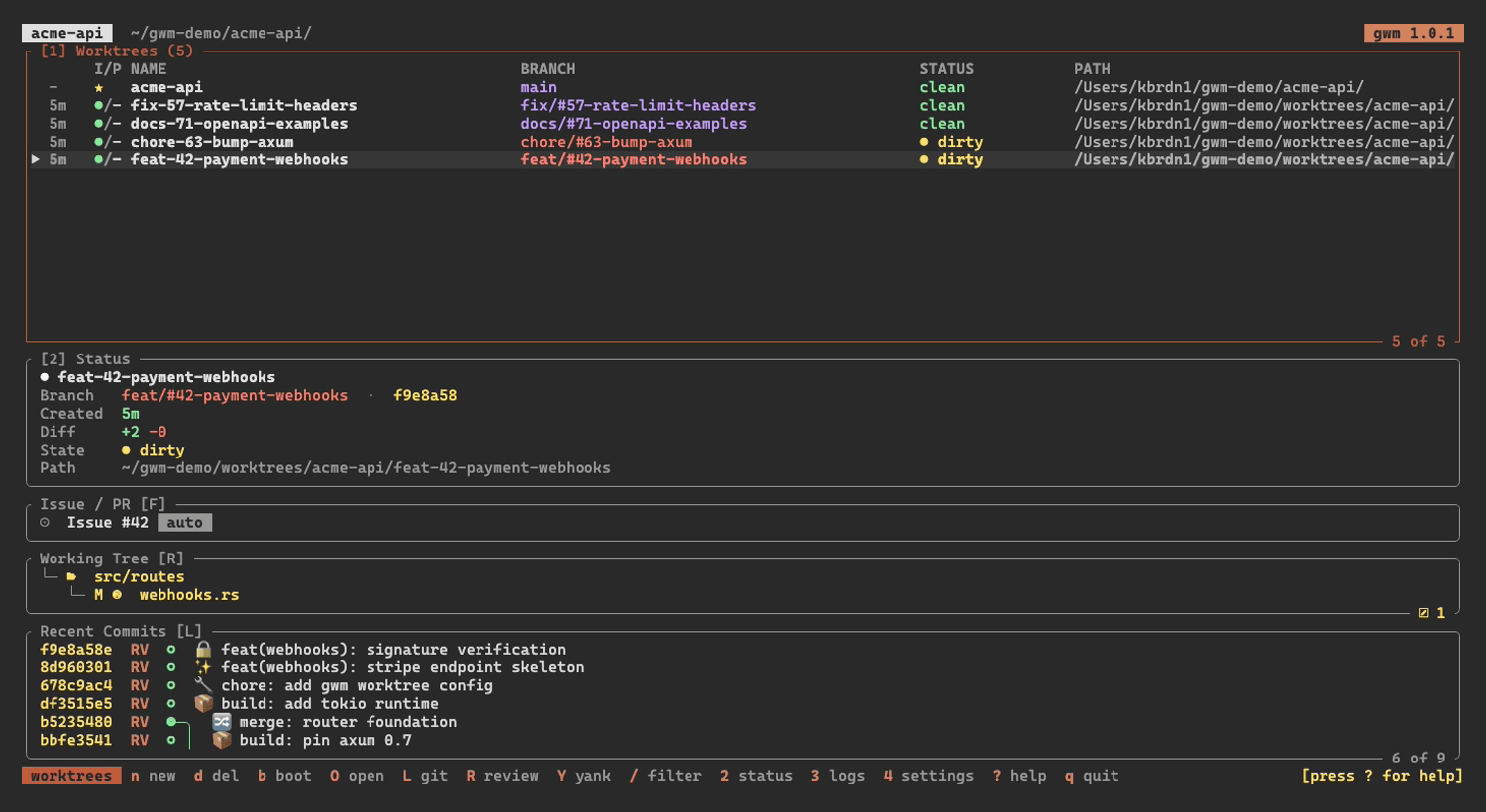
gwm simplifies that process with configurable setup tasks and lifecycle hooks. It can create a branch, prepare its worktree, copy required files and execute project-specific commands. Developers can then manage their worktrees through a full-screen terminal interface or individual commands.
The program also provides facilities for monitoring repository activity, working with multiple projects and recovering from accidental worktree removal. Integration with development tools and machine-readable interfaces makes it suitable for both interactive and automated workflows.
This is free and open source software.
Key Features
- Command-line and interactive terminal interfaces for Git worktree management.
- Native worktree operations using libgit2.
- Creates, lists, removes and cleans up worktrees across repositories.
- Multi-repository workspace management.
- Configurable bootstrap tasks, file copying and lifecycle hooks.
- Provides predefined setup configurations for common development environments.
- Creates worktrees associated with GitHub issues and pull requests.
- Terminal interface with configurable themes, key bindings and command palette.
- Integrates repository details, working-tree information and CI status.
- Detects coding-agent sessions associated with individual worktrees.
- Supports embedded shell and lazygit interfaces.
- Provides JSON output and a JSON-RPC daemon for external integrations.
- Undo and history commands assist with recovery after worktree removal.
- Supports branch synchronisation through merge and rebase workflows.
- Cross-platform support – runs on Linux, macOS, and Windows.
Website: github.com/kbrdn1/gwm-cli
Support:
Developer: Kylian Bardini
License: MIT License and Apache License 2.0
gwm is written in Rust. Learn Rust with our recommended free books and free tutorials.
Related Software
| Git Workflow Tools | |
|---|---|
| git-extras | Superb collection of tools for Git |
| forgit | Utility for using git interactively |
| wrkflw | Validate and run GitHub Actions workflows locally |
| git-branchless | Branchless workflow for git |
| git-absorb | Super-charging git rebase |
| git-toolbelt | Suite of useful Git commands |
| git-open | Adds a handy git open command to Git. |
| git-town | Automate the creation, synchronization, shipping, and cleanup |
| git-fuzzy | Interactive git with the help of fzf |
| git-recent | Jump between recently used local Git branches |
| git-machete | Robust tool that simplifies your git workflows |
| git-flow-next | Modern implementation of the Git-flow branching model |
| Git Interactive Rebase Tool | Terminal-based sequence editor for interactive rebase |
| git-crecord | Interactively select changes to commit or stage |
| git-xargs | Update across multiple GitHub repositories |
| git-prompt.zsh | Lightweight git prompt for zsh |
| gh-stack | GitHub CLI extension for managing stacked pull requests |
| drydock | Monitor unfinished work across multiple Git repositories |
| git revise | Git subcommand and Python library |
| wtp | Enhanced Git worktree management |
| LazyWorktree | Git worktree management for the terminal |
| gwm | Create and manage isolated Git worktrees from the terminal |
| git-spice | Create, rebase and submit stacks of dependent Git branches |
| git-smart | Small collection of Git helper commands |
| stax | CLI and TUI for stacked Git branches and PRs |
| git-fixup | Command-line helper for Git users |
| git-autofixup | Git helper that creates fixup commits for topic branches |
| Branchlet | Create and manage Git worktrees |
Read our verdict in the software roundup.
 LinuxLinks helps you discover the best free and open source software for Linux. Explore our extensive collection of recommended applications, including alternatives to popular proprietary software. We also publish software reviews, Linux tutorials, hardware reviews, free programming books and articles covering the wider open source community. Browse our Linux resources to discover more. Know a useful free and open source Linux application we haven't covered? Suggest a program for inclusion. Has your software been featured on LinuxLinks? Display one of our Featured on LinuxLinks badges on your website or GitHub README. |
Please read our Comment Policy before commenting.