

Log files record the activity of applications, services and operating systems. They provide clues when something fails, performance deteriorates or unexpected behaviour needs investigating. Unfortunately, raw logs can be difficult to read. Important messages are buried in thousands of entries, inconsistent formats and rapidly scrolling terminal output.
Many Linux distributions use systemd, a system and service manager that includes a centralised logging facility called the systemd journal. Managed by systemd-journald, it collects messages from the kernel, system services, applications and other sources. Unlike traditional plain-text log files, the journal stores structured entries containing metadata such as timestamps, severity levels and service identifiers.
System log and journal viewers make this information easier to interpret. They provide ways to browse, search, filter and monitor events, isolate errors, examine individual services and identify patterns that might otherwise be overlooked. Some offer graphical interfaces, while others provide powerful terminal-based navigation and filtering.
These tools are useful for system administrators diagnosing server problems, developers debugging applications, and desktop users troubleshooting hardware, services or unexpected system behaviour.
Here’s our verdict captured in a legendary LinuxLinks-style ratings chart. Only free and open source software is eligible for inclusion here.
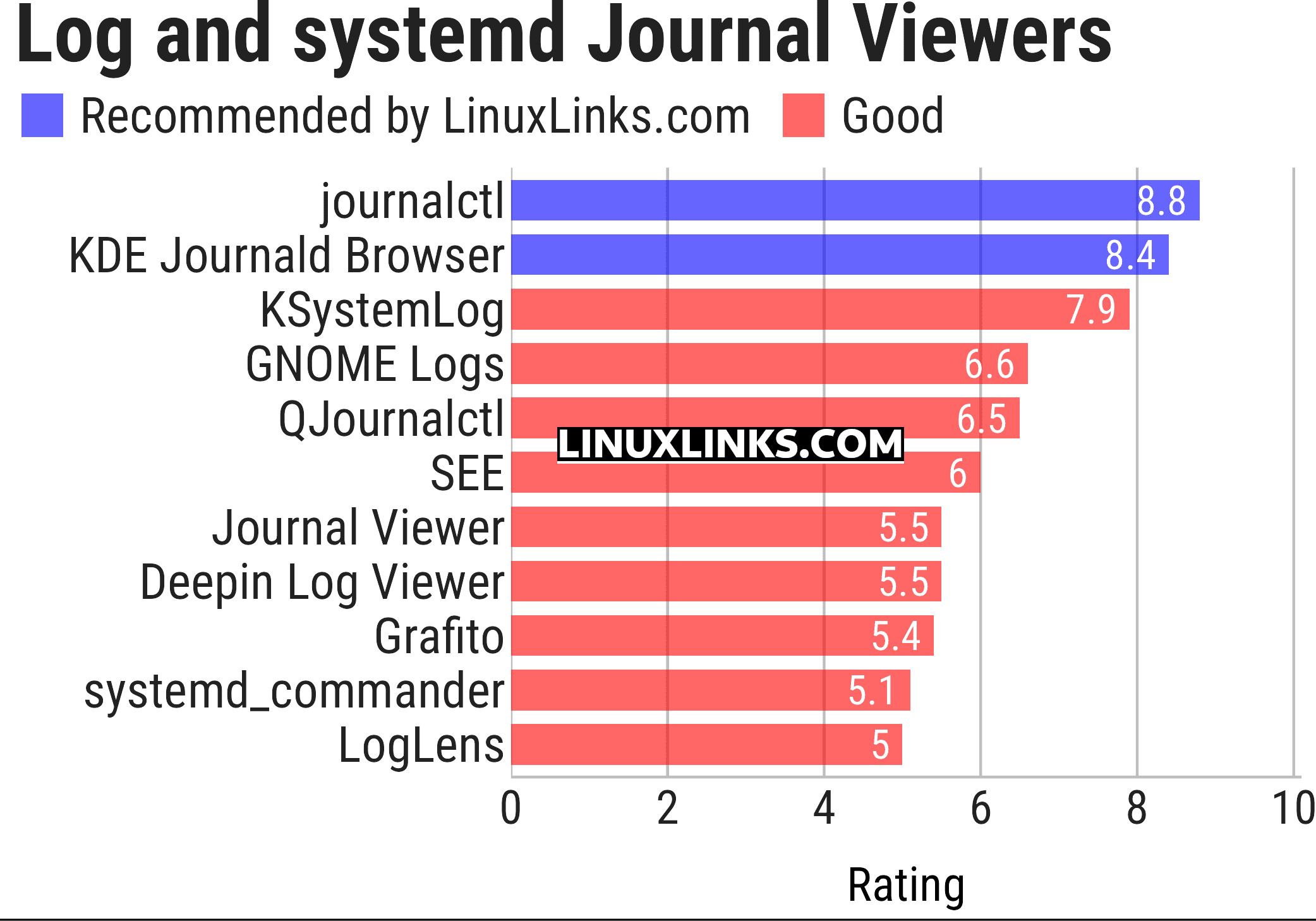
Click the links in the table below to learn more about each tool.
| Linux System Log and systemd Journal Viewers | |
|---|---|
| journalctl | Command-line access to system events and diagnostic messages |
| KDE Journald Browser | KDE application for filtering messages by service and priority |
| KSystemLog | KDE utility for reviewing activity across system services |
| GNOME Logs | GNOME desktop tool for browsing and searching system events |
| QJournalctl | Qt interface for filtering and examining system events |
| SEE | Keyboard-driven service inspection with vi-style navigation |
| Journal Viewer | Desktop dashboard with activity graphs and detailed filters |
| Deepin Log Viewer | Graphical diagnostic viewer with search, export and themes |
| Grafito | Self-hosted web interface with live updates and filtering |
| systemd_commander | Graphical interface for managing services and their status |
| LogLens | Interactive terminal interface with advanced event filtering |
 Explore our carefully curated directory of recommended free and open source software, covering every major software category. Explore our carefully curated directory of recommended free and open source software, covering every major software category.The directory forms part of our extensive collection of articles for Linux enthusiasts. It includes hundreds of detailed reviews, together with free and open source alternatives to proprietary software from companies such as Google, Microsoft, Apple, Adobe, IBM, Cisco, Oracle, and Autodesk. LinuxLinks also covers interesting projects worth exploring, Linux-compatible hardware, free programming books and tutorials, and much more. Know a useful free and open source Linux application that we haven’t covered? Tell us about it using our submission form. |
Please read our Comment Policy before commenting.