

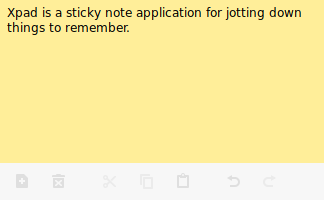
Xpad is a sticky note application for jotting down things to remember.
It’s written using GTK+ 3.0 that strives to be simple, fault-tolerant, and customizable. Xpad consists of independent pad windows; each is basically a text box in which notes can be written. Despite being called Xpad, all that is needed to run or compile it is the GTK+ 3.0 libraries.
Xpad needs a GTK 3 icon theme. A commonly used theme is the gnome-icon-theme, but any will suffice.
This is free and open source software.
Key Features
- Configure visual aspects like system text color, background color, font, height, width etc.
- A customizable toolbar puts the most frequently used commands at your fingertips.
- Autohide toolbar.
- Show scrollbar.
- Show notes on all workspaces.
- Show window decorations
- Option to start Xpad automatically after login.
- Add multiple separators.
- Undo/redo functionality.
- Keyboard shortcuts.
- Tray icon with configurable mouse click behavior.
- Option to make pads read-only.
- Fault tolerant. All information is kept on the hard drive, not memory. So if power is lost or your computer freezes, there is little lost information.
- Internationalization support – with translations for Afrikaans, Bulgarian, Chinese (Simplified), Chinese (traditional), Croatian, Czech, Danish, Dutch, Estonian, French, German, Hungarian, Irish, Kinyarwanda, Latvian, Portuguese, Romanian, Russian, Slovak, Spanish, Swedish, Thai, Turkish, and Vietnamese.
- Cross-platform support – runs under Linux and Mac OS X.
Website: launchpad.net/xpad
Support: FAQ
Developer: Xpad Administrators
License: GNU General Public License v3.0
Xpad is written in C. Learn C with our recommended free books and free tutorials.
Return to Notes | Return to Sticky Notes
| Explore Linux | |
|---|---|
 | Best Free and Open Source Software - A huge collection of recommended free and open source software covering every major category. |
 | In-depth Linux Software Reviews - Detailed assessments of Linux software covering features, usability and overall quality. |
 | The Big List of Active Linux Distros - An extensive collection of actively developed Linux distributions. |
 | Open Source Alternatives - Alternatives to software and services from Google, Microsoft, Apple, Adobe, IBM, Autodesk, Oracle and others. |
 | Essential Linux System Tools - Indispensable utilities for monitoring, maintaining and managing Linux systems. |
 | Linux Productivity Tools - Useful utilities for improving productivity and streamlining everyday tasks. |
 | Alternatives to Popular CLI Tools - Modern alternatives to familiar command-line utilities supplied with Linux systems. |
 | Awesome Free Linux Game Tools - Tools, utilities and companion software that improve gaming on Linux. |
 | Machine Learning on Linux - Machine learning and deep learning software, self-hosted applications and practical tools. |
 | Saving Money with Linux - Practical ways to reduce electricity consumption and lower computing costs with Linux. |
 | Linux Candy - Fun, entertaining and sometimes delightfully quirky software from the lighter side of Linux. |
Please read our Comment Policy before commenting.
This one looks nice, though after setting ‘Left Click’ on tray icon, it still opens the full menu as does the context menu (RMB).