

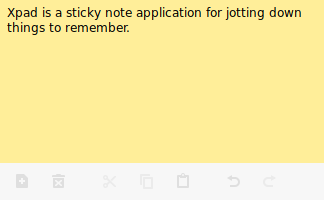
Xpad is a sticky note application for jotting down things to remember.
It’s written using GTK+ 3.0 that strives to be simple, fault-tolerant, and customizable. Xpad consists of independent pad windows; each is basically a text box in which notes can be written. Despite being called Xpad, all that is needed to run or compile it is the GTK+ 3.0 libraries.
Xpad needs a GTK 3 icon theme. A commonly used theme is the gnome-icon-theme, but any will suffice.
This is free and open source software.
Key Features
- Configure visual aspects like system text color, background color, font, height, width etc.
- A customizable toolbar puts the most frequently used commands at your fingertips.
- Autohide toolbar.
- Show scrollbar.
- Show notes on all workspaces.
- Show window decorations
- Option to start Xpad automatically after login.
- Add multiple separators.
- Undo/redo functionality.
- Keyboard shortcuts.
- Tray icon with configurable mouse click behavior.
- Option to make pads read-only.
- Fault tolerant. All information is kept on the hard drive, not memory. So if power is lost or your computer freezes, there is little lost information.
- Internationalization support – with translations for Afrikaans, Bulgarian, Chinese (Simplified), Chinese (traditional), Croatian, Czech, Danish, Dutch, Estonian, French, German, Hungarian, Irish, Kinyarwanda, Latvian, Portuguese, Romanian, Russian, Slovak, Spanish, Swedish, Thai, Turkish, and Vietnamese.
- Cross-platform support – runs under Linux and Mac OS X.
Website: launchpad.net/xpad
Support: FAQ
Developer: Xpad Administrators
License: GNU General Public License v3.0
Xpad is written in C. Learn C with our recommended free books and free tutorials.
Return to Notes | Return to Sticky Notes
| Popular series | |
|---|---|
 | The largest compilation of the best free and open source software in the universe. Each article is supplied with a legendary ratings chart helping you to make informed decisions. |
 | Hundreds of in-depth reviews offering our unbiased and expert opinion on software. We offer helpful and impartial information. |
 | The Big List of Active Linux Distros is a large compilation of actively developed Linux distributions. |
 | Replace proprietary software with open source alternatives: Google, Microsoft, Apple, Adobe, IBM, Autodesk, Oracle, Atlassian, Corel, Cisco, Intuit, SAS, Progress, Salesforce, and Citrix |
 | Awesome Free Linux Games Tools showcases a series of tools that making gaming on Linux a more pleasurable experience. This is a new series. |
 | Machine Learning explores practical applications of machine learning and deep learning from a Linux perspective. We've written reviews of more than 40 self-hosted apps. All are free and open source. |
 | New to Linux? Read our Linux for Starters series. We start right at the basics and teach you everything you need to know to get started with Linux. |
 | Alternatives to popular CLI tools showcases essential tools that are modern replacements for core Linux utilities. |
 | Essential Linux system tools focuses on small, indispensable utilities, useful for system administrators as well as regular users. |
 | Linux utilities to maximise your productivity. Small, indispensable tools, useful for anyone running a Linux machine. |
 | Surveys popular streaming services from a Linux perspective: Amazon Music Unlimited, Myuzi, Spotify, Deezer, Tidal. |
 | Saving Money with Linux looks at how you can reduce your energy bills running Linux. |
 | Home computers became commonplace in the 1980s. Emulate home computers including the Commodore 64, Amiga, Atari ST, ZX81, Amstrad CPC, and ZX Spectrum. |
 | Now and Then examines how promising open source software fared over the years. It can be a bumpy ride. |
 | Linux at Home looks at a range of home activities where Linux can play its part, making the most of our time at home, keeping active and engaged. |
 | Linux Candy reveals the lighter side of Linux. Have some fun and escape from the daily drudgery. |
 | Getting Started with Docker helps you master Docker, a set of platform as a service products that delivers software in packages called containers. |
 | Best Free Android Apps. We showcase free Android apps that are definitely worth downloading. There's a strict eligibility criteria for inclusion in this series. |
 | These best free books accelerate your learning of every programming language. Learn a new language today! |
 | These free tutorials offer the perfect tonic to our free programming books series. |
 | Linux Around The World showcases usergroups that are relevant to Linux enthusiasts. Great ways to meet up with fellow enthusiasts. |
 | Stars and Stripes is an occasional series looking at the impact of Linux in the USA. |
Please read our Comment Policy before commenting.
This one looks nice, though after setting ‘Left Click’ on tray icon, it still opens the full menu as does the context menu (RMB).