

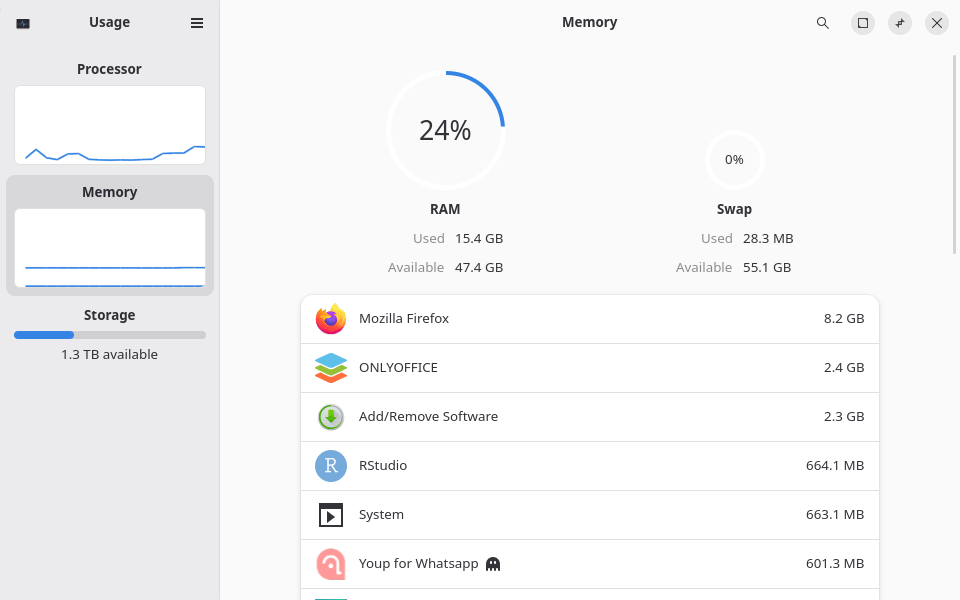
Usage is a graphical application for examining how system resources are being consumed. Developed for the GNOME desktop, it presents processor, memory, network and storage information in a straightforward interface.
The application is intended for users who want to understand what their computer is doing without examining large collections of technical statistics. It provides a visual overview of resource consumption, making it easier to identify unusually demanding applications or investigate a shortage of available memory.
Usage also includes tools for examining storage consumption. This helps users determine how much space is occupied by files and directories and identify areas that may require attention.
Unlike more specialised monitoring applications, Usage concentrates on presenting a small selection of important measurements clearly. It is particularly suitable for everyday desktop troubleshooting and checking resource consumption during normal use.
This is free and open source software.
Key Features
- Provides a graphical overview of system resource consumption.
- Displays processor utilisation and recent CPU activity.
- Monitors physical memory usage.
- Shows network activity and traffic statistics.
- Provides information about running applications and processes.
- Supports identifying applications with high resource consumption.
- Allows selected running applications to be terminated.
- Displays storage consumption and available disk space.
- Provides a graphical overview of storage utilisation.
- Helps users identify files and directories occupying disk space.
- Offers an interface designed for integration with the GNOME desktop.
Website: gitlab.gnome.org/GNOME/gnome-usage
Support:
Developer: Petr Štětka
License: GNU General Public License v3.0
Usage is written in Vala. Learn Vala with our recommended free books and free tutorials.
Related Software
| System Resource Monitoring GUI Tools | |
|---|---|
| Mission Center | Monitor CPU, memory, disk, network and GPU usage |
| System Monitoring Center | GTK-based multi-featured system monitor |
| Plasma System Monitor | KDE-based tool |
| System Monitor | View and manage system resources |
| Resources | GNOME-based tool |
| jdSystemMonitor | Desktop-independent system monitor |
| xfce4-taskmanager | Monitor system resources |
| Monitorets | Small utility application for monitoring resources |
| LXTask | Lightweight task manager for LXDE |
| CoreX | Basic hardware monitor |
| Usage | GNOME lightweight system monitoring application |
| xosview2 | X11 system monitor |
Read our verdict in the software roundup.
 LinuxLinks helps you discover the best free and open source software for Linux. Explore our extensive collection of recommended applications, including alternatives to popular proprietary software. We also publish software reviews, Linux tutorials, hardware reviews, free programming books and articles covering the wider open source community. Browse our Linux resources to discover more. Know a useful free and open source Linux application we haven't covered? Suggest a program for inclusion. Has your software been featured on LinuxLinks? Display one of our Featured on LinuxLinks badges on your website or GitHub README. |
Please read our Comment Policy before commenting.