
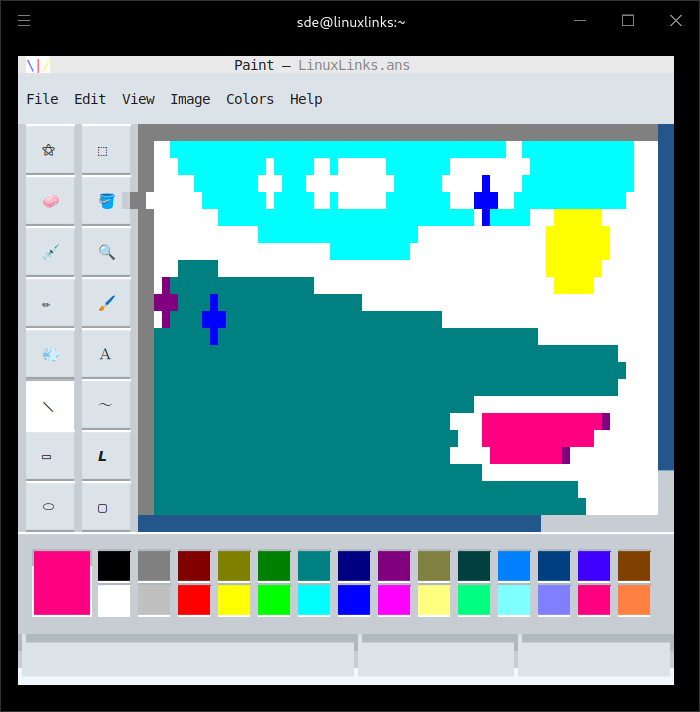
Textual Paint is a TUI (Text User Interface) image editor, inspired by MS Paint.
It’s built with Textual, a Rapid Application Development framework for Python.
This is free and open source software.
Key Features
- Open and save images.
- Fancy file dialogs.
- Drag and drop files to open.
- Warnings when overwriting an existing file, or closing with unsaved changes.
- Auto-saves a temporary .ans~ backup file alongside the file you’re editing, for crash recovery.
- Edits ANSI art and raster images and more.
- All tools from MS Paint: Free-Form Select, Select, Eraser/Color Eraser, Fill With Color, Pick Color, Magnifier, Pencil, Brush, Airbrush, Text, Line, Curve, Rectangle, Polygon, Ellipse, and Rounded Rectangle.
- Color palette.
- Efficient screen updates and undo/redo history, by tracking regions affected by each action.
- Use over SSH.
- Brush previews.
- Status bar.
- Menu bar.
- Keyboard shortcuts.
- Nearly every command from MS Paint is supported, including fun ones like:
- Flip/Rotate.
- Stretch/Skew.
- Edit Colors.
- Set As Wallpaper (Tiled/Centered).
- Dark mode.
- Zooming works with text, despite running in the terminal.
- International support – 26 languages: Arabic, Czech, Danish, German, Greek, English, Spanish, Finnish, French, Hebrew, Hungarian, Italian, Japanese, Korean, Dutch, Norwegian, Polish, Portuguese, Brazilian Portuguese, Russian, Slovak, Slovenian, Swedish, Turkish, Chinese, and Simplified Chinese.
Website: github.com/1j01/textual-paint
Support:
Developer: Isaiah Odhner
License: MIT License
Textual Paint is written in Python. Learn Python with our recommended free books and free tutorials.
Related Software
| Raster Image Editors | |
|---|---|
| GIMP | GNU Image Manipulation Program |
| JS Paint | Classic MS Paint recreation with modern browser-based features |
| Pinta | Mimics the usability of Paint.Net |
| Photoflare | Cross-platform image editor |
| LazPaint | Image editor with layers and transparency |
| dibuja | Simple to use paint program like Paintbrush for Mac or classic MS Paint |
| Drawing | Basic raster image editor similar to Microsoft Paint |
| Textual Paint | MS Paint in your terminal |
| Pixelitor | Feature-rich editing with layers, filters and effects |
| paint.software | Accessible Paint.NET-style raster editing application |
| Brushshe | Simple and user-friendly raster graphics editor |
| KolourPaint | Easy-to-use paint program by KDE |
| CinePaint | Tools for painting, manipulation and image processing |
Read our verdict in the software roundup.
 Explore our comprehensive directory of recommended free and open source software. Our carefully curated collection spans every major software category. Explore our comprehensive directory of recommended free and open source software. Our carefully curated collection spans every major software category.This directory is part of our ongoing series of informative articles for Linux enthusiasts. It features hundreds of detailed reviews, along with open source alternatives to proprietary solutions from major corporations such as Google, Microsoft, Apple, Adobe, IBM, Cisco, Oracle, and Autodesk. You’ll also find interesting projects to try, hardware coverage, free programming books and tutorials, and much more. Discovered a useful open source Linux program that we haven’t covered yet? Let us know by completing this form. |
Please read our Comment Policy before commenting.