

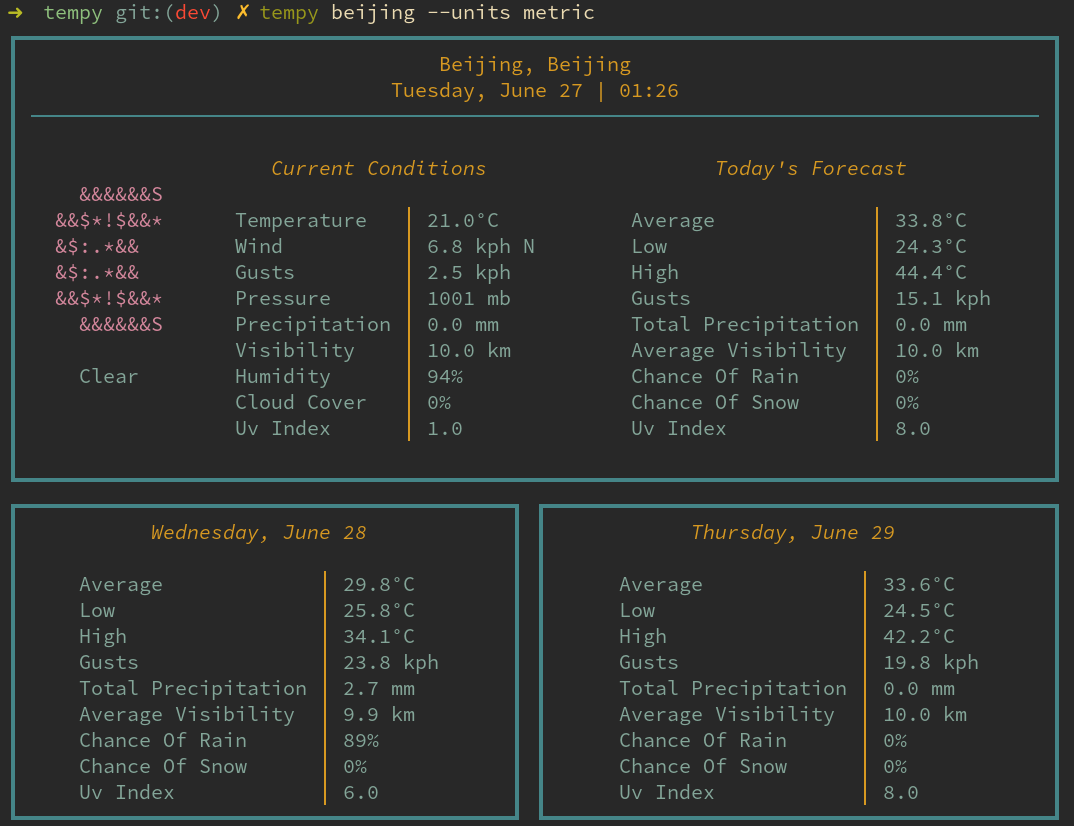
tempy will render a simple, visually pleasing weather report for current and near-future conditions to your terminal.
tempy does not require an API key.
This is free and open source software.
Website: github.com/noprobelm/tempy
Support:
Developer: Jeff Barfield
License: MIT License
tempy is written in Python. Learn Python with our recommended free books and free tutorials.
Related Software
| Terminal-Based Weather Tools | |
|---|---|
| wttr.in | Curl the weather |
| Wego | ASCII weather app for the terminal written in Go |
| AnsiWeather | Current weather conditions in your terminal |
| girouette | Sources its data from OpenWeather |
| wthrr | Weather companion for the terminal |
| weather | Quick access to current weather conditions and forecasts |
| tempy | Visually pleasing weather report |
| stormy | neofetch-like weather CLI |
| rainy | neofetch-like, minimalistic, and customizable weather-fetching tool |
| wevva | Terminal-based weather application built with Textua |
| weather-cli | Uses the Open-Meteo API |
| starlit | Minimal and customizable weather CLI |
| outside | Multi-purpose weather client |
| metar | Weather report tool |
| rustormy | neofetch-like weather CLI |
| termrain | Combines detailed forecasts with an interactive rain radar |
| linecast | Weather, radar, solar and tide visualisations |
| terminal-weather | Animated terminal weather dashboard |
| weather | Go-based tool |
Read our verdict in the software roundup.
 LinuxLinks helps you discover the best free and open source software for Linux. Explore our extensive collection of recommended applications, including alternatives to popular proprietary software. We also publish software reviews, Linux tutorials, hardware reviews, free programming books and articles covering the wider open source community. Browse our Linux resources to discover more. Know a useful free and open source Linux application we haven't covered? Suggest a program for inclusion. Has your software been featured on LinuxLinks? Display one of our Featured on LinuxLinks badges on your website or GitHub README. |
Please read our Comment Policy before commenting.