
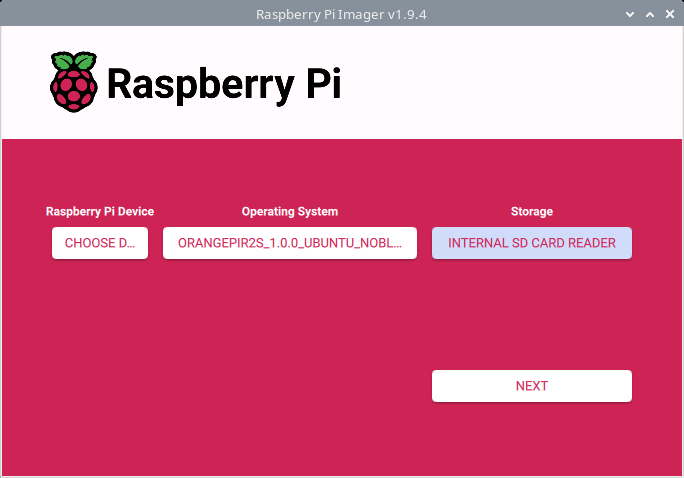
Raspberry Pi Imager is a cross-platform application designed to simplify the process of preparing bootable media for Raspberry Pi devices.
It offers an intuitive graphical interface alongside a command-line mode, enabling users to download, select, and write operating system images in just a few steps. The tool also supports advanced pre-configuration options such as setting up WiFi, enabling SSH, and defining system parameters before first boot, making it especially useful for headless deployments and automated setups.
The Raspberry Pi Imager is a capable cross-platform image writing tool. Pi Imager isn’t just for the Pi, as it offers the ability to choose a custom image file. This can be missed as it’s right at the bottom in the Operating system list.
This is free and open source software.
Key Features
- Official Raspberry Pi imaging tool for writing OS images to SD cards and USB drives.
- Graphical interface with optional command-line mode for scripted usage.
- Downloads and installs Raspberry Pi OS and third-party operating systems directly.
- Pre-boot configuration including WiFi, SSH, hostname, locale, and user settings.
- Supports custom image files alongside curated OS selections.
- Verification of written images to detect corruption and ensure reliability.
- Cross-platform support for Linux, macOS, and Windows systems.
- Custom repository support for loading alternative OS image sources.
Website: github.com/raspberrypi/rpi-imager
Support:
Developer: Raspberry Pi Foundation
License: Apache License 2.0
Raspberry Pi Imager is written in C. Learn C with our recommended free books and free tutorials.
Related Software
| Flash OS Images | |
|---|---|
| Ventoy | Create bootable USB drive for ISO/WIM/IMG/VHD(x)/EFI files |
| USBWriter | Cross-platform disk image writer |
| Etcher | Image burner with multi-platform support |
| UNetbootin | Create bootable Live USB drives for Ubuntu and other distros |
| USB Imager | Lightweight cross-platform utility for writing and verifying disk images |
| Raspberry Pi Imager | Create bootable media. Not only useful for the Raspberry Pi |
| Imagewriter | Write RAW images and ISO images to USB keys |
| Fedora Media Writer | Creates bootable Fedora USB media and supports custom ISOs |
| Caligula | Terminal-based tool for flashing disk images to removable media |
| Impression | Create bootable drives |
| MultiBootUSB | Create multi boot live Linux on a removable USB disk |
| dd | Convert and copy files |
| GNOME Disks | View, modify and configure disks and media |
| MultiWriter | Write an ISO file to multiple USB devices at once |
| Mintstick | Tool for creating bootable USB media and formatting sticks |
| JustDD | USB image writer |
| KDE ISO Image Writer | Simple KDE utility for writing ISO files to USB drives |
| MajUSB | USB bootable drive creator with a GTK4 GUI |
Read our verdict in the software roundup.
 Explore our carefully curated directory of recommended free and open source software, covering every major software category. Explore our carefully curated directory of recommended free and open source software, covering every major software category.The directory forms part of our extensive collection of articles for Linux enthusiasts. It includes hundreds of detailed reviews, together with free and open source alternatives to proprietary software from companies such as Google, Microsoft, Apple, Adobe, IBM, Cisco, Oracle, and Autodesk. LinuxLinks also covers interesting projects worth exploring, Linux-compatible hardware, free programming books and tutorials, and much more. Know a useful free and open source Linux application that we haven’t covered? Tell us about it using our submission form. |
Please read our Comment Policy before commenting.
You should update your screenshot. There are new versions 2.x that came our sometime ago already………………………………………
Email me a screenshot if you want.
LinuxLinks is a small community project. I don’t have the resources to update every image every time a project produces a new version. I reused an image from my hardware series.
I doubt an image of a new version for this program is really going to offer any extra insight in any event.