
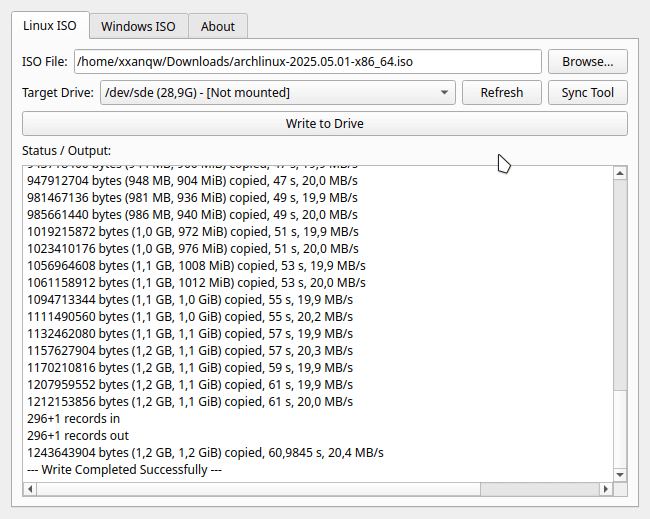
JustDD is a graphical USB image writer for preparing Linux and Windows installation media. It provides a wizard-style interface that guides users through selecting an ISO file, identifying the destination device and confirming the writing operation. The application offers separate handling for Linux images and Windows installers because their boot media preparation requirements can differ.
For Linux images, JustDD can write ISO files directly to a USB device using raw image writing. Windows installation media is handled through a preparation workflow that can create suitable partitions and copy the installation files. Users can select partitioning options where supported, including GPT and MBR layouts.
The application filters its destination list to show removable drives, reducing the chance of selecting an internal system disk. Its interface provides progress information and detailed operational logs, allowing users to inspect the steps taken during preparation. JustDD also supports cancellation with best-effort cleanup and desktop notifications when operations complete or fail. Privileged operations are handled through the system’s authentication facilities rather than requiring the entire graphical interface to run with administrative permissions.
This is free and open source software.
Key Features
- Write Linux ISO images directly to USB drives.
- Prepare bootable USB installation media for Windows.
- Provide a graphical wizard for selecting images and destination devices.
- Separate Linux and Windows image-writing workflows.
- Detect removable drives available for writing.
- Exclude non-removable drives from the standard destination list.
- Support raw disk image writing with progress reporting.
- Offer GPT and MBR partitioning options for supported Windows workflows.
- Prepare appropriate filesystems for Windows installation media.
- Copy Windows installation files to the prepared USB device.
- Display live operational logs during writing.
- Report errors encountered while preparing installation media.
- Support cancellation with best-effort cleanup.
- Show desktop notifications when operations succeed or fail.
- Request administrative privileges using pkexec when required.
- Provide a manual facility for synchronising pending filesystem writes.
Website: github.com/xxanqw/justdd
Support:
Developer: Іван Потієнко
License: GNU General Public License v3.0
JustDD is written in Python. Learn Python with our recommended free books and free tutorials.
Related Software
| Flash OS Images | |
|---|---|
| Ventoy | Create bootable USB drive for ISO/WIM/IMG/VHD(x)/EFI files |
| USBWriter | Cross-platform disk image writer |
| Etcher | Image burner with multi-platform support |
| UNetbootin | Create bootable Live USB drives for Ubuntu and other distros |
| USB Imager | Lightweight cross-platform utility for writing and verifying disk images |
| Raspberry Pi Imager | Create bootable media. Not only useful for the Raspberry Pi |
| Imagewriter | Write RAW images and ISO images to USB keys |
| Fedora Media Writer | Creates bootable Fedora USB media and supports custom ISOs |
| Caligula | Terminal-based tool for flashing disk images to removable media |
| Impression | Create bootable drives |
| MultiBootUSB | Create multi boot live Linux on a removable USB disk |
| dd | Convert and copy files |
| GNOME Disks | View, modify and configure disks and media |
| MultiWriter | Write an ISO file to multiple USB devices at once |
| Mintstick | Tool for creating bootable USB media and formatting sticks |
| JustDD | USB image writer |
| KDE ISO Image Writer | Simple KDE utility for writing ISO files to USB drives |
| MajUSB | USB bootable drive creator with a GTK4 GUI |
Read our verdict in the software roundup.
 LinuxLinks helps you discover the best free and open source software for Linux. Explore our extensive collection of recommended applications, including alternatives to popular proprietary software. We also publish software reviews, Linux tutorials, hardware reviews, free programming books and articles covering the wider open source community. Browse our Linux resources to discover more. Know a useful free and open source Linux application we haven't covered? Suggest a program for inclusion. Has your software been featured on LinuxLinks? Display one of our Featured on LinuxLinks badges on your website or GitHub README. |
Please read our Comment Policy before commenting.