

Caligula is a terminal-based disk imaging utility for writing operating system images and other disk images to removable storage. It provides an interactive alternative to manually combining commands for device identification, decompression, checksum verification and raw disk writing. The application is particularly useful when working in a terminal but wanting clearer feedback and safeguards than a conventional command-line copying utility offers.
Caligula displays candidate storage devices with identifying information such as capacity and hardware model, helping users distinguish the intended destination from other attached drives. It accepts ordinary image files and several compressed formats, decompressing the data as part of the writing process. Users can also supply a checksum so that the input image is checked before it overwrites the selected device.
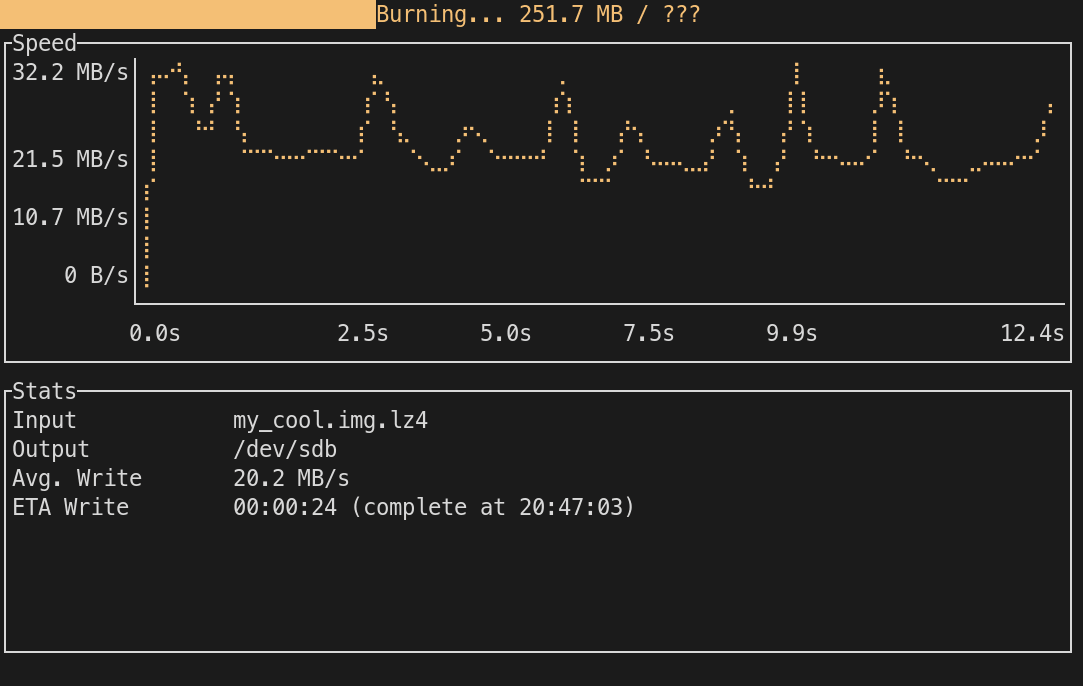
The writing workflow includes explicit confirmation of destructive operations, live transfer information and verification of the destination after the write completes. Caligula can request elevated privileges through supported administrative tools when direct access to a storage device is required. Its command-line options allow experienced users to specify image paths, destination devices and verification preferences while retaining the interactive interface for operations that need confirmation.
This is free and open source software.
Key Features
- Write disk image files directly to removable storage devices.
- Provide an interactive terminal interface for selecting the destination.
- List connected storage devices with capacity and hardware model information.
- Accept a destination device supplied through command-line options.
- Read ordinary uncompressed disk images.
- Decompress gzip, bzip2, xz, lz4 and zstd input images.
- Automatically detect supported input compression formats.
- Verify source images against supplied cryptographic hashes.
- Support MD5, SHA-1 and SHA-256 checksums.
- Distinguish hashes of compressed files from hashes of decompressed image data.
- Display detailed confirmation prompts before destructive writes.
- Show write progress and data transfer speed.
- Display graphical transfer-speed information within the terminal.
- Read back destination data to verify the completed write.
- Request administrative privileges using sudo, doas or su.
- Allow experienced users to control confirmation behaviour through command-line options.
- Support displaying additional storage devices when requested.
- Report errors encountered while reading, writing or verifying images.
- Cross-platform support – runs on Linux and macOS.
Website: github.com/ifd3f/caligula
Support:
Developer: ifd3f
License: GNU General Public License v3.0
Caligula is written in Rust. Learn Rust with our recommended free books and free tutorials.
Related Software
| Flash OS Images | |
|---|---|
| Ventoy | Create bootable USB drive for ISO/WIM/IMG/VHD(x)/EFI files |
| USBWriter | Cross-platform disk image writer |
| Etcher | Image burner with multi-platform support |
| UNetbootin | Create bootable Live USB drives for Ubuntu and other distros |
| USB Imager | Lightweight cross-platform utility for writing and verifying disk images |
| Raspberry Pi Imager | Create bootable media. Not only useful for the Raspberry Pi |
| Imagewriter | Write RAW images and ISO images to USB keys |
| Fedora Media Writer | Creates bootable Fedora USB media and supports custom ISOs |
| Caligula | Terminal-based tool for flashing disk images to removable media |
| Impression | Create bootable drives |
| MultiBootUSB | Create multi boot live Linux on a removable USB disk |
| dd | Convert and copy files |
| GNOME Disks | View, modify and configure disks and media |
| MultiWriter | Write an ISO file to multiple USB devices at once |
| Mintstick | Tool for creating bootable USB media and formatting sticks |
| JustDD | USB image writer |
| KDE ISO Image Writer | Simple KDE utility for writing ISO files to USB drives |
| MajUSB | USB bootable drive creator with a GTK4 GUI |
Read our verdict in the software roundup.
| Alternatives to dd | |
|---|---|
| ddrescue | Data recovery tool |
| dcfldd | Enhanced version of dd |
| dd_rescue | Data recovery and data protection tool |
| ddi | Wrapper for dd |
| ddrescueview | GUI front-end for ddrescue |
 LinuxLinks helps you discover the best free and open source software for Linux. Explore our extensive collection of recommended applications, including alternatives to popular proprietary software. We also publish software reviews, Linux tutorials, hardware reviews, free programming books and articles covering the wider open source community. Browse our Linux resources to discover more. Know a useful free and open source Linux application we haven't covered? Suggest a program for inclusion. Has your software been featured on LinuxLinks? Display one of our Featured on LinuxLinks badges on your website or GitHub README. |
Please read our Comment Policy before commenting.