
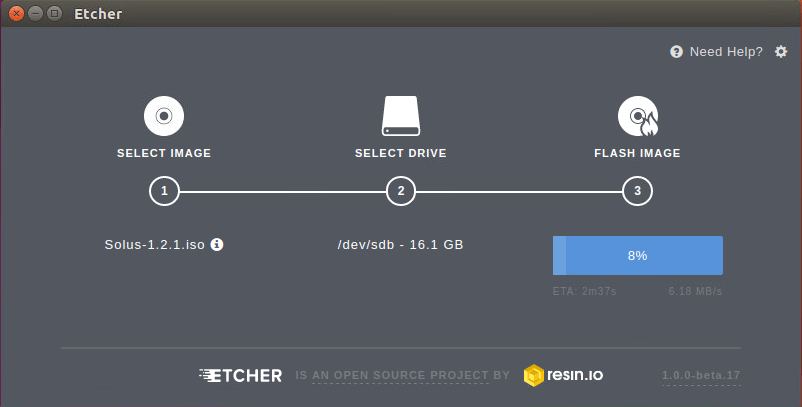
Etcher is a free and open-source image burner with multi-platform support. It makes USB and SD card image burning as effortless as possible. This utility is so simple to use.
One of the best attributes of Etcher is that is protects the user from accidentally writing the image to a hard disk.
Etcher has been built with web technologies: JS, HTML, node.js and Electron.
The developers are also working on Etcher CLI, a command-line tool that aims to provide all the benefits of the Etcher desktop application in a way that can be run from a terminal, or even used from a script. Currently, Etcher CLI has not received an official release, but it’s one to watch out for.
Key Features
- Attractive and simple interface.
- Supports IMG, ETCH, RAW, ISO, and DSK images.
- Supports xz, gzip and bzip2 files. This feature lets users burn images without extracting them from the source compressed files.
- Validation of images with CRC32 checksums – avoids writing images on corrupted cards.
- Cross-platform support.
- Drive auto-selection.
- Images can declare a recommended minimum drive size.
- Displays ETA during flash and validation.
- Drag and drop an image.
- Disable auto-update notifications with an environment variable.
Website: etcher.io
Support: Blog, GitHub
Developer: resin.io
License: Apache License Version 2.0
Etcher is written in TypeScript. Learn TypeScript with our recommended free books and free tutorials.
Related Software
| Flash OS Images | |
|---|---|
| Ventoy | Create bootable USB drive for ISO/WIM/IMG/VHD(x)/EFI files |
| USBWriter | Cross-platform disk image writer |
| Etcher | Image burner with multi-platform support |
| UNetbootin | Create bootable Live USB drives for Ubuntu and other distros |
| Raspberry Pi Imager | Create bootable media. Not only useful for the Raspberry Pi |
| Imagewriter | Write RAW images and ISO images to USB keys |
| Impression | Create bootable drives |
| MultiBootUSB | Create multi boot live Linux on a removable USB disk |
| dd | Convert and copy files |
| GNOME Disks | View, modify and configure disks and media |
| MultiWriter | Write an ISO file to multiple USB devices at once |
| JustDD | USB image writer |
| MajUSB | USB bootable drive creator with a GTK4 GUI |
Read our verdict in the software roundup.
 Explore our comprehensive directory of recommended free and open source software. Our carefully curated collection spans every major software category. Explore our comprehensive directory of recommended free and open source software. Our carefully curated collection spans every major software category.This directory is part of our ongoing series of informative articles for Linux enthusiasts. It features hundreds of detailed reviews, along with open source alternatives to proprietary solutions from major corporations such as Google, Microsoft, Apple, Adobe, IBM, Cisco, Oracle, and Autodesk. You’ll also find interesting projects to try, hardware coverage, free programming books and tutorials, and much more. Discovered a useful open source Linux program that we haven’t covered yet? Let us know by completing this form. |
Please read our Comment Policy before commenting.