
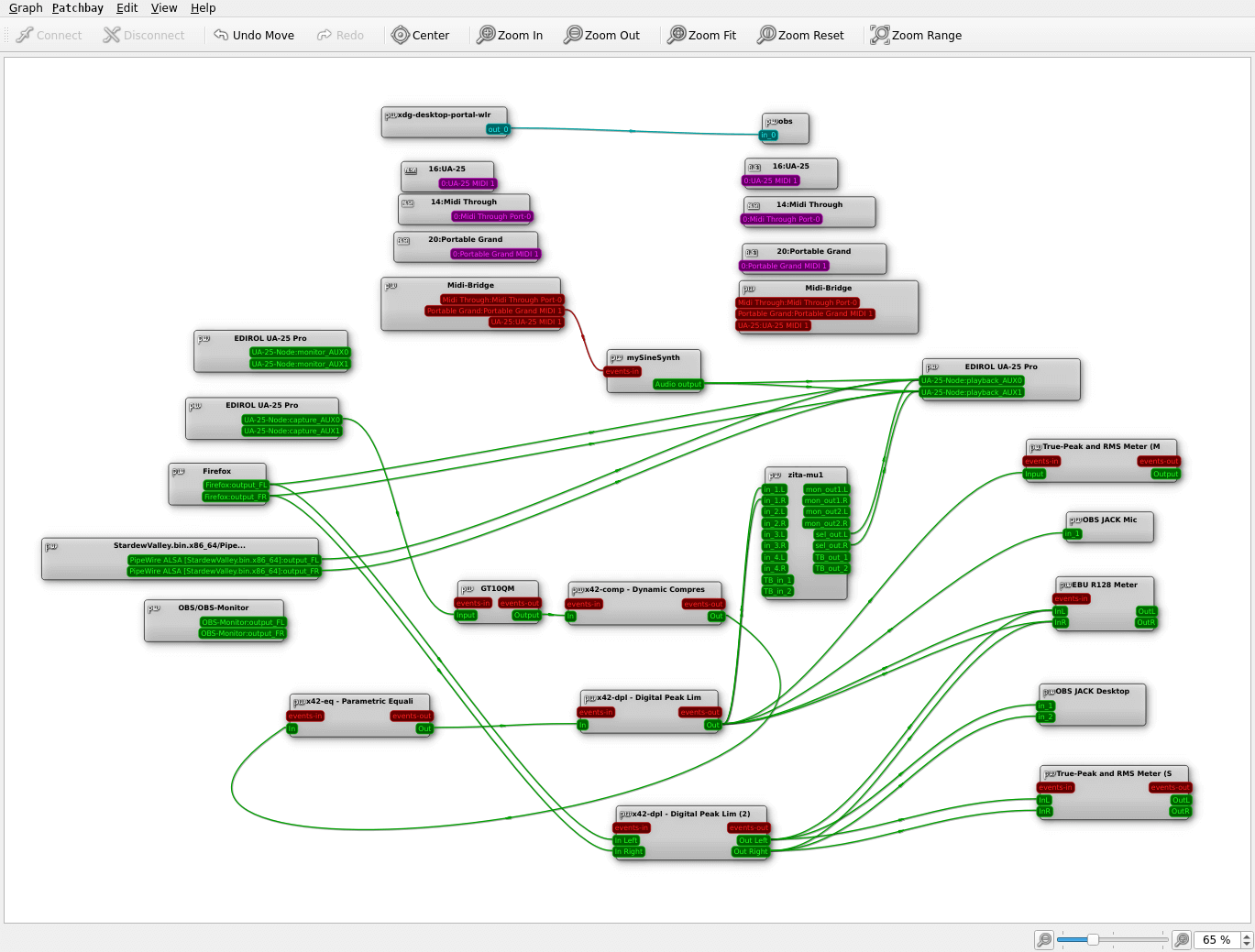
qpwgraph is a graphical graph manager for PipeWire.
It presents multimedia clients, devices and ports as movable nodes connected by visible links. This provides a direct way to understand how applications are connected and to change those relationships when PipeWire’s automatic routing is not sufficient. The approach is particularly useful for multi-device setups, audio production and users accustomed to graphical JACK patchbays.
This is free and open source software.
Key Features
- Displays PipeWire clients and devices as nodes on a graphical canvas.
- Shows individual input and output ports belonging to each node.
- Create new connections by linking compatible ports directly in the graph.
- Remove unwanted connections without restarting applications or audio devices.
- Move and arrange nodes to make complicated multimedia graphs easier to read.
- Patchbay facilities can retain selected connection relationships for later reuse.
- Optional ALSA MIDI Sequencer integration adds MIDI ports to the same workspace.
- Distinguishes different connection types visually within a single graph.
- Display identifiers associated with PipeWire nodes and ports for diagnostic work.
- Connect to a named remote PipeWire instance rather than only the default daemon.
- Automatic layout tools can organise nodes according to their graph relationships.
- Custom colours help distinguish groups, connection types and graph elements.
- Configurable widget and interface themes allow the presentation to be adjusted.
- Full-screen operation provides more working space for particularly large routing graphs.
- Qt interface integrates well with KDE Plasma and other Qt-based Linux desktops.
- Designed by the developer of QjackCtl and follows a familiar patchbay-oriented workflow.
Website: github.com/rncbc/qpwgraph
Support:
Developer: Rui Nuno Capela
License: GNU General Public License v2.0
qpwgraph is written in C++. Learn C++ with our recommended free books and free tutorials.
Related Software
| Audio Effects, Mixers, and PipeWire Routing Tools | |
|---|---|
| Easy Effects | GTK audio manipulation software which includes a range of tools |
| Carla | Modular audio plugin host |
| JamesDSP for Linux | Audio effect processor for Pipewire |
| Pulsemeeter | Audio routing and mixer application |
| wiremix | Terminal mixer for PipeWire audio devices and streams |
| Melodic Mix | Simple mixer and digital signal processing application |
| LSP Plugins | Broad collection of studio-oriented plug-ins |
| Sonusmix | GTK4 audio routing and device management application |
| qpwgraph | Graph manager dedicated to PipeWire |
| pwvucontrol | Pipewire volume control |
| Pipeweaver | Audio management tool built on top of PipeWire |
| coppwr | Low-level GUI for inspecting and controlling PipeWire |
| Helvum | Graphical patchbay for connecting PipeWire audio streams |
Read our verdict in the software roundup.
 Explore our carefully curated directory of recommended free and open source software, covering every major software category. Explore our carefully curated directory of recommended free and open source software, covering every major software category.The directory forms part of our extensive collection of articles for Linux enthusiasts. It includes hundreds of detailed reviews, together with free and open source alternatives to proprietary software from companies such as Google, Microsoft, Apple, Adobe, IBM, Cisco, Oracle, and Autodesk. LinuxLinks also covers interesting projects worth exploring, Linux-compatible hardware, free programming books and tutorials, and much more. Know a useful free and open source Linux application that we haven’t covered? Tell us about it using our submission form. |
Please read our Comment Policy before commenting.