

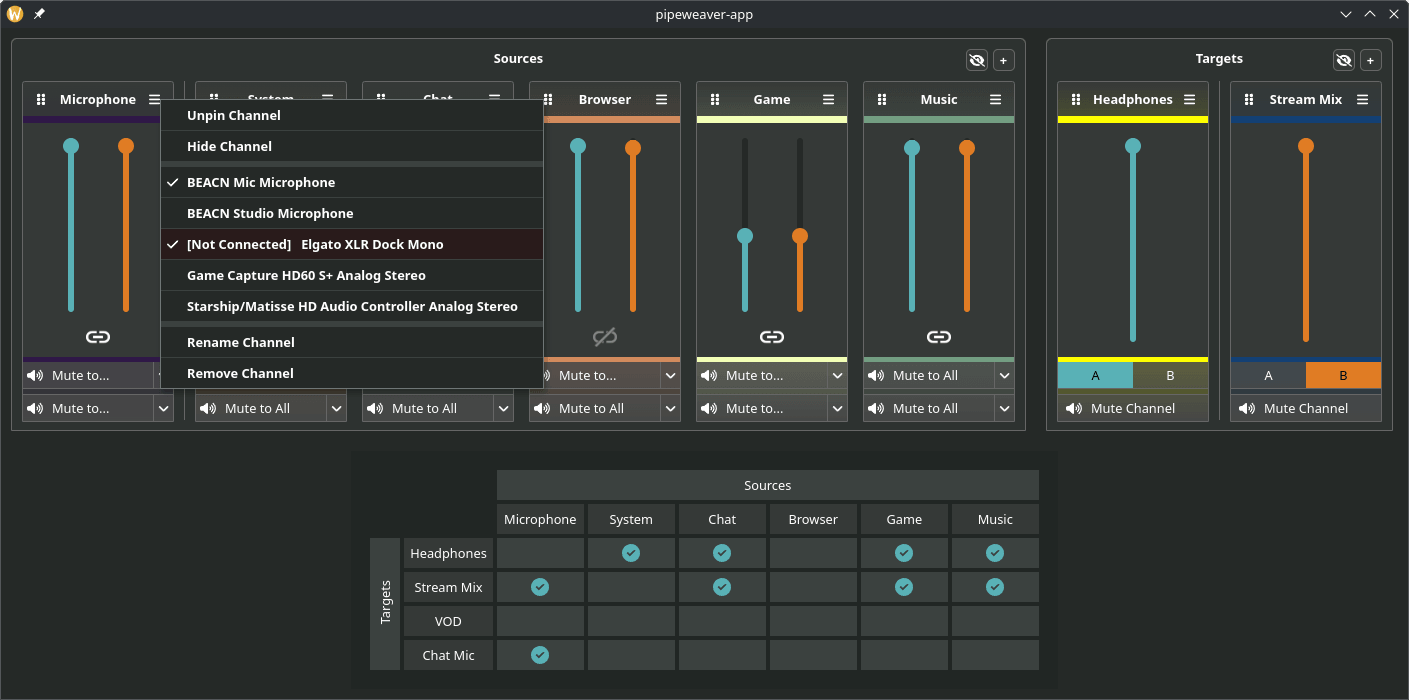
Pipeweaver is an audio management tool for Linux built on top of PipeWire, designed specifically for streaming and broadcasting workflows.
It provides a way to manage complex audio setups through a browser-based configuration interface, with an optional Qt wrapper app for a more integrated desktop experience. The project includes a daemon and command-line client, and it can be installed from distribution packages, Flatpak repository reference, the AUR, or built from source with Rust/Cargo.
This is free and open source software.
Key Features
- Creates virtual audio channels for stream-oriented setups.
- Maps physical audio devices into PipeWire routing layouts.
- Manages volumes, muting, and audio routing.
- Supports configuration saving and recall.
- Moves applications to channels from inside the user interface.
- Provides a command-line configuration tool.
- Includes tray icon and desktop integration files.
- Supports custom channel colours.
Website: github.com/pipeweaver/pipeweaver
Support:
Developer: Craig McLure
License: MIT License
Pipeweaver is written in Rust. Learn Rust with our recommended free books and free tutorials.
Related Software
| Audio Effects, Mixers, and PipeWire Routing Tools | |
|---|---|
| Easy Effects | GTK audio manipulation software which includes a range of tools |
| Carla | Modular audio plugin host |
| JamesDSP for Linux | Audio effect processor for Pipewire |
| Pulsemeeter | Audio routing and mixer application |
| Melodic Mix | Simple mixer and digital signal processing application |
| LSP Plugins | Broad collection of studio-oriented plug-ins |
| Sonusmix | GTK4 audio routing and device management application |
| qpwgraph | Graph manager dedicated to PipeWire |
| pwvucontrol | Pipewire volume control |
| Pipeweaver | Audio management tool built on top of PipeWire |
Read our verdict in the software roundup.
 Explore our comprehensive directory of recommended free and open source software. Our carefully curated collection spans every major software category. Explore our comprehensive directory of recommended free and open source software. Our carefully curated collection spans every major software category.This directory is part of our ongoing series of informative articles for Linux enthusiasts. It features hundreds of detailed reviews, along with open source alternatives to proprietary solutions from major corporations such as Google, Microsoft, Apple, Adobe, IBM, Cisco, Oracle, and Autodesk. You’ll also find interesting projects to try, hardware coverage, free programming books and tutorials, and much more. Discovered a useful open source Linux program that we haven’t covered yet? Let us know by completing this form. |
Please read our Comment Policy before commenting.