

PHoto bATCH Processor (Phatch) is a simple to use open source GUI Photo Batch Processor which handles all popular image formats and can duplicate (sub)folder hierarchies.
Phatch can batch resize, rotate, apply perspective, shadows, rounded corners, … and more. Phatch allows you to use EXIF and IPTC tags for renaming and data stamping. Phatch also supports a console version to batch photos on webservers.
Phatch is a cross-platform tool, running on Linux, Windows and Mac operating systems.
Key Features
- Actions:
- Auto Contrast – maximise image contrast.
- Background – put colour under transparent image.
-
- Blender – 3D objects.
-
- Border – draw border inside or outside.
-
- Brightness – adjust brightness from black to white.
-
- Canvas – crop or expand the canvas without scaling.
-
- Color to Alpha – make selected color transparent.
-
- Colourise – colourise greyscale images.
-
- Common – copies the most common pixel value.
-
- Contour – draw a contour around image edges.
-
- Contrast – adjust from grey to black & white.
-
- Convert Mode – convert the colour mode of an image.
-
- Copy – copy the original image.
-
- Crop – crop the image.
-
- Delete Tags – delete Exif or Lptc tags.
-
- Desaturate – fade all colours to grey.
-
- Effect – blur, contour, detail, edge enhance, edge enhance more, emboss, find edges, smooth, smooth more, and sharpen.
-
- Equalise – equalise the image histogram.
-
- Fit – downsize and crop image with fixed ratio.
-
- Geek – execute external command.
-
- Geotag – add GPS data.
-
- Grid – make n x m matrix of image.
-
- Highlight – apply a transparency highlight.
-
- Imagemagick – 3D edge, blur, bullet, charcoal, motion blur, paint, pencil sketch, polaroid, shadow, sharpen, sigmoidal contrast, unsharp, and wave.
-
- Invert – invert the colours of an image.
-
- Lossless JPEG – rotate, flip, greyscale, and crop.
-
- Mask – apply a transparency mask.
-
- Maximum – copies the maximum pixel value.
-
- Median – copies the median pixel value.
-
- Minimum – copies the minimum pixel value.
-
- Mirror – symmetrical tile texture.
-
- Offset – offset by distance and wrap around.
-
- Perspective – shear 2D or 3D.
-
- Posterise – reduce the number of bits of colour channel.
-
- Rank – copies the rank’th pixel value.
-
- Reflection – drops a reflection.
-
- Rename – rename the original image.
-
- Rename Tag – rename a tag.
-
- Rotate – rotate with random angle.
-
- Round – rounded or crossed corners.
-
- Saturation – adjust saturation from greyscale to high.
-
- Save – save and convert to other types.
-
- Save Tags – save only metadata (lossless).
-
- Scale – make the image smaller or larger.
-
- Shadow – drops a blurred shadow under a photo.
-
- Sketch – transform to a greyscale pencil drawing.
-
- Solarise – invert all pixel values above threshold.
-
- Tamogen – tone alerting mosaic generator.
-
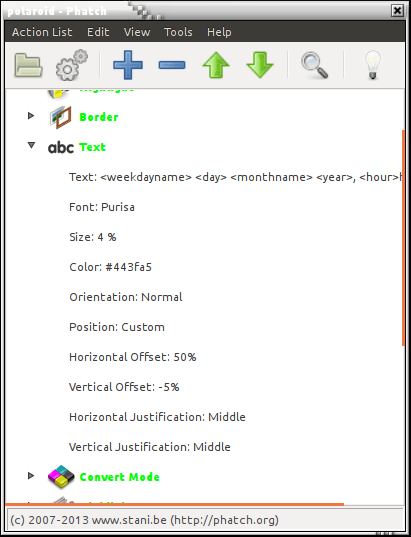
- Text – write text at a given position.
-
- Time Shift – shift time values of tags.
-
- Transpose – flip or rotate 90 degrees.
-
- Warm Up – colorize midtones of an image.
-
- Watermark – apply with tiling, scaling and opacity.
-
- Write Tag – write new value to a tag.
- Enable & disable actions.
- Copy folder hierarchies.
- Python shell.
- Error logging.
- File history.
- Console (can run on servers without gui).
- Desktop droplets.
- Image Inspector (exif & iptc).
- DPI change.
- Drag & Drop droplet.
- Cross-platform (Linux, Windows & Mac).
- python-api.
- Formats supported:
- Read & Write: BMP, DIB, GIF, JPE, JPEG, JPG, IM, MSP, PCX, PNG, PBM, PGM, PPM, TIF, TIFF, and XBM.
- Read only: CUR, DCX, FLI, FLC, FPX, GBR, GD, ICO, IMT, MIC, MCIDAS, PCD, PSD, BW, RGB, CMYK, SUN, TGA, XPM.
- Write only: EPS, PS, PDF.
- Color support:
- Monochrome (1-bit pixels, black and white).
- Grayscale (8-bit pixels, black and white).
- RGB (3×8-bit pixels, true colour).
- RGBA (4×8-bit pixels, RGB with transparency mask).
- CMYK (4×8-bit pixels, colour separation).
- P (8-bit pixels, mapped using a colour palette).
- YCbCr (3×8-bit pixels, colour video format).
- I (32-bit integer pixels).
- F (32-bit floating point pixels).
Website: photobatch.wikidot.com
Support:
Developer: Stani, Nadia Alramli
License: GNU General Public License v3.0
Phatch is written in Python. Learn Python with our recommended free books and free tutorials.
Related Software
| Photo Metadata Editors | |
|---|---|
| Photini | Easy to use digital photograph metadata editor |
| ExifTool | CLI application and library for reading and writing meta information |
| Exiv2 | C++ library and a command line utility to manage image metadata |
| digiKam | Provides tools for viewing and editing metadata |
| jExifToolGUI | Graphical frontend to ExifTool |
| Jhead | Exif Jpeg header manipulation tool |
| Scramble | Privacy-focused image metadata removal tool |
| Phatch | Simple to use cross-platform GUI photo batch processor |
| mat2 | Remove metadata from files to improve privacy |
| Metadata Cleaner | Inspect and remove metadata from files |
| Kleaner | Clean metadata from images with a simple graphical interface |
| Metamorphosis | Inspect and change embedded metadata |
Read our verdict in the software roundup.
| Small Image Tools | |
|---|---|
| Rembg | Background segmentation tool using machine learning |
| imgp | Multi-core batch image file resize and rotate |
| ExifTool | Read, write and edit meta information |
| imagededup | Find duplicate images |
| Durdraw | ASCII, Unicode and ANSI art editor |
| pstoedit | PostScript and PDF files to editable vector graphics converter |
| potrace | Transforms bitmaps into vector graphics |
| jhead | Manipulate the non-image part of Exif compliant JPEG files |
| CropGUI | Graphical user interface for jpegtran |
| pngcrush | Optimizer for PNG files. It's a command-line tool |
| Picsort | Tool for sorting images into folders |
| imagineer | Offers image processing and conversion |
| truss | Image transformation toolkit |
| slimg | Fast image optimization tool |
| Pictures Converter | Convert image formats |
Read our verdict in the software roundup.
| Batch Image Processors | |
|---|---|
| ImageMagick | Create, edit, and compose bitmap images. Extremely versatile software |
| XL Converter | Easy-to-use image converter for modern formats |
| imgp | Multi-core batch image file resize and rotate |
| GraphicsMagick | Swiss army knife of image processing |
| FotoKilof | GUI for ImageMagick |
| Caesium | Image compression software |
| Converseen | Qt-based open source batch image converter and resizer |
| Switcheroo | Utility to convert and manipulate images |
| PixelBatch | Batch image optimization tool |
| Imagine Plus | Image optimisation utility for compressing, converting and resizing images |
| Image Normalizer | Batch-processing tool that resizes and compresses images |
Read our verdict in the software roundup.
 Explore our carefully curated directory of recommended free and open source software, covering every major software category. Explore our carefully curated directory of recommended free and open source software, covering every major software category.The directory forms part of our extensive collection of articles for Linux enthusiasts. It includes hundreds of detailed reviews, together with free and open source alternatives to proprietary software from companies such as Google, Microsoft, Apple, Adobe, IBM, Cisco, Oracle, and Autodesk. LinuxLinks also covers interesting projects worth exploring, Linux-compatible hardware, free programming books and tutorials, and much more. Know a useful free and open source Linux application that we haven’t covered? Tell us about it using our submission form. |
Please read our Comment Policy before commenting.