

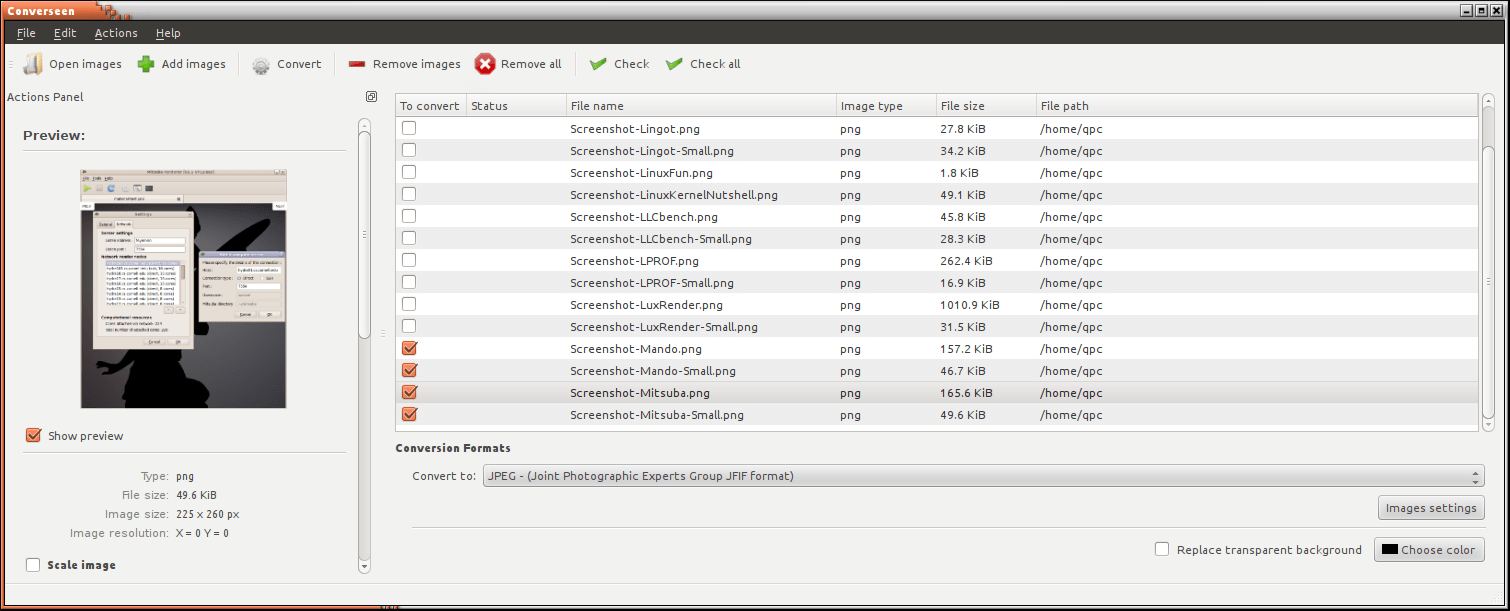
Converseen is a graphical batch image converter and resizer that uses ImageMagick for image processing. It provides a Qt interface for converting, resizing and manipulating collections of images without requiring users to enter command-line instructions.
The application is designed around batch operations. Users can add multiple images, choose a destination format and apply the same settings to the selected files. This is useful when preparing photographs for websites, converting scanned documents or standardising image dimensions across a collection.
Converseen supports more than 100 image formats through ImageMagick, including JPEG, PNG, TIFF, WebP, HEIC/HEIF, GIF, SVG and formats used in photography and digital imaging. Available formats depend on the ImageMagick installation and its enabled decoding and encoding components.
In addition to converting individual images, Converseen can extract pages from PDF documents and save them as separate images. It also provides batch renaming, allowing converted files to receive sequential numbers or configurable prefixes and suffixes.
The interface allows users to select image dimensions, rotation settings and output filenames before processing. A preview helps inspect selected images, while progress information provides feedback during lengthy batch operations.
This is free and open source software.
Key Features
- Converts individual images or entire batches between supported formats.
- Supports more than 100 image formats through ImageMagick.
- Handles JPEG, PNG, TIFF, GIF, WebP, HEIC/HEIF, SVG and numerous specialist formats.
- Converts PDF document pages into individual image files.
- Resizes images using pixel dimensions or percentages.
- Preserves aspect ratios when resizing images.
- Provides selectable resampling filters for image scaling.
- Rotates and flips images during batch processing.
- Supports automatic output filename generation using numbering, prefixes and suffixes.
- Creates image thumbnails.
- Provides controls for output image compression and quality.
- Replaces transparent areas with a selected background colour when required.
- Supports adding files through drag-and-drop.
- Provides an optional image preview and conversion progress information.
- Includes translations into multiple languages.
- Cross-platform support – runs on Linux, macOS, and Windows.
Website: github.com/Faster3ck/Converseen
Support:
Developer: Francesco Mondello
License: GNU General Public License v3.0
Converseen is written in C++. Learn C++ with our recommended free books and free tutorials.
Related Software
| Batch Image Processors | |
|---|---|
| ImageMagick | Create, edit, and compose bitmap images. Extremely versatile software |
| XL Converter | Easy-to-use image converter for modern formats |
| imgp | Multi-core batch image file resize and rotate |
| GraphicsMagick | Swiss army knife of image processing |
| FotoKilof | GUI for ImageMagick |
| Caesium | Image compression software |
| Converseen | Qt-based open source batch image converter and resizer |
| Switcheroo | Utility to convert and manipulate images |
| PixelBatch | Batch image optimization tool |
| Imagine Plus | Image optimisation utility for compressing, converting and resizing images |
| Image Normalizer | Batch-processing tool that resizes and compresses images |
Read our verdict in the software roundup.
| Graphical Frontends for ImageMagick | |
|---|---|
| FotoKilof | GUI for ImageMagick and Wand |
| Converseen | Frontend to the ImageMagick conversion tools |
| Switcheroo | Fork of Upscaler to convert images instead of upscaling |
| Perspec | Perspective correction of images |
| Conjure | Simple GUI built on ImageMagick and Wand |
Read our verdict in the software roundup.
 LinuxLinks helps you discover the best free and open source software for Linux. Explore our extensive collection of recommended applications, including alternatives to popular proprietary software. We also publish software reviews, Linux tutorials, hardware reviews, free programming books and articles covering the wider open source community. Browse our Linux resources to discover more. Know a useful free and open source Linux application we haven't covered? Suggest a program for inclusion. Has your software been featured on LinuxLinks? Display one of our Featured on LinuxLinks badges on your website or GitHub README. |
Please read our Comment Policy before commenting.