
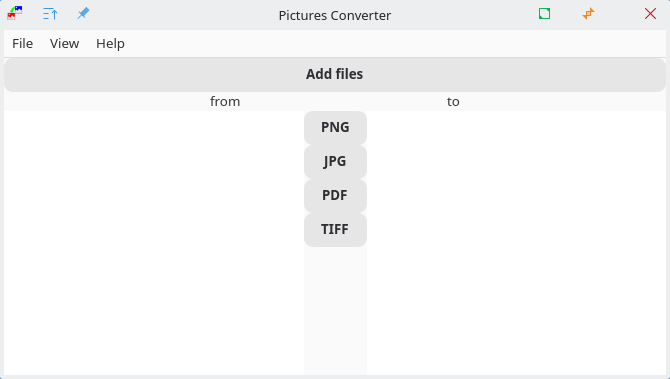
Pictures Converter is a program that allows users to convert various file formats through a graphical interface.
With this program, the following formats can be converted into all supported formats: JPG, PNG, TIFF, and PDF Users can select images from different directories. By double-clicking, the program automatically navigates to the directory where the image is stored. After selecting the new format (using the buttons in the middle), the files are converted into the desired format. They are saved in the same directory from which they were selected. The TIFF and PDF formats can contain multiple pages. These pages are converted into separate files with sequential numbering.
In the settings function, users can choose whether images are always saved in the “Pictures/Converted” directory, the original directory from which they came (note that the Flatpak version requires elevated permissions for this), or if the program should always prompt for the desired save location.
This is free and open source software.
Website: github.com/Quantum-mutnauQ/pictures_converter_gtk
Support:
Developer: Quantum-mutnauQ
License: GNU General Public License v2.0
Pictures Converter is written in C++. Learn C++ with our recommended free books and free tutorials.
Related Software
| Small Image Tools | |
|---|---|
| Rembg | Background segmentation tool using machine learning |
| imgp | Multi-core batch image file resize and rotate |
| ExifTool | Read, write and edit meta information |
| imagededup | Find duplicate images |
| Durdraw | ASCII, Unicode and ANSI art editor |
| pstoedit | PostScript and PDF files to editable vector graphics converter |
| potrace | Transforms bitmaps into vector graphics |
| jhead | Manipulate the non-image part of Exif compliant JPEG files |
| CropGUI | Graphical user interface for jpegtran |
| pngcrush | Optimizer for PNG files. It's a command-line tool |
| Picsort | Tool for sorting images into folders |
| imagineer | Offers image processing and conversion |
| truss | Image transformation toolkit |
| slimg | Fast image optimization tool |
| Pictures Converter | Convert image formats |
Read our verdict in the software roundup.
 LinuxLinks helps you discover the best free and open source software for Linux. Explore our extensive collection of recommended applications, including alternatives to popular proprietary software. We also publish software reviews, Linux tutorials, hardware reviews, free programming books and articles covering the wider open source community. Browse our Linux resources to discover more. Know a useful free and open source Linux application we haven't covered? Suggest a program for inclusion. Has your software been featured on LinuxLinks? Display one of our Featured on LinuxLinks badges on your website or GitHub README. |
Please read our Comment Policy before commenting.