

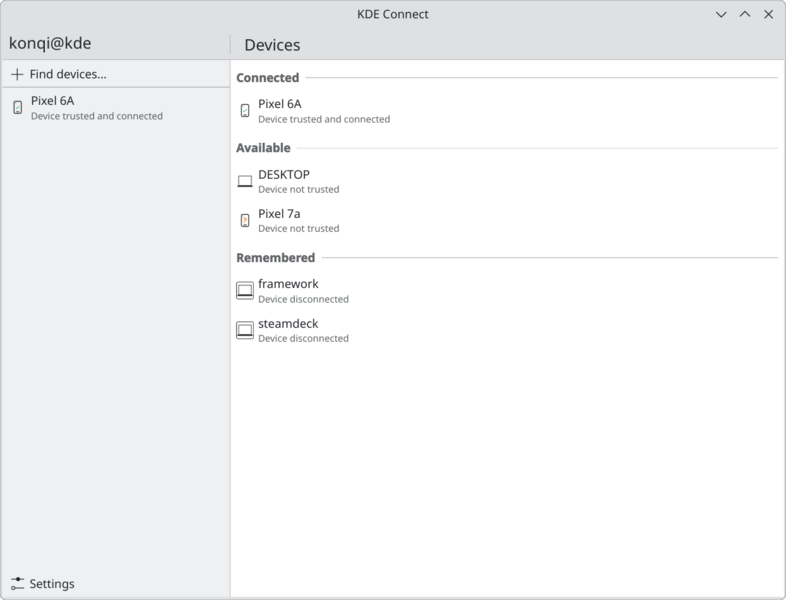
KDE Connect is a multi-platform application that allows computers, smartphones and other devices to communicate with one another. It is closely integrated with KDE Plasma but can also be used with other Linux desktop environments.
The application creates a connection between paired devices, allowing them to exchange information and interact remotely. This makes it possible to use a smartphone as an extension of a desktop computer rather than treating the two as entirely separate devices.
KDE Connect uses a modular architecture with a background service that exposes D-Bus interfaces to desktop applications. Its functionality is implemented through individual components, allowing different platforms to support the capabilities appropriate to them. The source repository contains the desktop implementation.
This is free and open source software.
Key Features
- Synchronises clipboard contents between paired computers and mobile devices, allowing text copied on one device to be pasted on another.
- Displays notifications from connected devices on the desktop, including support for replying to compatible Android notifications.
- Transfers files, text and URLs between devices, with integration into supported desktop file managers.
- Supports browsing files stored on compatible Android devices through SFTP.
- Provides an SMS interface for reading, sending and replying to messages through a paired Android phone, including supported MMS functionality.
- Controls media players remotely using MPRIS, including play, pause, track selection and volume adjustment.
- Turns a smartphone into a virtual touchpad and keyboard for controlling a computer.
- Offers a presentation remote for advancing slides and controlling presentations from a mobile device.
- Executes predefined commands on connected computers, including user-defined shell commands.
- Displays battery levels and charging information from connected devices.
- Provides a Find My Phone function that makes a paired mobile device ring.
- Supports using the phone to control the desktop’s multimedia volume and other supported system functions.
- Integrates with Plasma Browser Integration for sharing browser links and controlling supported web media.
- Uses TLS encryption to protect communication between paired devices.
- Can communicate across VPN connections where network configuration permits device discovery and connectivity.
- Cross-platform support – runs on Linux, Android, Windows, macOS and iOS. Features vary between platforms.
Website: kdeconnect.kde.org
Support:
Developer: KDE Community
License: GNU General Public License v2.0, GNU General Public License v3.0
KDE Connect is written in C++. Learn C++ with our recommended free books and free tutorials.
This article was written with the help of a site visitor who completed this form. Help the site by suggesting new open source software.
Related Software
| GUI File Sharing Tools | |
|---|---|
| LocalSend | Cross-platform alternative to AirDrop |
| Flying Carpet | Cross-platform AirDrop alternative |
| Warpinator | Share files across the LAN |
| Warp | Fast and secure file transfer over the internet or local network |
| Rymdport | File, folder and text sharing |
| KDE Connect | Wireless communications and data transfer between devices |
| GSConnect | Complete implementation of KDE Connect |
| DashBeam | Send files and folders anywhere in the world |
| Valent | Connect, control and sync devices |
| dragit | Intuitive file sharing between devices |
| Packet | Implementation of the Google Quick Share protocol |
| Sharik | Share files via Wi-Fi or mobile hotspot |
| QuickDAV | Transfer files between devices |
| wyrmhole | Secure peer-to-peer file transfer app built around Magic Wormhole |
| Croc GUI | GUI for simple, secure peer-to-peer file transfers |
| Sendworm | Send files securely using Magic Wormhole |
Read our verdict in the software roundup.
 LinuxLinks helps you discover the best free and open source software for Linux. Explore our extensive collection of recommended applications, including alternatives to popular proprietary software. We also publish software reviews, Linux tutorials, hardware reviews, free programming books and articles covering the wider open source community. Browse our Linux resources to discover more. Know a useful free and open source Linux application we haven't covered? Suggest a program for inclusion. Has your software been featured on LinuxLinks? Display one of our Featured on LinuxLinks badges on your website or GitHub README. |
Please read our Comment Policy before commenting.