

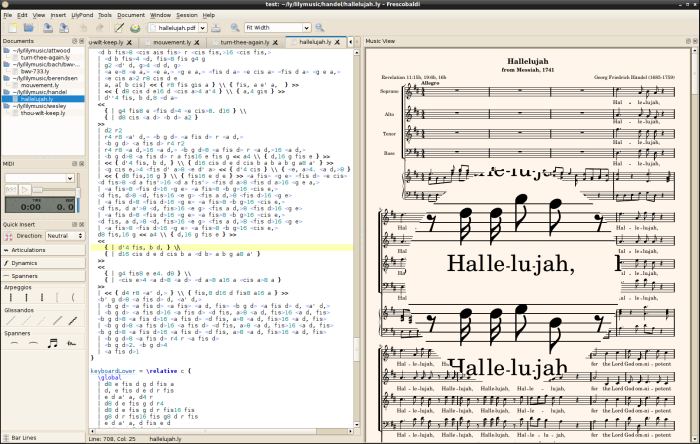
Frescobaldi is a graphical text editor designed specifically for creating and editing LilyPond music notation. It combines a powerful source editor with an integrated score preview, allowing musicians to work directly with LilyPond notation while viewing the engraved results.
The application provides an alternative to entering LilyPond code through a general-purpose text editor. Its editing tools understand musical notation, making it easier to transpose passages, alter rhythms, manage lyrics and insert commonly used symbols.
Frescobaldi uses a modern Qt interface and is particularly useful for composers, arrangers and publishers who prefer LilyPond’s text-based engraving workflow but want the convenience of a dedicated graphical application.
This is free and open source software.
Key Features
- LilyPond source editing – provides a dedicated editor with syntax highlighting and automatic command completion.
- Integrated score preview – displays engraved PDF output without requiring a separate viewer.
- Two-way point-and-click – navigates between notation in the preview and the corresponding LilyPond source.
- Score Wizard – generates initial LilyPond source for common instrumental and vocal arrangements.
- Snippet Manager – stores and inserts frequently used notation fragments, templates and scripts.
- Music transformations – transposes passages, modifies rhythms and converts between relative and absolute pitch notation.
- Quick Insert panel – adds articulations, dynamics, spanners and other musical symbols.
- MIDI playback – plays MIDI files generated from LilyPond scores for checking compositions.
- MIDI input – captures note information from a compatible MIDI keyboard.
- Document outline – navigates sections and musical structures in large scores.
- Multiple LilyPond installations – selects compatible LilyPond versions for individual documents.
- Syntax conversion – uses convert-ly to update older LilyPond notation and display the changes.
- Import tools – supports importing ABC, MIDI and MusicXML through compatible LilyPond conversion tools.
- Lyrics tools – provides hyphenation and editing assistance for vocal notation.
- Integrated documentation – offers context-sensitive access to LilyPond reference material.
- Cross-platform support – runs on Linux, macOS, and Windows.
Website: frescobaldi.org
Support:
Developer: Wilbert Berendsen and contributors
License: GNU General Public License v2.0
Frescobaldi is written in Python. Learn Python with our recommended free books and free tutorials.
Related Software
| Open Source Scorewriters | |
|---|---|
| Rosegarden | Sophisticated MIDI (and audio) sequencer and notation editor |
| MuseScore Studio | Graphical WYSIWYG music score typesetter |
| Lilypond | Produce musical scores that are engraved with traditional layout rules |
| Frescobaldi | LilyPond sheet music text editor |
| Denemo | Musical score editor intended primarily as a frontend to Lilypond |
| music21 | Toolkit for computational musicology |
| mup | Very feature-laden application for producing printed music |
| TuxGuitar | Multitrack tablature editor and player writen in Java-SWT |
| Aria Maestosa | Midi sequencer/editor |
| Gregorio | Tools for Typesetting Gregorian Chant |
| Canorus | Graphical music score editor written for the Qt4 toolkit |
| PMW | Music typesetting program for creating high-quality scores |
| EasyABC | Graphical editor for creating and editing ABC music notation |
Read our verdict in the software roundup.
 LinuxLinks helps you discover the best free and open source software for Linux. Explore our extensive collection of recommended applications, including alternatives to popular proprietary software. We also publish software reviews, Linux tutorials, hardware reviews, free programming books and articles covering the wider open source community. Browse our Linux resources to discover more. Know a useful free and open source Linux application we haven't covered? Suggest a program for inclusion. Has your software been featured on LinuxLinks? Display one of our Featured on LinuxLinks badges on your website or GitHub README. |
Please read our Comment Policy before commenting.