

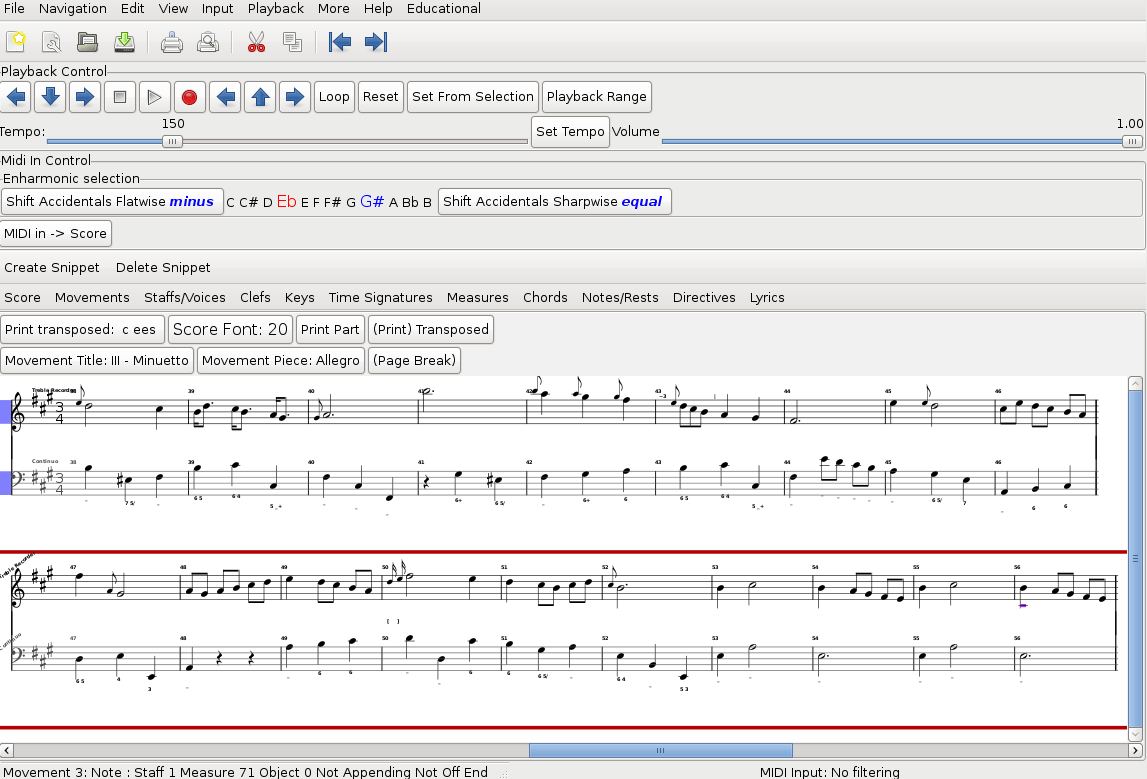
Denemo is a graphical music notation editor designed for entering, editing and arranging musical scores. It provides a notation-oriented workspace in which musicians can compose using a computer keyboard, mouse or MIDI instrument.
Unlike conventional scorewriters that combine editing and final page layout in one interface, Denemo separates music entry from engraving. The application uses LilyPond to prepare the finished score, allowing musicians to concentrate on musical structure rather than adjusting the printed appearance of individual symbols.
Denemo is also suitable for transcribing existing compositions and preparing scholarly editions. It includes specialised editing commands, customisable input methods and facilities for connecting score passages to original source documents.
This is free and open source software.
Key Features
- Graphical notation editing – enters notes, rests, chords and other symbols directly into a musical score.
- Keyboard-oriented workflow – supports rapid music entry using configurable shortcuts and note-duration methods.
- MIDI note entry – captures performances and notation input using connected MIDI instruments.
- LilyPond engraving – produces printed scores using LilyPond’s notation and page layout facilities.
- Multiple score layouts – generates full scores and individual instrumental parts from the same composition.
- Transcription support – links passages in a score to corresponding locations in imported source PDFs.
- Notation transformations – transposes music, adjusts durations and modifies existing passages.
- Specialised notation – supports figured bass, historical symbols, chord notation and tablature.
- Scheme scripting – automates editing operations and extends the application with custom commands.
- Customisable input – assigns musical operations to keyboard shortcuts, MIDI controls and mouse actions.
- NotationMagick – generates and transforms musical material using patterns and other configurable operations.
- Integrated playback – plays scores through an internal sampler.
- Audio and MIDI routing – communicates with compatible external applications and audio systems.
- Score interchange – imports MIDI, MusicXML and LilyPond files.
- Export facilities – produces PDF scores, LilyPond files, images, MIDI and audio output.
Website: denemo.org
Support:
Developer: Richard Shann, Jeremiah Benham, Nils Gey, and contributors
License: GNU General Public License v3.0
Denemo is written in C and Scheme. Learn C with our recommended free books and free tutorials. Learn Scheme with our recommended free books and free tutorials.
Related Software
| Open Source Scorewriters | |
|---|---|
| Rosegarden | Sophisticated MIDI (and audio) sequencer and notation editor |
| Musescore | Graphical WYSIWYG music score typesetter |
| Lilypond | Produce musical scores that are engraved with traditional layout rules |
| Frescobaldi | LilyPond sheet music text editor |
| Denemo | Musical score editor intended primarily as a frontend to Lilypond |
| music21 | Toolkit for computational musicology |
| mup | Very feature-laden application for producing printed music |
| TuxGuitar | Multitrack tablature editor and player writen in Java-SWT |
| Aria Maestosa | Midi sequencer/editor |
| Gregorio | Tools for Typesetting Gregorian Chant |
| Canorus | Graphical music score editor written for the Qt4 toolkit |
| Impro-Visor | Educational program designed to help musicians compose and hear solos |
Read our verdict in the software roundup.
 LinuxLinks helps you discover the best free and open source software for Linux. Explore our extensive collection of recommended applications, including alternatives to popular proprietary software. LinuxLinks helps you discover the best free and open source software for Linux. Explore our extensive collection of recommended applications, including alternatives to popular proprietary software.We also publish software reviews, Linux tutorials, hardware reviews, free programming books and articles covering the wider open source community. Browse our Linux resources to discover more. Know a useful free and open source Linux application we haven't covered? Suggest a program for inclusion. Has your software been featured on LinuxLinks? Display one of our Featured on LinuxLinks badges on your website or GitHub README. |
Please read our Comment Policy before commenting.